First, choose a controller that works with your console or PC and the specific co-op game you want to play. Then consider whether a wireless connection will work from your seating area, or if a safely routed cable of sufficient length would be a better option. When several people are playing, separate supported inputs and power supply matter more than extra features. And no controller can make small text easier to read from a distance.
Which controller is right for you?
Co-op gaming on a console
If you want to set up extra controls for other players, the controller and game need to be compatible with your console. PlayStation describes the DualSense as an additional controller for other players, while Nintendo says using a Joy-Con 2 on its own depends on the game supporting it.
PC gaming from the sofa
If you play on a PC connected to your TV, check whether your controller works wirelessly with the PC and whether you need a USB receiver. Turtle Beach lists wireless PC connectivity for the Stealth Pivot; 8BitDo Support says a USB receiver is needed for wireless use of a Windows controller.
Groups settling in for a long gaming session
If you need several controllers at once, plan when to charge them or replace their batteries before everyone starts playing. Nintendo explicitly describes the stated battery life of around 40 hours for the Switch 2 Pro Controller as an estimate.
What to look for when buying
Start by checking that the controller works with your platform and game, then test the connection from where you plan to sit. Finally, consider how many separate inputs you need and how the controllers are powered.
| What matters |
What to check before buying |
Who should pay particular attention |
| Platform and game |
Check your console or PC, the exact model variant and the co-op game's controller requirements. |
If you're looking for an extra controller for a system you already own, make sure the game actually supports it. Around 29% of consumers would prioritise compatibility with their platform and game. |
| Connection from your seat |
Check which wireless or wired connections are supported on your platform, and make sure the receiver or cable will work with your planned setup. Turtle Beach lists wireless connectivity on PC for the Stealth Pivot, but a wired connection on Xbox. |
If you want to play from the sofa further away, you need a connection that will work from there. Around 29% of consumers would consider their seating position and connection first. |
| Controls for everyone playing |
Check the game mode, player count and supported controller configurations, and take any controllers you already own into account before buying more. Nintendo says using a Joy-Con 2 on its own depends on the game. |
If everyone needs their own controls, what matters is how many separate player inputs the specific game supports. Around 24% of consumers would prioritise the need for separate player controls. |
| Power supply |
Check how each controller is powered, how to charge it and whether any accessories are included. |
If you need several controllers ready for a longer session, you’ll want to keep charging breaks and extra effort to a minimum. Around 18% of consumers would consider power supply and ongoing costs first. |
Common misconceptions
-
“Wireless” doesn’t mean wireless on every platform
For the Turtle Beach Stealth Pivot, the manufacturer lists wireless connectivity on PC, but a wired connection for Xbox. This means the connection type can affect whether you can play from your chosen seat without a cable.
Before buying, check the exact model variant and the connection type supported by your platform.
-
Two Joy-Con 2 controllers don’t always mean two separate sets of controls
Nintendo says using a Joy-Con 2 on its own depends on the software and the supported control configuration. So the number of controllers alone doesn’t tell you how many people can play at once.
Check the control options for the specific Switch 2 game before relying on individual Joy-Con controllers.
-
A controller can’t make the screen easier to see from further away
A working controller connection won’t change the text size or make in-game menus easier to read. Your setup can also affect the wireless connection.
Check readability and connectivity separately from where you plan to sit. If you have wireless issues, Nintendo recommends reducing the distance between the Joy-Con and console and repositioning the console if needed.
A guide to relevant brands
Sony PlayStation
The DualSense adds extra controls for PS5 players; the DualSense Edge is for players looking for customisable controls.
- PlayStation describes the DualSense as a way to add more players. Sony says the DualSense Edge lets you save button layouts.
- Custom profiles don’t replace the need to check whether the specific co-op game supports the controls you want to use.
Microsoft Xbox
The Xbox Wireless Controller works with Xbox consoles and other listed devices, including Windows PCs.
- Microsoft lists Xbox and Bluetooth connections, as well as Windows compatibility.
- Check which connection works with your device. A platform listing alone doesn’t tell you whether the wireless connection will work from your seat.
Nintendo
Joy-Con 2 controllers offer separate controls in supported Switch 2 games; the Switch 2 Pro Controller provides a full-size option.
- Nintendo describes using a Joy-Con 2 on its own in supported games.
- Using a Joy-Con on its own depends on the game and its control configuration. The Switch 2 Pro Controller is designed for Switch 2, and its stated battery life is an estimate from the manufacturer.
8BitDo
The Ultimate 2 Bluetooth is for buyers looking to switch between Switch and Windows, according to the manufacturer.
- 8BitDo lists a charging dock and compatibility with Switch and Windows.
- The product page says a firmware update is required for Switch 2. Manufacturer claims about precision or wireless latency haven’t been independently verified.
Turtle Beach
The Stealth Pivot is for PC gamers looking for a wireless connection and customisable controls.
- Turtle Beach lists wireless connectivity on PC and Bluetooth on mobile devices.
- The manufacturer lists a wired connection for Xbox, so check which connection is supported by your specific platform.
Joybuy controller options for different gaming setups
This selection includes Joy-Con 2 controllers and a full-size controller for Switch 2, plus wireless options for PS5, Xbox and Windows PCs. The right choice depends on your game, platform and connection from where you plan to sit.
 Image unavailable
Nintendo Switch 2 Joy-Con 2 2-Piece Set (Blue/Light Yellow)
For Switch 2, when the specific game supports separate use; the set includes one left and one right Joy-Con 2 for local multiplayer in compatible games.
The product description lists wireless use.
View at Joybuy
 Image unavailable
The G-Lab K-PAD-HELIUM-WL Gaming Controller
For Windows PCs, if you want to play wirelessly from your seat; according to the product description, the controller uses a 2.4 GHz connection via a USB receiver.
Windows 10/11 and PlayStation 3 are listed as compatible platforms. The description lists a rechargeable battery with up to 8–10 hours of play time, plus two programmable rear buttons.
View at Joybuy
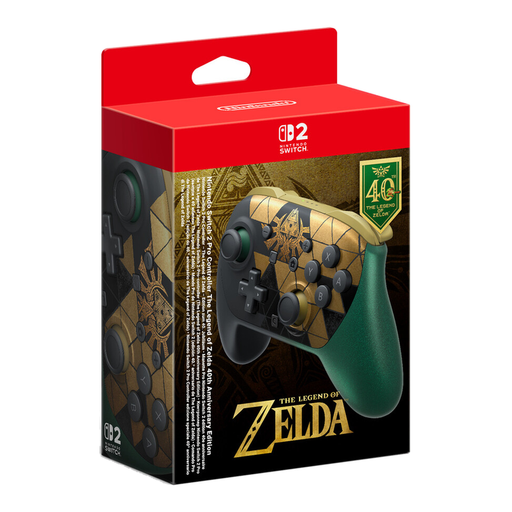 Image unavailable
Nintendo Switch 2 Pro Controller The Legend of Zelda 40th Anniversary Edition
For Switch 2, if you’d prefer a full-size controller to individual Joy-Con controllers. The product description lists Bluetooth connectivity.
According to the description, mouse controls are available only in compatible games.
View at Joybuy
 Image unavailable
Microsoft Xbox Wireless Controller Pulse Red
For Xbox consoles and Windows 10 PCs, provided the connection works with your device; the product description lists Xbox Wireless and Bluetooth connectivity.
The controller uses two AA batteries. According to the description, the stated battery life of up to 40 hours may vary depending on use.
View at Joybuy
 Image unavailable
PlayStation DualSense Wireless Controller Midnight Black
For PS5, if you need an extra DualSense for a supported multiplayer game; the product description lists Bluetooth and wireless connectivity.
A USB cable is included and, according to the description, can be used for charging or connecting the controller.
View at Joybuy
Frequently asked questions
Can two people each use a Joy-Con 2 on Switch 2?
Yes, if the game supports horizontal single Joy-Con controls. Nintendo explicitly says this depends on the game and its control configuration.
What can I check if the connection drops from the sofa?
Check the battery level and distance, and move the console if needed. For Joy-Con wireless issues, Nintendo recommends, among other things, not placing the console behind the TV or under metal. This is troubleshooting advice, not a guaranteed range.
Will a different controller help if game text looks too small from the sofa?
No. Readability needs to be considered separately from the controller connection. Check your display and seating position; Sony’s viewing-distance guidance relates to the visibility of individual pixels on TVs and doesn’t guarantee that small in-game menus will be readable.
What rights do I have if my controller is faulty?
For purchases from a trader, EU consumer law provides a legal guarantee of at least two years from the date you receive the goods. This is separate from any voluntary manufacturer’s warranty. For eligible online distance purchases, you generally have a 14-day right to cancel.


