
Lieferung heute & morgen

Qualitätsgarantie

Willkommens-Angebote freischalten: KOSTENLOSE Lieferung | Bis zu 80 % RABATT | Kostenlose 30-Tage-JoyPlus-Testphase
App herunterladen
A TV can deliver a sharp picture and still sound thin, quiet or difficult to understand. The right soundbar can improve your TV’s sound without the need for an AV receiver and large speakers. However, technical terms and high wattage figures don’t automatically mean a system is right for you.
The maximum power output mainly indicates potential volume and amplifier headroom. It doesn’t automatically tell you how clear dialogue will sound, how strong the bass is or how immersive the audio will be. You should also consider:
A compact 2.0 soundbar may be a better choice for a bedroom than a large system whose speakers have nowhere suitable to go in your living room.
A Dolby Atmos soundbar can process Atmos signals. However, the speaker layout, ceiling height and finish, and the source material all play a part in creating a noticeable sense of height. Up-firing speakers need a reasonably flat, even ceiling. Virtual surround technologies, on the other hand, use signal processing and often work without additional speakers.
So consider whether you want a soundbar with separate surround speakers, a virtual surround system or a combination of the two.
A TV with HDMI ARC isn’t automatically compatible with every soundbar feature. HDMI eARC is useful for certain multichannel and Atmos signals. Also check:
2.0 means two main channels with no separate subwoofer. 2.1 adds a bass channel or subwoofer. In a 5.1 soundbar, the first number represents the front channels, the second the bass channel and the third the surround channels. A 7.1 soundbar may offer additional surround channels or corresponding signal processing.
However, the channel count is only useful if you know whether the system has physical speakers. A system with four separate surround speakers will generally distribute sound around the room differently from a single bar using virtual surround sound.
A soundbar with a subwoofer can handle low frequencies more effectively. A wireless subwoofer still needs its own mains socket, but gives you more flexibility over where to place it. A built-in subwoofer saves space and cables, although very compact enclosures may have less room for the speaker.
A separate subwoofer is often a good choice for films, games and bass-heavy music. In smaller rooms, or if you have neighbours close by, a compact soundbar without powerful bass may be more practical.
HDMI ARC sends your TV’s audio through a single HDMI cable and, with compatible devices, lets you control the volume using your TV remote. HDMI eARC offers greater bandwidth and is better suited to higher-quality multichannel formats, including certain Dolby Atmos signals.
Check the specifications for both your TV and soundbar. You may also need to set the TV’s audio output in the menu to Bitstream, Passthrough or a compatible format.

Why it suits this type of user: This 2.0 soundbar is designed for TV, gaming and smaller rooms. It offers HDMI ARC, Bluetooth, an optical input, AUX, RCA and USB.
Its rated output of 50 W RMS is clearly stated, and you can adjust the bass and treble using the remote control.
Compact design, HDMI ARC connection and several wired inputs.
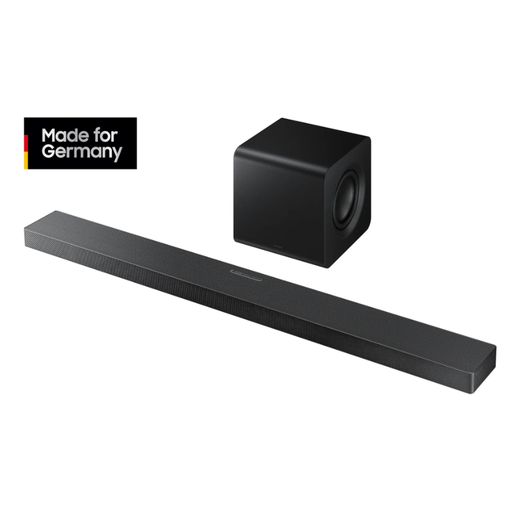
Why it suits this type of user: The system combines 3.1.2 channels, eight built-in speakers, up-firing speakers and a wireless 6.5-inch subwoofer.
The specifications list specific formats, including Dolby Atmos and DTS:X, as well as HDMI ARC, an optical input and 4K 60 Hz passthrough.
Wi-Fi, Bluetooth 5.2, AirPlay 2, Chromecast compatibility and automatic room optimisation, according to the product specifications.
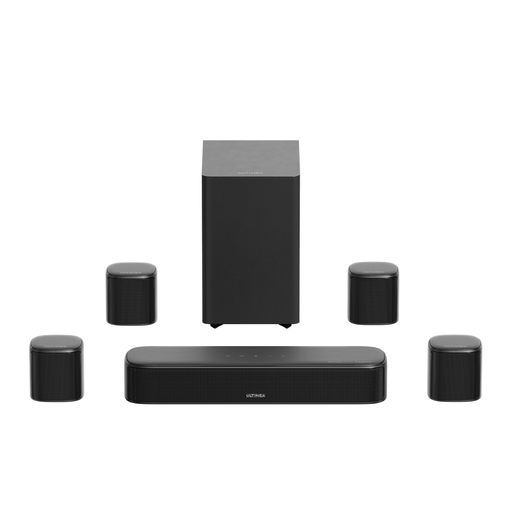
Why it suits this type of user: With four surround speakers, a 5.25-inch subwoofer and HDMI eARC, this system is aimed at anyone looking to build a separate home cinema set-up.
The actual speaker layout is specified, rather than relying on a virtual channel count. You’ll need to plan how to route the cables for the rear speakers.
7.1-channel set-up, Dolby Atmos, 420 W peak power, app-based EQ and 13 surround levels, according to the manufacturer.
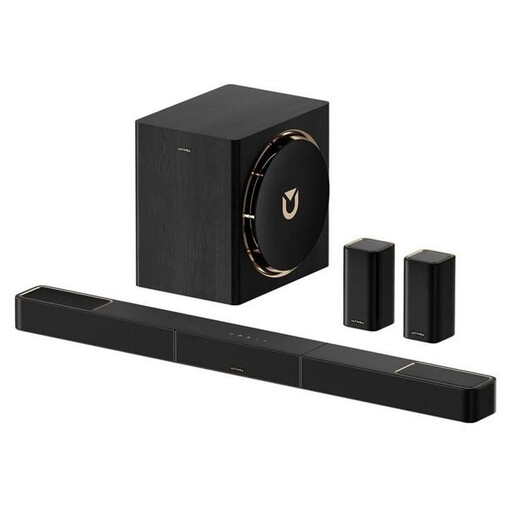
Why it suits this type of user: This system is designed for larger rooms and those looking for wireless rear speakers, Dolby Atmos and low audio latency for films and games.
The specifications include HDMI eARC, wireless rear speakers and a stated latency of under 20 ms. However, every component still needs to be connected to a power socket.
7.1.4-channel configuration, wireless subwoofer, Bluetooth 5.4 and app control with an equaliser.
We’ve put together a comprehensive, regularly updated list of products that meet these strict selection criteria and the safety regulations applicable in the EU.
Place the soundbar as centrally as possible beneath your TV. Make sure furniture or the TV stand doesn’t block the centre channel. If you’re mounting it on a wall, check that the bracket, wall material and cable routing are all suitable. A subwoofer can sound different depending on where it’s placed in the room, so try a few locations without blocking its ventilation openings.
With surround speakers, place the side or rear units roughly level with your listening position. Route cables safely to avoid trip hazards, and keep small accessories out of children’s reach. Keep the volume moderate, especially during long gaming or film sessions.
For a straightforward improvement in sound, a 2.0 or 2.1 soundbar with HDMI ARC is often enough. If you watch films or play games with surround sound, check for HDMI eARC, Dolby Atmos and the speaker layout you want.
Its lifespan depends on how it’s used, ventilation, volume levels and power supply. Keeping it in a dry, well-ventilated place and installing regular firmware updates can help it work reliably. For wireless components, you should also consider the wireless range and the location of power sockets.
A wireless soundbar and a wireless subwoofer each need their own power supply. In standby, their power consumption is usually much lower than when they’re in use. You can find the specific figures on the energy label, in the product data sheet or in the user manual for the model.