
Lieferung heute & morgen

Qualitätsgarantie

Willkommens-Angebote freischalten: KOSTENLOSE Lieferung | Bis zu 80 % RABATT | Kostenlose 30-Tage-JoyPlus-Testphase
App herunterladen
Clear TV sound depends on more than a high wattage or a well-known brand name. If you want to buy a soundbar for TV, you should primarily check the connections, speaker configuration and space required. Otherwise, you could end up with a device under the television that promises plenty of features but does not suit the size of the room or the TV.
Maximum power in watts does not determine sound quality on its own. It says little about dialogue clarity, bass control or the sense of space. The number and arrangement of the speakers, signal processing and supported audio formats are also important.
A compact 2.1 soundbar setup may be sufficient for news, series and smaller rooms. For film fans or gamers looking for genuine surround sound, additional surround speakers or upward-firing drivers are more relevant.
A Dolby Atmos soundbar can process height information. However, several conditions must be met for it to be reproduced properly:
With a low ceiling, an open-plan living area or a large distance from the TV, the virtual surround effect may differ from what you expect.
A wireless subwoofer transmits the audio signal without a connection cable to the soundbar, but it still requires a mains socket. Rear speakers may also need power or connection cables. Before buying, you should therefore plan for sockets, cable routes and the position behind the sofa.
HDMI ARC transmits TV audio and, with compatible devices, often allows you to control the volume using the TV remote. HDMI eARC offers greater bandwidth and is better suited to uncompressed multi-channel formats such as Dolby Atmos.
Check the connections on both devices. A TV with HDMI ARC cannot automatically use all the benefits of eARC. An optical input, AUX and Bluetooth are useful additions, but they do not fully replace eARC for demanding multi-channel formats.
The channel designation describes the speaker configuration:
Depending on the product, “7.1” may refer to a genuine speaker system or a virtual simulation. You should therefore check whether rear speakers are included.
Measure the width of the TV unit and the distance to the bottom edge of the screen. A soundbar must not block the television’s infrared sensor. For wall mounting, you also need to consider the type of wall, the bracket and cable routing.
The subwoofer should stand securely and should not be enclosed directly in a corner. Depending on the room, even a small change in position can significantly alter the bass. Families with children should choose a tip-resistant setup and secure cable routing.

Why this product suits the profile: This compact stereo soundbar is ideal for smaller rooms, second TVs or anyone looking for a simple TV soundbar with several inputs.
The product specification states 50 W and a 2.0 configuration rather than making exaggerated multi-channel claims. HDMI ARC, Optical, AUX, USB, RCA and Bluetooth are clearly listed.
Compact design, three sound modes and wall brackets included.
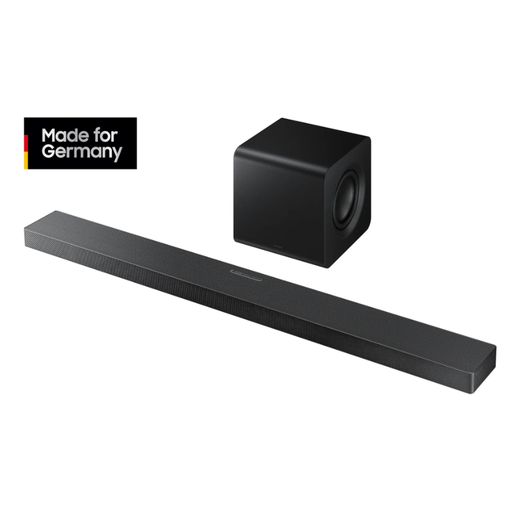
Why this product suits the profile: Film and series fans get a 3.1.2 configuration with a centre speaker, upward-firing drivers and a wireless 6.5-inch subwoofer.
The specification lists Dolby Atmos and DTS:X alongside the height speakers that are actually built in. HDMI ARC, an optical input and 4K-60-Hz passthrough are also specified.
Q-Symphony for compatible Samsung TVs, Wi-Fi, Bluetooth 5.2 and automatic room sound calibration according to the product description.
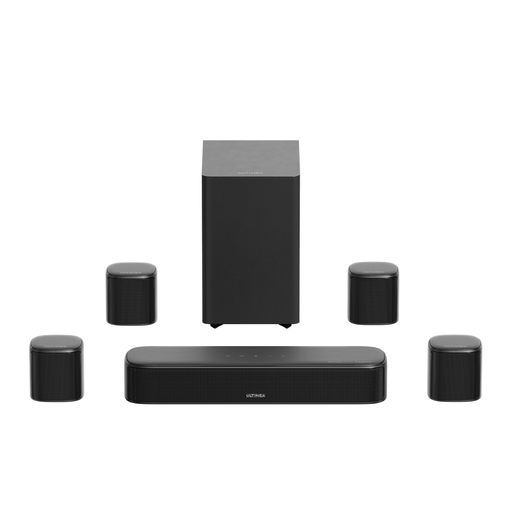
Why this product suits the profile: This home cinema soundbar is designed for users who want to combine four surround speakers, a subwoofer and app-based sound settings.
The product data specifies 7.1 channels, HDMI eARC and a 5.25-inch subwoofer. The hybrid cabling for the rear speakers should be factored into your room planning before purchase.
420 W peak power, a 10-band EQ, 121 presets and 13 surround levels according to the manufacturer.
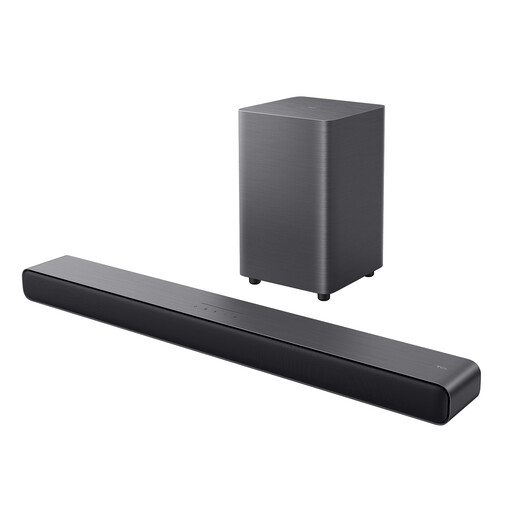
Why this product suits the profile: A 2.1 system with a wireless subwoofer is suitable for mixed use with TV, music, gaming and family programmes.
The specification clearly distinguishes between virtual surround sound and a physical speaker configuration. HDMI eARC, an optical input, USB and Bluetooth 5.3 are listed.
220 W total power, six sound modes and automatic room calibration according to the product description.
Connect the soundbar via HDMI ARC or eARC wherever possible and activate audio output through the HDMI connection on the TV. With Bluetooth, bear in mind that depending on the TV and playback device, a slight delay between the picture and sound may occur. For music from your smartphone, however, a soundbar with Bluetooth is still practical.
Before installation, test all components at the intended location. Also check whether firmware updates are available through an app and whether the desired voice or dialogue enhancement can be deactivated. A Night mode can be useful for evening use, helping to reduce the impact of bass peaks in flats.
We have put together a complete, regularly updated list of products that fully meet these strict selection criteria and the safety regulations applicable in the EU.
A compact 2.0 or 2.1 soundbar is often sufficient for smaller rooms. A separate subwoofer can add greater depth, but it needs extra space and a mains socket. Measure the available space under the TV before buying.
Not always, but HDMI eARC provides the greater transmission bandwidth needed for compatible, uncompressed multi-channel formats. Check whether both the TV and soundbar support eARC. Otherwise, alternative Atmos signal paths may be possible depending on the devices.
Its lifespan depends on usage, ventilation, volume, power supply and care. Place the device somewhere dry and away from heat sources, do not cover any ventilation openings and use the supplied cables. With wireless subwoofers, you should also ensure a stable wireless connection and secure positioning.