
Lieferung heute & morgen

Qualitätsgarantie

Willkommens-Angebote freischalten: KOSTENLOSE Lieferung | Bis zu 80 % RABATT | Kostenlose 30-Tage-JoyPlus-Testphase
App herunterladen
A TV can deliver a sharp picture while the sound remains thin, quiet or hard to understand. A soundbar with a subwoofer adds a separate bass speaker to your TV and can bring greater clarity to dialogue, film soundtracks and gaming effects. However, high wattage figures and terms such as ‘3D sound’ don’t automatically mean you’ve found the right system.
Manufacturers often quote maximum output power. This figure alone doesn’t tell you about the sound tuning, dialogue clarity or quality at lower volumes. In a flat, it’s also important that the bass stays controlled and can be adjusted to suit the room.
A Dolby Atmos soundbar can process compatible audio tracks. However, to hear height effects, you need suitable speaker configurations, an appropriate ceiling and a compatible source. Virtual surround processing works differently from adding rear speakers. So it’s best not to judge a system by its channel number alone.
A wireless subwoofer receives the audio signal without a cable connecting it to the soundbar, but it still needs a mains socket. Surround speakers may also need power or connection cables. Before you buy, check how the system will fit into your space and how long the supplied cables are.
For a soundbar for your TV, HDMI ARC is usually the most convenient connection. You can often control the volume with your TV remote. HDMI eARC offers greater bandwidth and is designed for certain multi-channel formats and higher-quality audio transmission. Check whether your TV has an ARC or eARC port.
An optical input is a useful alternative, though it doesn’t support every modern audio format. Bluetooth or Wi-Fi are handy for playing music from your mobile phone. A soundbar with app control may offer extra equaliser settings, sound modes and firmware updates.
The 2.1 designation usually means two main channels and a subwoofer. A 5.1 soundbar adds multiple surround channels, while a 7.1 soundbar may offer even more discrete or simulated channels. The key question is whether separate rear speakers are actually included.
With a soundbar that has up-firing speakers, Dolby Atmos effects can depend on the shape of the room. If you prefer clearly defined surround sound in your listening area, consider systems with physical rear speakers.
Measure the space beneath your TV and check whether the TV stand will obscure the soundbar. Wall mounting may be a good option if your furniture has limited depth. The subwoofer should stand securely and shouldn’t be completely enclosed by furniture or fabric.
Also check for:
The information below is based on the relevant product descriptions. Check availability, what’s included and the technical specifications on the product page before buying.
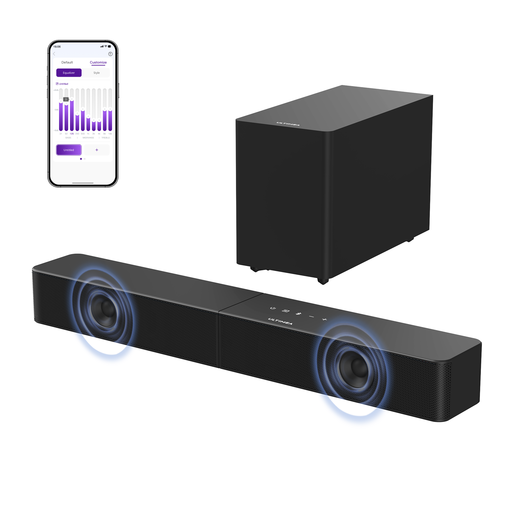
Why this product suits this profile: This 2.1 system is for buyers looking to improve their TV sound with a separate subwoofer and a straightforward set-up. It offers HDMI ARC, an optical input, USB and Bluetooth.
The product specifications list 2.1 channels and a separate 5.25-inch subwoofer, rather than an unclear virtual channel figure. The 240 W power rating is specified as peak power.
Wireless subwoofer, HDMI ARC, Bluetooth 6.0 and an app with a 10-band equaliser, according to the product description.

Why this product suits this profile: This system offers 3.1.2 channels, up-firing speakers and support for Dolby Atmos and DTS:X. Q-Symphony is also available with compatible Samsung TVs.
The channel configuration, eight built-in speakers and available connections are clearly specified. SpaceFit Sound Pro is listed as a room-optimisation feature, but it doesn’t replace suitable speaker placement.
Wi-Fi, Bluetooth 5.2, HDMI ARC, an optical input and a 6.5-inch subwoofer, according to the manufacturer’s specifications.

Why this product suits this profile: Four surround speakers, a 5.25-inch subwoofer and 7.1 channels make this a good option for people who want a more immersive speaker set-up for films, gaming and multi-channel audio.
The product description specifies a hybrid set-up, with wired front speakers and rear speakers that can be connected partly wirelessly. This gives you flexibility over placement without promising a completely cable-free system.
HDMI eARC, Dolby Atmos, app control with a 10-band equaliser and 13 surround levels, according to the product specifications.
We’ve put together a complete, regularly updated list of products that meet these strict selection criteria and fully comply with the safety regulations applicable in the EU.
Where possible, connect the soundbar via HDMI ARC or eARC, then select the corresponding output option on your TV. If you’re using an optical cable, you may need to set the TV audio format to PCM. If the bass sounds boomy, avoid placing the subwoofer right in a corner. Small changes to its position can affect how the sound carries around the room.
At high volumes, make sure ventilation openings remain clear. Clean the devices with a soft, dry cloth and follow the manufacturer’s instructions. In Germany, electronics and batteries must not be put in household waste; use the designated take-back and collection schemes instead.
Yes, as long as its size, volume and placement suit the room. A wireless subwoofer still needs a nearby mains socket. In flats where sound travels easily between rooms, night mode, bass control and keeping the volume moderate are particularly important.
Not necessarily. The way audio is transmitted depends on your TV, soundbar, source and audio format. However, HDMI eARC offers more bandwidth than ARC and is often the better connection for more demanding multi-channel formats.
There’s no reliable way to guarantee a set lifespan. It depends on factors including how long it’s used, volume levels, ventilation, power supply and software support. Keeping the system in a dry, well-ventilated spot and using suitable cables can help it perform reliably day to day.