
Lieferung heute & morgen

Qualitätsgarantie

Willkommens-Angebote freischalten: KOSTENLOSE Lieferung | Bis zu 80 % RABATT | Kostenlose 30-Tage-JoyPlus-Testphase
App herunterladen
A slim television doesn’t automatically need a weak audio setup. In practice, however, wattage and terms such as Dolby Atmos aren’t the only factors that determine whether a soundbar for your TV is right for your living room. Room size, connection standards, speaker placement and how you plan to use it are just as important.
If you focus only on high power ratings, it’s easy to overlook important details. The buying criteria below will help you see past the marketing claims and choose a home cinema sound system that suits you.
Maximum or so-called peak power doesn’t automatically indicate the volume you can sustain or the sound quality you’ll get. The speaker configuration, number of channels, frequency range and whether there’s a subwoofer are more useful indicators. A compact 2.1 system may be a better choice for a small room than a more powerful multi-channel system that’s difficult to position properly.
A Dolby Atmos soundbar needs a compatible source and a suitable signal path. HDMI ARC and HDMI eARC differ in the bandwidth they can support. For certain high-resolution and multi-channel audio formats, HDMI eARC is the more suitable connection. Older TVs, on the other hand, may only be able to transmit Dolby Digital or another compressed format.
With a wireless soundbar, the subwoofer or rear speakers may connect to the soundbar wirelessly, but they’ll usually still need a power supply. For wired surround speakers, you’ll also need to consider cable lengths, socket positions and potential trip hazards.
Start by checking the connections on your TV:
You should also select the right audio output in your TV’s settings. With HDMI ARC or eARC, you may also need to enable HDMI-CEC and choose the correct audio format, depending on the model.
A 2.1 soundbar typically consists of two main channels and a subwoofer. It’s a good choice if you want to improve your TV’s sound and keep installation straightforward. A soundbar with a subwoofer has a dedicated bass channel, which can add depth to film soundtracks, music and games.
A 5.1 soundbar or 7.1 soundbar adds further centre and surround channels. This can be beneficial in a larger seating area, but you’ll need enough space for the speakers. Virtual surround technologies create a sense of space through signal processing; separate rear speakers, by contrast, use physical sound sources positioned behind you.
Measure the space beneath your TV. The soundbar shouldn’t cover the TV’s infrared sensor or block any ventilation openings. If you’re wall-mounting it, consider the brackets, wall material and cable routing.
The subwoofer shouldn’t be placed inside a closed cabinet. If you have rear speakers, check whether your seating position allows you to arrange them effectively. Automatic room correction can be helpful, but it’s no substitute for getting the basic placement right.
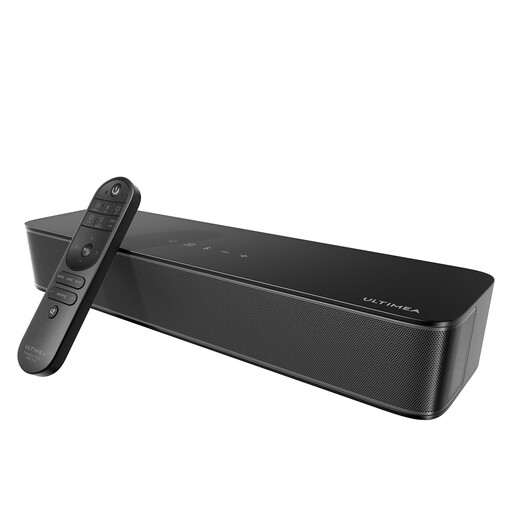
Why it suits this profile: This 2.1 all-in-one system has a built-in 76 mm subwoofer, so there’s no need for a separate bass speaker in the room. It connects via optical, AUX, USB or Bluetooth 5.4.
The power rating is backed up by practical connection and control options. Its integrated design takes up less space and reduces the need for extra cables.
Built-in subwoofer, six preset sound modes and app control with a 10-band equaliser.
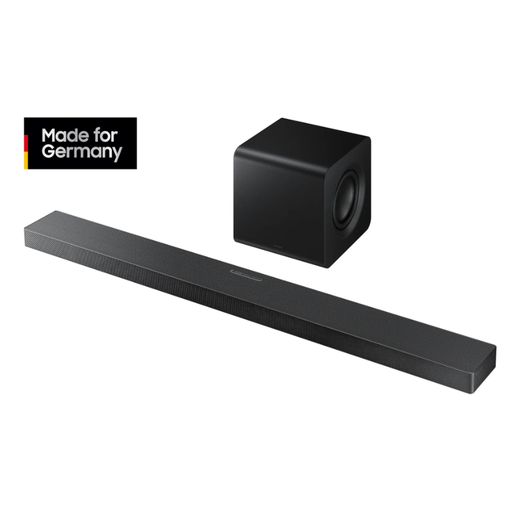
Why it suits this profile: This system combines a 3.1.2-channel setup with a wireless subwoofer, Dolby Atmos, DTS:X, Wi-Fi and Bluetooth. It’s a good option if you want to bring together a range of streaming and TV features.
It lists specific standards as well as audio features: HDMI ARC, an optical input, 4K 60 Hz passthrough and support for several streaming protocols.
Wireless 6.5-inch subwoofer, built-in up-firing speakers and compatibility with the SmartThings app.
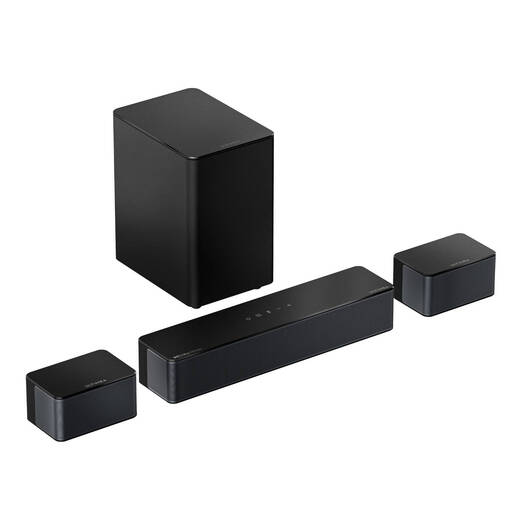
Why it suits this profile: With three main channels, two surround speakers and a wireless 5.25-inch subwoofer, this system is aimed at households that enjoy films, sport and gaming and have room for extra speakers.
The surround effect isn’t created solely through virtual sound processing; it also comes from additional surround speakers. The 20-foot extension cables give you more flexibility when positioning them.
HDMI eARC, Dolby Atmos, six sound modes and app control for bass, treble and dialogue.
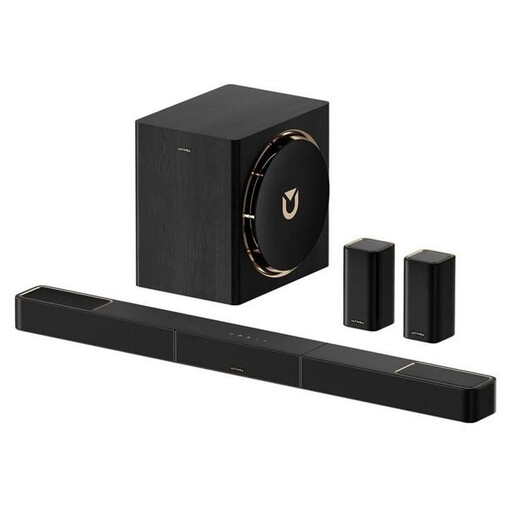
Why it suits this profile: This 7.1.4 system combines wireless rear speakers with an 8-inch subwoofer and HDMI eARC. Its quoted low latency of under 20 milliseconds is especially useful for film soundtracks and gaming.
The rear speakers aren’t positioned virtually. At the same time, the audio connections between the extra speakers and the soundbar are wireless.
7.1.4-channel setup, Dolby Atmos, Bluetooth 5.4 and app control with an equaliser and preset sound profiles.
Where possible, connect the soundbar via HDMI ARC or eARC if your TV has the right port. Then select the appropriate digital audio output in your TV’s settings. With an optical connection, the output may be limited to PCM or a compatible compressed format, depending on the device.
For reliable operation, make sure the speakers, subwoofer and power supplies have enough ventilation. Arrange cables to avoid trip hazards. Power consumption varies by model, volume level and standby mode. If your devices stay plugged in, low standby power consumption can help reduce running costs.
We’ve put together a complete, regularly updated list of products that meet these strict selection criteria and fully comply with the safety regulations in force in the EU.
A soundbar with an optical input, AUX or HDMI ARC is usually suitable for older TVs. Before buying, check which connections are actually available and whether your TV remote supports volume control.
Yes, as long as the subwoofer has space around it and isn’t placed inside a closed piece of furniture. A 2.1 system is often enough for a small room. A larger 5.1 or 7.1 system needs more space and a suitable seating position.
They serve different purposes. Dolby Atmos can create a more spacious listening experience, while low latency helps keep the picture and sound in sync. For consoles and PCs, you should also check the HDMI version, passthrough support and your TV’s connections.