
Lieferung heute & morgen

Qualitätsgarantie

Willkommens-Angebote freischalten: KOSTENLOSE Lieferung | Bis zu 80 % RABATT | Kostenlose 30-Tage-JoyPlus-Testphase
App herunterladen
TV audio often sounds thin, dialogue gets lost in action scenes and there’s no suitable speaker for powerful bass. A soundbar with subwoofer can improve the sound without the need for a separate AV receiver and several large speakers. However, high wattage figures, channel counts and terms such as ‘3D sound’ don’t automatically mean it’s the right choice for you.
Depending on the manufacturer, the stated power output may be measured under different conditions. That’s why peak power is only a limited guide to volume or sound quality. Other important factors include the speaker layout, room size, signal processing and sound adjustment options.
A Dolby Atmos soundbar can reproduce compatible audio tracks with a sense of space. However, to transmit larger amounts of uncompressed audio data, an HDMI eARC soundbar paired with a TV and source device that support eARC is usually a good choice. Features may be limited when using HDMI ARC, an optical connection or incompatible audio formats.
Upward-firing speakers can also use reflections from the ceiling. The result therefore depends on the ceiling height and material, your seating position and the layout of the room. Dolby Atmos is no substitute for suitable room acoustics.
A wireless subwoofer will generally still need to be plugged into a mains socket. ‘Wireless’ usually refers to the audio connection between the soundbar and subwoofer. Rear speakers in surround systems may also need power sockets or speaker cables. Before buying, check which components really work without audio cables.
The first number describes the main channels, while the second refers to the subwoofer. A 2.1 soundbar typically consists of two main channels and a subwoofer. A 5.1 soundbar adds a centre channel and surround channels. A 7.1 soundbar may include several surround speakers or virtual channels.
Important: the channel count alone doesn’t tell you whether there are separate speakers in the room. Check the product description for terms such as ‘Rear Speaker’, ‘Surround Speaker’, ‘wired’ or ‘wireless’.
These connections are useful when linking your soundbar to your TV:
A Bluetooth soundbar is therefore a flexible choice for music, but it doesn’t automatically replace a suitable HDMI connection for home cinema audio.
Measure the width of your TV stand and check that the soundbar won’t block the TV’s infrared sensor. For models with upward-firing speakers, make sure a shelf won’t obstruct the top of the soundbar. Place the subwoofer on a stable surface and avoid putting it directly in a tight corner, as this can make the bass louder or uneven around the room.
For everyday use, other practical features include automatic room calibration, dialogue enhancement, night mode, app control and a shared remote control.
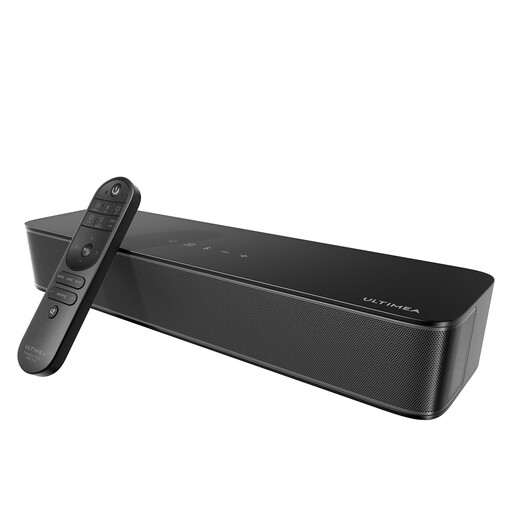
Why it suits this type of user: This compact 2.1 soundbar is ideal for smaller living rooms, bedrooms or use beneath a monitor. The subwoofer is built in, so there’s no need to find space for a separate bass module.
The 2.1 configuration is clearly stated, with no claims of rear speakers that aren’t included. Optical, AUX, USB and Bluetooth offer several ways to connect.
Built-in 76 mm subwoofer, Bluetooth 5.4, app control and SUB-OUT for adding an active subwoofer later.

Why it suits this type of user: The 3.1.2 configuration is designed for film and TV fans who want a slim soundbar with a centre channel, upward-firing speakers and a separate subwoofer.
Dolby Atmos is backed up by specific components, including upward-firing speakers and nine drivers. Its 50 mm profile makes it easier to position beneath many TVs.
3.1.2-channel layout, DTS:X, HDMI eARC, Bluetooth 5.3 and a wireless subwoofer.
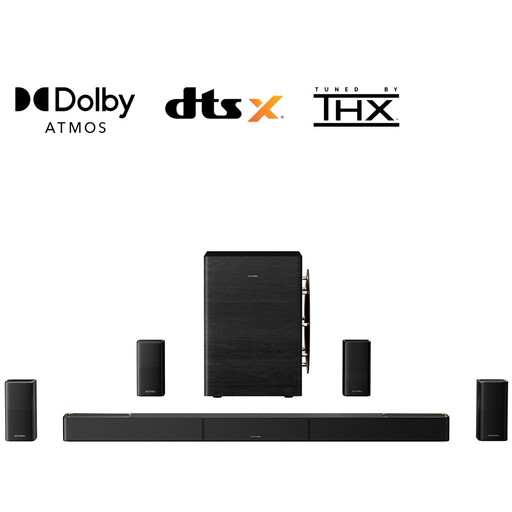
Why it suits this type of user: For larger living rooms, high-frame-rate gaming and extensive home cinema setups, this system offers several wireless components and plenty of connectivity options.
The specifications list the individual components, including four surround speakers and a 10-inch subwoofer. HDMI 2.1 supports 8K at 60 Hz and 4K at 120 Hz passthrough.
9.1.6-channel layout, Dolby Atmos, DTS:X, HDMI eARC, 8K passthrough and wireless surround components.
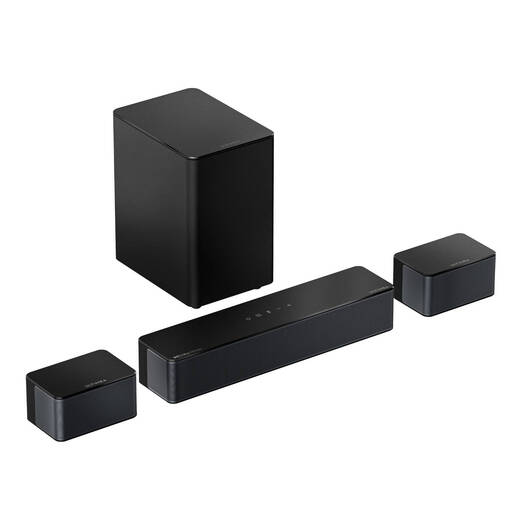
Why it suits this type of user: Two surround speakers and a wireless subwoofer complement the three main channels. It’s a good fit for households looking for more immersive sound without having to set up an AV receiver.
The rear speakers are clearly described as wired. This gives you a realistic idea of the installation required before you buy.
5.1-channel layout, Dolby Atmos, HDMI eARC, six sound modes and a 20-foot extension cable for the surround speakers.
We’ve put together a complete, regularly updated list of products that meet these strict selection criteria and fully comply with the safety regulations in force in the EU.
With a soundbar with wireless subwoofer, the subwoofer should pair automatically when switched on. If it doesn’t, check the manufacturer’s pairing instructions and try moving it closer to the soundbar.
Yes, as long as it has Bluetooth, Wi-Fi or a suitable streaming connection. For listening to music, the equaliser, music mode and subwoofer position may matter more than a high channel count.
Its lifespan depends on how long it’s used, ventilation, dust, volume levels and software support. Keep the components in a dry place, don’t block any ventilation openings and use the supplied power adapters. Install firmware updates in line with the manufacturer’s instructions.
The soundbar and subwoofer each use power while operating; consumption is usually much lower in standby. The exact figures vary by model. To reduce power consumption, use automatic standby features and switch the system off completely if you’ll be away for an extended period.