A 34-inch 21:9 monitor is an obvious choice if your game displays the cockpit, field of view and HUD well, and you have enough desk space. If space is limited or you prefer to keep your instruments centred in view, a 27-inch 16:9 QHD monitor could be a better fit. OLED and especially wide 32:9 models come with their own trade-offs in terms of care, space and PC requirements. Before you buy, check how your chosen game looks and whether your PC can deliver the resolution and refresh rate you want through your intended connection.
Which monitor is right for you?
Cockpit-view enthusiasts
If you play on a PC from a fixed seated position and want to see the sides of the cockpit, check whether your game displays the field of view and HUD properly in a wide format. Xiaomi lists a resolution of 3440 × 1440 pixels for the G34WQi; some users on Star Citizen Spectrum have reported issues with the HUD display at 3440 × 1440 pixels.
Players who need to save space and read their instruments
If you have limited desk space or prefer to keep your displays centred in view, compare 16:9 monitors by screen size, resolution and stand. AOC lists the Q27G4XF as a 27-inch QHD IPS model with a height-adjustable stand.
Players who enjoy dark space scenes
If dark scenes matter most to you, consider long periods with static HUD elements and the care your panel needs when choosing an OLED monitor. LG explains that image retention can occur with static elements displayed for long periods and describes a pixel-cleaning feature.
What should you look for when choosing?
First, check whether your game supports your chosen aspect ratio and displays docking indicators as you’d expect. Then compare the available desk space and resolution with your seating position and PC.
| Priority |
What to check before buying |
Who is it important to? |
| Side cockpit view |
Resolution, field of view and HUD in your chosen game; monitor width and stand. |
If I want to see the sides of the cockpit while docking, my game needs to display the field of view and indicators properly. Around 36% of consumers prioritise a side cockpit view. |
| Instruments and desk space |
Viewing distance, available width, height adjustment and HUD legibility. |
If space is limited or I want my instruments clearly laid out in front of me, a more manageable 16:9 display could be an alternative. Around 29% of consumers focus first on clear instrument visibility and desk space. |
| Dark scenes and OLED |
Care features and warranty terms for the specific model; consider use with static displays. |
If dark scenes are particularly important to me, I consider visible HUD elements and panel care when choosing. Around 21% of consumers prioritise the display of dark scenes. |
| Maximum width |
Dimensions of the monitor and stand, PC output and how the game displays in 32:9. |
If I want as much screen space at the sides as possible, my desk needs to accommodate an extra-wide display. Around 14% of consumers prioritise maximum 32:9 width. |
Buying decisions to check carefully
-
A wider panel doesn’t guarantee a better view when docking
The stated resolution alone doesn’t tell you how a particular game displays the field of view and HUD. If the game doesn’t support the format properly, some of the screen width may go unused.
Before buying, check the resolution, field of view and position of the indicators in your chosen game. Also consider the extra space needed for the monitor and stand, as well as your PC’s requirements.
If the display isn’t supported properly, some of the screen width may go unused. A wider, higher-resolution model also needs more desk space and a more capable PC.
-
Check model suffixes and response-time figures carefully
The Xiaomi G34WQi and the separately named G34WQi 2026 have different published specifications. MPRT and GtG are also different ways of measuring response time.
Check the full model name and specifications against the specific listing. For response-time figures, make sure you know which measurement method is being used.
-
Don’t confuse an OLED warranty with your statutory rights
OLED care is important if HUD elements stay on screen unchanged for long periods. A voluntary warranty and your statutory rights when goods are faulty have different bases.
Read the care guide and warranty terms for the exact variant. Consider your statutory rights for faulty goods separately.
Panel care may take extra effort; a voluntary warranty is subject to its own terms and conditions.
Notable brands and models
AOC
The Q27G4XF is an example of a more compact 27-inch 16:9 monitor with QHD resolution and an IPS panel.
- AOC lists a height-adjustable stand and a maximum refresh rate of 180 Hz for the Q27G4XF.
- Compared with 21:9, this model offers less screen space at the sides. It doesn’t guarantee a wider usable field of view in your game.
Xiaomi
The G34WQi is a 34-inch example of a wide 21:9 LCD monitor.
- Xiaomi lists a resolution of 3440 × 1440 pixels and a maximum refresh rate of 180 Hz for the G34WQi.
- The G34WQi is not the same model as the separately named G34WQi 2026; their published specifications differ.
Samsung
The Odyssey G5 LC34G55TWWPXEN is a 34-inch example of a 21:9 monitor with a VA panel and a more pronounced curve.
- Samsung Germany lists a resolution of 3440 × 1440 pixels and a refresh rate of up to 165 Hz for this model.
- The 1000R curve is a matter of personal set-up and viewing preference; it doesn’t prove an advantage when docking.
LG
The UltraGear 34GS95QE-B is an example of a 34-inch 21:9 OLED monitor.
- LG lists a resolution of 3440 × 1440 pixels and a maximum refresh rate of 240 Hz for this model.
- LG notes that image retention can occur with static elements displayed for long periods and describes a pixel-cleaning feature. Care guidance and terms for the specific variant are therefore important.
MSI
The MPG 491CQP QD-OLED is a 49-inch example of an extra-wide 32:9 display.
- MSI’s global specifications list a resolution of 5120 × 1440 pixels, a refresh rate of up to 144 Hz and a width of 1195 mm with the stand.
- MSI notes that products may differ between countries. The global specifications don’t confirm availability in Germany or identical local warranty terms.
Joybuy monitors for wide cockpit views
This Joybuy selection includes wide 21:9 and 32:9 gaming monitors. For each model, check whether your game supports the aspect ratio and HUD layout, and whether the monitor and stand will fit your set-up.
 No image available
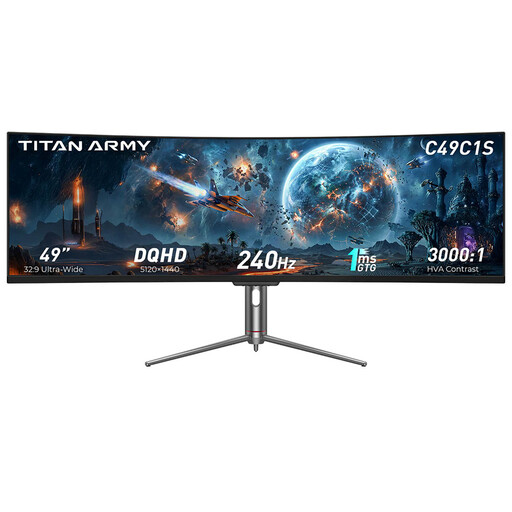
TITAN ARMY C49C1S, 49 inches, 32:9, DQHD, 240 Hz
Designed for an extra-wide cockpit view, this monitor is listed as 49 inches, 32:9 and DQHD. Check first that your game displays the format properly.
The title lists an HVA panel and an 1800R curve. The description specifies height, tilt and swivel adjustment.
View at Joybuy
 No image available
CRUA CR340QA-H, 34 inches, 21:9, 3440 × 1440, 165 Hz
The 34-inch 21:9 format is an option for seeing the sides of the cockpit, provided your game displays the resolution, field of view and HUD properly.
The title lists a 1500R curve and 1 ms MPRT. The description lists HDMI and DisplayPort connections.
View at Joybuy
 No image available
CRUA, 49 inches, 32:9, 5120 × 1440, 165 Hz
For plenty of screen space at the sides, this monitor is listed as 49 inches and 32:9. Make sure your game displays the format and indicators properly.
The title lists a 1500R curve and a height-adjustable stand. Bear in mind that a 49-inch display takes up a considerable amount of space.
View at Joybuy
 No image available
INNOCN E34A1R, 34 inches, 21:9, 3440 × 1440, 200 Hz
The 21:9 format could suit a wide cockpit view if your game displays the field of view and HUD accordingly.
The title lists a VA panel, a 1500R curve and FreeSync. For positioning at your seat, the description specifies height, tilt and swivel adjustment.
View at Joybuy
 No image available
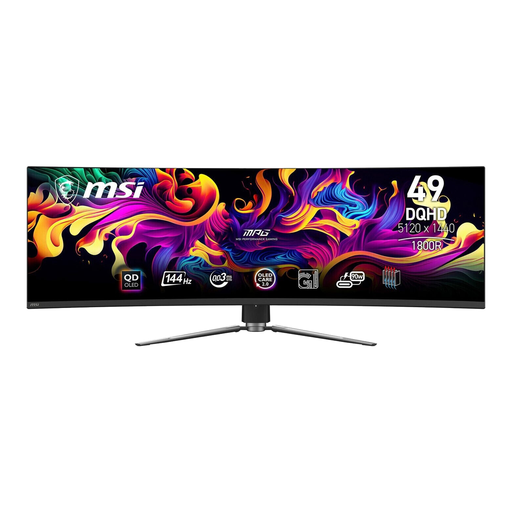
MSI MPG 491CQPDE QD-OLED, 49 inches, 32:9, 144 Hz
The 49-inch 32:9 format is designed to give you plenty of screen space at the sides; how the HUD displays depends on the game.
The product details list DQHD, a width of 1195 mm, and height, tilt and swivel adjustment. OLED care guidance is important if you use a static HUD for long periods.
View at Joybuy
Frequently asked questions
Should I check whether my game supports an ultrawide monitor?
Yes, if the extra width is one of the main reasons you’re buying it. Check the resolution, field of view and position of docking indicators in your chosen game; the monitor’s resolution alone doesn’t guarantee that the game or HUD will display properly.
How should I position a monitor at a fixed seating position?
Before ordering, compare the dimensions of the screen and stand with your desk, and check whether you need an adjustable stand. AOC lists height adjustment for the Q27G4XF; Xiaomi gives the G34WQi a width of 811.3 mm with the stand.
What should I bear in mind when using OLED for long gaming sessions with a static HUD?
Follow the care guidance for your specific monitor. LG describes possible image retention when game menus remain static for long periods and explains its pixel-cleaning feature; this doesn’t guarantee that every OLED issue can be avoided.
What are my rights when buying a monitor online in Germany?
When you buy online from a retailer as a consumer, you generally have a 14-day right to cancel; the Verbraucherzentrale explains the applicable terms. If the goods are faulty, you have statutory rights against the seller; Your Europe states that applicable consumer purchases in the EU are covered by a minimum two-year guarantee from the date you receive the goods. A voluntary manufacturer’s warranty is separate.
How should I dispose of my old monitor?
In Germany, take waste electrical equipment to an authorised collection operator. The Federal Ministry for the Environment explains how to dispose of it through authorised collection points and other approved operators.


