What should you look for when buying?
First, check that your game supports the aspect ratio you want and offers a suitable HUD layout. Then compare the size that will fit your desk, along with the resolution, connections and panel care requirements that matter for how you use it.
| Priority |
What to check |
Who is it important to? |
| Side-on cockpit view |
Check aspect ratio support and the HUD layout in the specific game. |
If you mainly want to see more of the cockpit to the sides on one screen, your game needs to display the format properly. Around 36% of consumers prioritise a panoramic view. |
| Instruments and motion |
Check HUD legibility at your seating distance, and match the frame rate and refresh rate to the connection you plan to use. |
In fast-paced combat, you want to read your instruments clearly and see smooth motion; what your PC can actually deliver matters too. Around 29% of consumers put instruments and motion first. |
| Dark scenes and OLED |
Check the panel type, OLED protection features, and the care and warranty terms for the specific model. |
If dark scenes matter particularly to you, weigh OLED care requirements against how you use the monitor, especially if cockpit elements stay on screen for long periods. Around 21% of consumers prioritise contrast and this OLED trade-off. |
| Desk space and running costs |
Compare the dimensions with the stand and check the energy label; for wall mounting, check the VESA standard for the exact variant. |
If desk space is limited, you’ll want to make sure the screen and stand will fit. Around 14% of consumers prioritise space and cost. |
Joybuy monitors for different cockpit setups
This selection includes 32:9 and 21:9 ultrawide models, as well as 27-inch Mini LED and OLED options. The key considerations are still your game’s support, the HUD layout and the space available on your desk.
 No image available
CRUA 49-inch DQHD monitor, 32:9
If your game supports 32:9 with a suitable HUD layout and you have enough desk space, this extra-wide single-screen display could work well for a cockpit view.
The product name lists 5120 × 1440, 165 Hz, 1500R curvature, HDMI 2.1 and DisplayPort 1.4.
View at Joybuy
 No image available
INNOCN E34A1R 34-inch curved gaming monitor
If your game supports 21:9 and the HUD remains legible, the 34-inch format is an option for a wider view on a single monitor.
The product name lists 3440 × 1440, a VA panel, 200 Hz and 1500R curvature.
View at Joybuy
 No image available
INNOCN 2751S PLUS 27-inch Mini LED monitor
If you prefer a less wide cockpit view, consider this 27-inch option for the game you want to play and your seating distance.
The product name lists QHD, 275 Hz, an IPS display and 1152 dimming zones.
View at Joybuy
 No image available
MSI MAG 341CQPDE 34-inch QD-OLED monitor
If you want to combine a wide single-screen view with OLED, first check whether your game supports 21:9 and displays cockpit instruments appropriately.
The model is listed at 3440 × 1440 and 175 Hz. If cockpit elements stay on screen for long periods, follow the OLED care guidance for this model; protection features cannot rule out burn-in.
View at Joybuy
 No image available
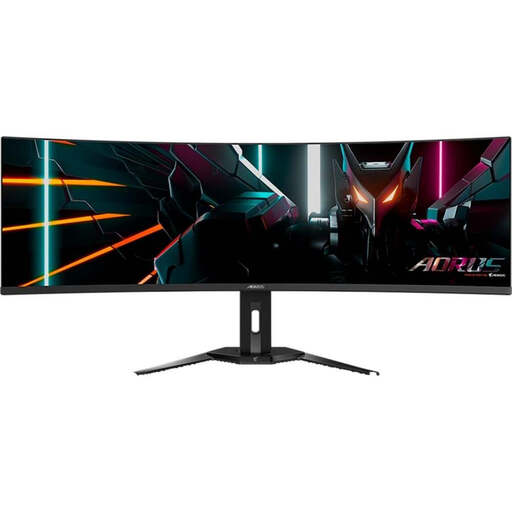
Gigabyte AORUS CO49DQ 49-inch QD-OLED monitor
If your game supports 32:9 and the HUD is laid out appropriately, this 49-inch model offers an option for an extra-wide cockpit view; check that you have enough desk space too.
The product name lists 5120 × 1440, 144 Hz, 1800R curvature and HDMI 2.1. OLED care guidance is relevant if cockpit elements stay on screen for long periods.
View at Joybuy
Frequently asked questions
Will a 21:9 monitor automatically show more of the cockpit in my space game?
No, not automatically. Check that your specific game supports the resolution, and look at the camera view and HUD position; only then can you tell whether the extra width gives you a usable wider view of the game. RTINGS.com notes that consoles do not support ultrawide aspect ratios.
How do I get the stated refresh rate?
Check the input you’re using, the cable, your settings and your PC’s performance. Dell Germany lists 165 Hz over DisplayPort and 100 Hz over HDMI for the AW3423DWF; Xiaomi Germany recommends using the DisplayPort cable supplied with the G34WQi 2026.
What should I bear in mind when using an OLED monitor with a cockpit HUD that stays on screen?
Follow the care and protection instructions for the exact model and check its warranty terms. ASUS ROG describes a feature on the PG34WCDN that reduces the risk of burn-in, not one that eliminates it.
What buying and disposal information applies in Germany?
For covered electronic displays, the EU energy label shows information including the energy efficiency class and consumption figures. When monitoring the market for electrical and electronic products, Germany’s Federal Network Agency checks points including CE marking, product identification and safety instructions in German. According to Germany’s Federal Environment Agency, an old monitor should not go in household waste; take it to a suitable return or collection point instead.
Can I return a monitor bought online?
In Germany, consumers buying online generally have a right to cancel; the period is usually 14 days from receipt of the goods. Check the specific contract information and tell the retailer that you’re cancelling. This statutory right is separate from any voluntary returns policy offered by a shop.


