Cockpit-view fans
If you usually play in the same spot, first check whether your game gives you a useful cockpit view on a single widescreen monitor. The aspect ratio and space it takes up may matter more than the highest possible refresh rate.


If your game makes good use of 21:9 and your desk has enough room, an ultrawide monitor is a natural starting point for a wide cockpit view. If crisp instrument displays or a more compact setup matter more, consider a high-resolution 16:9 screen instead. With OLED, check the care guidance and warranty terms if on-screen displays will remain visible for long periods.
If you usually play in the same spot, first check whether your game gives you a useful cockpit view on a single widescreen monitor. The aspect ratio and space it takes up may matter more than the highest possible refresh rate.
If you want to make out instruments and map details clearly, weigh the sharpness of 4K against the extra horizontal space of an ultrawide monitor and your PC’s performance.
If cockpit displays stay in the same place for long periods, or you use your monitor for other things too, compare OLED contrast and care guidance with an LCD alternative. Also check the warranty terms for the specific model.
First, decide whether your game offers a usable 21:9 view and whether the monitor will fit your setup. Then compare resolution, panel technology and the frame rate your PC can actually achieve.
A good fit if: You want a wide view on a single screen, your game supports 21:9 and you’d rather avoid OLED care requirements. The ViewSonic VX3418C-2K is one example, with a 34-inch screen, UWQHD and 180 Hz.
The trade-off: Check how the game looks, the space available and your PC’s performance. ViewSonic describes the advertised 1 ms response time as MPRT.
A good fit if: Alongside a wide view, you care about how dark scenes look and are happy to follow the OLED model’s care guidance. LG and MSI offer 34-inch examples with 3440 × 1440 pixels and refresh rates of up to 240 Hz.
The trade-off: MSI describes OLED Care 2.0 as reducing the risk of burn-in, not eliminating it. Check the warranty terms for the exact variant.
A good fit if: Clear instrument displays and a less wide setup are your priorities. The Dell Alienware AW2725Q is one example of a 27-inch 4K QD-OLED monitor.
The trade-off: It offers less horizontal screen space than the 21:9 models mentioned above. Check whether your PC can achieve the frame rate you want at your chosen resolution.
| Priority | What to check when buying | Who will care most? |
|---|---|---|
| Wide cockpit view | Check how 21:9 works in the specific game, and measure the screen and stand width against the space available where you sit. | If I want to see as much of the cockpit as possible to either side while exploring, all on one screen, I’ll first check game support and available space. Around 26% of consumers prioritise a panoramic view. |
| Readable instrument displays | Check how easy the game’s interface is to read from your usual seating position, and take the resolution into account. | If I want to see instruments and map details clearly, I’ll weigh 4K against extra screen width and my PC’s performance. Around 21% of consumers prioritise readable detail. |
| Dark scenes and permanently visible displays | Check the care guidance and burn-in terms for the specific OLED variant; protective features don’t eliminate the risk. | If cockpit elements stay visible for long periods, I’ll weigh OLED’s potential advantage in dark scenes against the care requirements and warranty. Around 21% of consumers prioritise panel choice and HUD longevity. |
| Usable frame rate | Check the resolution and refresh rate supported by the connection you plan to use, as well as the frame rate achievable in the game. | If smooth motion matters to me, I don’t want to choose a maximum refresh rate that my game or PC can’t reach. Around 16% of consumers prioritise motion performance. |
| Space and seating position | Measure your desk and the space available, including the stand, and check that you can position the monitor comfortably. | If I’m playing while sitting for long periods, the screen needs to suit my space and viewing position. Around 16% of consumers prioritise space and seating comfort. |
The monitor’s maximum refresh rate alone doesn’t tell you what frame rate your game will achieve on your PC.
Check your graphics card, connection, resolution and the frame rate you can actually achieve before making a higher maximum refresh rate your main consideration.
For the MPG 341CQPX, MSI describes OLED Care 2.0 as reducing the risk of burn-in. It doesn’t eliminate the risk.
Compare the care guidance and warranty terms for the exact OLED variant with those of an LCD alternative.
The width, depth and curvature of a 34-inch monitor can all affect how well it fits your available space and seating position.
Measure the space it will take up, including the stand, and compare it with the dimensions of the specific model.
The UltraGear OLED 34GS95QE-B is one example of a strongly curved 34-inch 21:9 monitor.
The MPG 341CQPX QD-OLED is a 34-inch 21:9 example, featuring QD-OLED and 1800R curvature.
The VX3418C-2K is a 34-inch ultrawide example with an LCD panel.
The OMEN 34c is a 34-inch 21:9 VA example.
The Dell AW2725Q is one example of a more compact 27-inch 4K QD-OLED monitor.
This selection includes wide 21:9 gaming monitors and more compact 16:9 displays with a range of resolutions and panel types.
 No image available
A more compact 16:9 option if you want less horizontal screen space than an ultrawide monitor offers.
27 inches, 2560 × 1440 pixels, 280 Hz and 0.03 ms GtG, according to the product name.
 No image available
A wide LCD option if your game makes good use of 21:9 and the format suits your setup.
34 inches, 3440 × 1440 pixels, VA, 200 Hz and 1500R; the product name also mentions a height-adjustable stand.
 No image available
A 21:9 option if you want a wide view on a single monitor and your game supports the format.
34 inches, 3440 × 1440 pixels, 180 Hz and 1500R, according to the product name.
 No image available
A 16:9 alternative if you’d rather have 4K and a QD-OLED panel than extra horizontal screen space.
31.5 inches and 3840 × 2160 pixels, according to the product name.
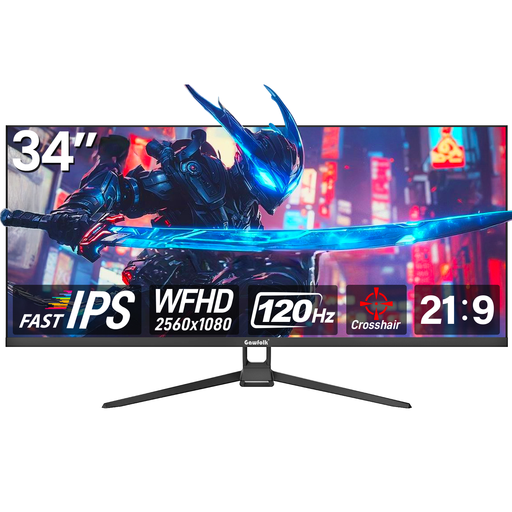 No image available
A wide 21:9 option if your game makes good use of the format and you’re happy with fewer pixels than UWQHD.
34 inches, WFHD with 2560 × 1080 pixels and 120 Hz, according to the product name.
Check how it looks in your game, especially the instruments and menus. The monitor’s aspect ratio alone doesn’t guarantee a wider view that’s useful to you.
Read the care guidance and warranty terms for the specific model. For the MPG 341CQPX, MSI describes OLED Care 2.0 as reducing the risk of burn-in, not eliminating it.
Adjust the screen position and tilt to suit your viewing position, and measure the space needed for the monitor and stand beforehand. Germany’s Federal Institute for Occupational Safety and Health lists individual positioning as a factor in comfortable screen use; its guidance isn’t a blanket legal requirement for gaming at home.
No. If a product is faulty, your statutory rights are against the seller; a warranty is an additional voluntary service with its own terms. The Verbraucherzentrale explains the difference. For an OLED offer, also check what the specific warranty says about burn-in.
An old monitor shouldn’t go in your household rubbish. The German Environment Agency recommends disposing of it separately, for example at a recycling centre or an appropriate take-back point; returning it to a retailer depends on the relevant conditions.
Yes. EU rules for electronic displays generally cover monitors too, and require energy labels and product information. Compare the details for the specific model variant rather than assuming its energy consumption from the panel type or refresh rate alone.