For a wider cockpit view on a single screen, 21:9 is a sensible place to start, provided your game supports the format and your desk and PC can accommodate it. If space or graphics performance is limited, 16:9 is the more modest option; 32:9 needs considerably more desk space and processing power. If you choose OLED, bear in mind that cockpit displays remaining on screen for long periods make the panel’s protection features and warranty terms particularly relevant.
Which monitor is right for you?
For a wider cockpit view
If you fly from a fixed seated position and want to see more of the sides on one screen, consider 21:9 or, potentially, 32:9. The key factors are whether your game supports the format and how much space you have; RTINGS.com and LC-Power describe the extra horizontal screen space offered by these ultrawide formats.
For long-haul traders and menu readers
If you use trading menus for long stretches and keep cockpit displays on screen, consider how easy they are to read from your seating distance, as well as the trade-offs between LCD and OLED. ASUS describes OLED protection measures, while RTINGS.com notes that text clarity can also be a matter of personal perception.
For limited space or PC performance
If desk width or graphics performance is limited, 16:9 QHD could be a good place to start. Before opting for more screen space and pixels, check that the view is wide enough in the game you play; Dell Germany lists a 27-inch QHD model as an example of this format.
What to look for when buying
16:9 QHD LCD
A good fit if: You want a more compact screen, prefer to read menus in the centre or want to keep the graphics workload down.
The trade-off: You get less horizontal screen space than with 21:9 or 32:9, so check the cockpit view in your game.
21:9 UWQHD LCD
A good fit if: You want a wider view on a single screen and your game supports 21:9.
The trade-off: Check that you have enough desk space, that menus are well positioned and that your PC can deliver the desired refresh rate from your seat.
21:9 UWQHD OLED
A good fit if: Dark-scene performance matters to you and you’re happy to follow the care guidance and check the warranty terms for the specific model.
The trade-off: If cockpit elements stay in the same place for long periods, OLED protection and how you use the screen matter; protection features don’t eliminate the risk.
32:9 DQHD
A good fit if: You want an especially wide screen and your desk, PC and in-game view can accommodate it.
The trade-off: This format needs plenty of desk space, and you’ll need to check that the game interface and displays sit sensibly around the edges.
| Priority |
What to check before buying |
Who it matters most to |
| Cockpit view |
Does the game support 21:9 or 32:9, and will cockpit elements remain well positioned? |
If you want to see more of the cockpit to either side from a fixed seated position, this should be a key consideration. Around 31% of consumers prioritise the cockpit view. |
| Menu readability and fixed displays |
Check text clarity and UI scaling from your usual seating distance. For OLED, check the model’s protection features and warranty terms too. |
If you read trading menus for long periods and keep the HUD on screen, readability is especially important. Around 25% of consumers put this first. |
| Space, PC and connections |
Measure the available width and check that your graphics card, cables, input, resolution and refresh rate are compatible. |
If your desk, PC performance or connections limit your choice, the monitor should suit the equipment you already have. Around 25% of consumers prioritise this. |
| Dark in-game scenes |
Compare the specific panel technology and, for OLED, factor in fixed displays and the care guidance. |
If how dark space scenes look is particularly important to you, you could consider OLED models. Around 19% of consumers prioritise this aspect of image quality. |
Common buying mistakes
-
Choosing 21:9 or 32:9 just because the screen is bigger
More screen space only helps if it suits your seating position and the in-game view. Wider formats can also take up more desk space and demand more graphics power.
Measure the space available and check the aspect ratio in the game you play before deciding.
-
Assuming OLED protection features guarantee no burn-in
On long trading routes, cockpit and menu elements can stay in the same place for extended periods. ASUS describes protection measures, but these don’t remove the risk.
Read the care guidance and warranty terms for the specific OLED model, and factor its protection features into how you use it.
-
Comparing maximum refresh rates without checking connection requirements
For the Dell G2725D, Dell Germany lists up to 180 Hz over DisplayPort and up to 144 Hz over HDMI at QHD resolution.
Check that your chosen resolution and refresh rate are supported by the monitor input, cable and PC output.
You may need a suitable cable, depending on the connection.
Key brands at a glance
Samsung
The Odyssey G5 G55T is a 34-inch 21:9 model for buyers looking for UWQHD with LCD rather than OLED.
- Samsung Germany lists a VA panel, 3440 × 1440 pixels, 165 Hz and 1000R curvature.
- The stated 1 ms response time is MPRT, so it isn’t a general comparison of motion clarity with other models. Check whether the curvature suits your seating position.
LG
The LG 34GN850P-B is a 34-inch ultrawide option with an IPS panel.
- LG Germany lists 21:9, G-SYNC Compatible and FreeSync Premium for this model.
- The 160 Hz figure applies specifically in overclocking mode. The features of this IPS model can’t be assumed to apply to a separate OLED model.
Dell und Alienware
The range includes a compact 27-inch QHD Fast IPS model, as well as 34-inch UWQHD options with QD-OLED.
- Dell Germany lists 3440 × 1440 pixels and 280 Hz for the Alienware AW3426DW.
- The stated refresh rates for the Dell G2725D vary by input: up to 180 Hz over DisplayPort and 144 Hz over HDMI.
- The QD-OLED and Fast IPS models are different product lines, so OLED care considerations don’t automatically apply to both.
ASUS ROG
The ROG Swift OLED PG34WCDN is a 34-inch UWQHD QD-OLED option.
- ASUS lists 360 Hz, an RGB stripe subpixel layout and OLED Care Pro with a proximity sensor.
- Manufacturer claims about text rendering and risk reduction don’t guarantee an advantage in every game or risk-free continuous use.
LC-Power
The LC-M49QCO is an especially wide 49-inch option that could suit you if you have enough space and the in-game view works well on it.
- LC-Power lists 5120 × 1440 pixels, 144 Hz and a QD-OLED panel in a 32:9 format.
- Check the desk space, the layout of the game interface and your PC’s performance. With an OLED display, permanently visible HUD elements are also part of the care considerations.
Joybuy monitors for your trading route
The following Joybuy models include compact 16:9 QHD screens and wider 21:9 options. Check that your game supports the format, that you have enough space and that your PC meets the requirements.
 No image available
GIGABYTE G27Q26, 27 inches
A 16:9 QHD option if you’d prefer a more compact screen for seated trading routes.
2560 × 1440 pixels, SuperSpeed IPS and 260 Hz (OC 275 Hz); HDMI 2.1 and DisplayPort 1.4. The description lists height, tilt, swivel and pivot adjustments.
View at Joybuy
 No image available
INNOCN 2751S PLUS, 27 inches
A compact 16:9 QHD option if you want a smaller screen for your trading route rather than an ultrawide format.
2560 × 1440 pixels, Mini LED and IPS; the description lists 1152 dimming zones and up to 275 Hz over DisplayPort. The stand is height-adjustable and supports tilt, swivel and pivot.
View at Joybuy
 No image available
MSI MAG 341CQPDE, 34 inches
A 21:9 UWQHD option if your game supports the wider format and you’re considering a QD-OLED panel.
3440 × 1440 pixels, 175 Hz and OLED Care 2.0 with Pixel Refresh and Panel Protect. If you play for long stretches with cockpit displays fixed in place, check the care guidance and warranty terms; protection features don’t rule out burn-in.
View at Joybuy
 No image available
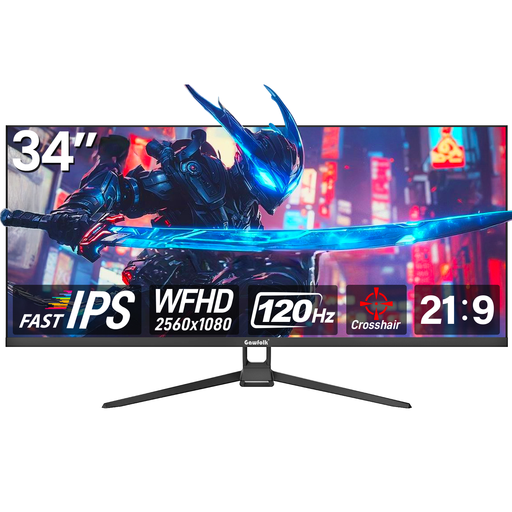
Gawfolk GF340H, 34 inches
A 21:9 option if you want more horizontal screen space and your game supports the format.
2560 × 1080 pixels, 120 Hz and a Fast IPS panel. The description lists HDMI and DisplayPort, as well as tilt adjustment; VESA wall mounting is specified as 75 × 75 mm.
View at Joybuy
 No image available
ASUS TUF Gaming VG34VQ3B, 34 inches
A 21:9 UWQHD option if your game supports the format and you’re looking for a curved screen with a VA panel.
3440 × 1440 pixels, 180 Hz and 1 ms MPRT. The product description lists FreeSync, ELMB, DisplayHDR 400, DisplayPort, HDMI, USB and speakers.
View at Joybuy
Frequently asked questions
Does 21:9 work with every space game?
No, support depends on the game. Before buying, check whether it supports 21:9 or 32:9 and how cockpit and menu elements are arranged on the wider screen.
Can I always use the maximum refresh rate on my PC?
No, the refresh rate you can achieve depends on factors including the input, cable and graphics card. For the G2725D at QHD resolution, Dell Germany lists up to 180 Hz over DisplayPort and up to 144 Hz over HDMI.
What should I consider when using OLED with a cockpit HUD that stays on screen?
Take the protection features and warranty terms for the specific model into account. ASUS describes screen protection measures such as screen savers and pixel cleaning; these features don’t guarantee protection against burn-in.
What are my rights when buying a monitor online in Germany?
If you buy from a business seller, faulty goods are generally covered by statutory consumer rights. Most online purchases of goods also come with a 14-day right to cancel, starting from delivery. Your Europe, the European Union’s consumer portal, explains these rights and notes that conditions and exceptions apply; they are separate from any additional manufacturer’s promise.


