Spaceship designers
When assessing model edges, small labels and toolbars, pay close attention to resolution and legibility. RTINGS notes that colour gamut and colour accuracy are separate criteria when choosing a monitor for video editing.


For design details and clearly legible toolbars, a sharp 16:9 monitor is a good choice. An ultrawide is worth considering only if your software makes good use of the extra width and you have enough desk space. For fast-paced flight games, what matters is the frame rate your system can actually achieve and VRR compatibility. If you choose OLED and have toolbars on screen for long periods, be sure to follow the care guidance. Check the headphone audio connection separately: a headphone socket on the monitor does not automatically support a microphone.
When assessing model edges, small labels and toolbars, pay close attention to resolution and legibility. RTINGS notes that colour gamut and colour accuracy are separate criteria when choosing a monitor for video editing.
If you want to use tools alongside a wide view, check that your particular simulator supports the format and displays its interface appropriately, and make sure the monitor will fit on your desk.
If smooth motion is your priority, compare the frame rate your system achieves in-game with the monitor's refresh rate, and check VRR compatibility. RTINGS distinguishes between a monitor's refresh rate and the frames per second it receives.
A good fit if: fine model edges, text and a familiar workspace are your priorities. Samsung Germany lists 4K and up to 240 Hz for the Odyssey OLED G8 S27FG814SU.
The trade-off: For 4K at a high frame rate, your graphics hardware and connection need to support the mode you want. OLED also needs extra care when static elements stay on screen.
A good fit if: your software or simulator genuinely supports wide views and tools on screen at the same time. LC-Power lists a 49-inch screen and 5.120 × 1.440 pixels for the LC-M49QCO.
The trade-off: Consider desk space and seating position. The monitor's specifications alone cannot confirm how well it will work with a particular programme.
A good fit if: fast motion matters more to you than the extra pixels of 4K, and your computer can deliver a suitable frame rate.
The trade-off: A high refresh rate alone tells you neither the frame rate you can achieve in games nor the monitor's colour accuracy. Also check VRR and the connection to your computer.
| What to consider | What to check | Especially important if |
|---|---|---|
| Design details and colour | Check native resolution, screen size and text scaling, as well as independent colour-accuracy measurements, separately. | I need to assess small labels and model edges with confidence, so legibility and reliable colour judgement come first. Around 40% of consumers put design details first. |
| Wide workspace or cockpit view | Check the aspect ratio, native resolution, dimensions with the stand, and how the specific application is displayed. | I want to see tools alongside the view or a wide cockpit, so I need compatible software and enough space. Around 30% of consumers prioritise a wide view. |
| Motion handling | Check the achievable in-game frame rate, supported resolution and refresh rate over the connection you plan to use, and VRR compatibility. | When flying at speed, I want motion that matches the frames my system can actually deliver. Around 20% of consumers put motion handling first. |
| Headphone audio connection | Check your headphone type, the connection on the monitor or source device, and whether it can carry microphone audio. | If I want to use my existing headphones while gaming, audio needs to pass through a suitable connection; microphone support is not automatic. Around 10% of consumers prioritise a headphone connection. |
A wide screen does not tell you how a particular game or design programme will arrange the view and controls.
Check how it looks in the programme you plan to use and measure the space available at your workstation before choosing this format.
The monitor's refresh rate and the frames per second delivered by your computer are two different things.
Check that your graphics hardware and chosen connection can handle your preferred resolution and frame rate. If the frame rate varies, check VRR compatibility too.
MSI describes static image elements displayed for long periods as a burn-in risk. Care features can reduce the risk, but they cannot eliminate it.
Check the care guidance and warranty terms for the specific model, and consider how long static toolbars will remain visible.
A listed socket does not automatically mean that it will also carry audio from your headset's microphone.
Check the headphone plug, audio playback and microphone with the PC or console connection you plan to use. Depending on your devices, you may need a different audio connection or a suitable adaptor.
The Odyssey OLED G8 S27FG814SU is a specific 27-inch option for detail-focused and mixed use.
The LC-M49QCO is a specific ultrawide option for a large, uninterrupted workspace or gaming view.
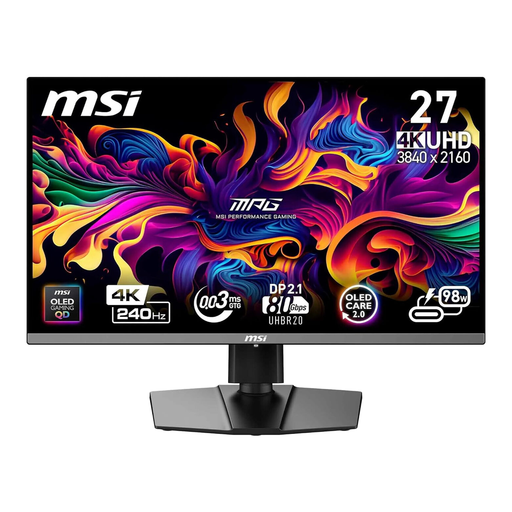
The MPG QD-OLED models take different approaches to WQHD and 4K gaming monitors.
The MOBIUZ EX2710Q is a specific IPS and WQHD option for gaming, with a listed headphone socket.
According to LG Germany, the UltraGear range includes different gaming display options, including IPS and OLED models.
This selection includes 27-inch QHD monitors for fast-paced games, as well as 4K gaming monitors for detail-focused 16:9 use. With every model, check that the frame rate, application and headphone audio connection suit your setup.
 No image available
For fast-paced flight games at QHD resolution, when a high maximum refresh rate matters more than 4K.
27 inches, QHD, Fast IPS, Mini-LED with 1.152 dimming zones and 275 Hz. Adobe RGB 99 % and sRGB 99 % are also listed; colour gamut coverage is not a measure of colour accuracy. The audio output does not automatically support a microphone.
 No image available
For fast-paced games and wired headphones, if QHD is detailed enough for your design work.
27 inches, QHD, SS-IPS, 200 Hz and up to 210 Hz in OC mode; 94 % DCI-P3 and a headphone output are also listed. QHD has fewer pixels than 4K, and the headphone output does not confirm microphone audio support.
 No image available
For detail-focused design work and fast-paced games on a 16:9 screen, provided your computer and connection support the 4K mode you want.
26.5 inches, 4K, QD-OLED, 240 Hz, 10-bit colour depth, 99 % DCI-P3 and a headphone output. Colour gamut coverage does not confirm measured colour accuracy. OLED care remains important if static toolbars stay on screen for long periods, and the headphone output does not confirm microphone audio support.
 No image available
For design details and fast-paced gaming in 16:9, if your system can deliver the 4K frame rate you want.
32 inches, 4K, QD-OLED, 240 Hz, 10-bit colour depth, 99 % DCI-P3 and a headphone output. Consider OLED care if toolbars stay on screen for long periods; the headphone output does not confirm microphone audio support.
 No image available
For detail-focused design work and fast-paced games, if 4K and 240 Hz suit your computer and connection.
32 inches, 4K, QD-OLED, 240 Hz, 10-bit colour depth, 99 % DCI-P3 and a headphone output. Colour gamut coverage is not proof of measured colour accuracy. OLED care remains important for static content displayed for long periods, and the headphone output does not confirm microphone audio support.
No. Resolution, legibility and tested colour reproduction matter for fine design details too. The benefit of a high refresh rate depends on the frame rate your system can actually deliver. RTINGS distinguishes between a monitor's refresh rate and the frames per second it receives.
No. Check that your particular simulator supports the aspect ratio and displays its controls appropriately, and measure the space available on your desk. LC-Power's specifications for the LC-M49QCO describe the display, not its compatibility with a particular game.
It depends on the model, your headphones and the audio connection you plan to use. BenQ Germany lists a headphone socket on the EX2710Q. Also check that your source device sends audio through this connection and whether a headset microphone needs to be connected separately.
Follow the care guidance and warranty terms for the specific model, and avoid leaving static content on screen for unnecessarily long periods. MSI describes static image elements as a burn-in risk. Care features can reduce the risk, but they cannot guarantee that burn-in will not occur.