Joybuy products for a wider gaming view
This Joybuy selection features 34-inch gaming monitors with a wide screen for single-monitor gaming. Check whether the HUD and menus work for the game you play.
 Image unavailable
Gawfolk GF340C-H, 34-inch
For a wide view on a single screen; check that the cockpit is easy to read in your game.
3440 × 1440P, 165 Hz, VA panel and 1500R curvature.
Joybuy
 Image unavailable
CRUA CR340QA-H, 34-inch
A 21:9 option if you want more horizontal screen space on a single monitor; check the HUD and text size in the game you play.
3440 × 1440, 21:9, 165 Hz and 1500R curvature. The product name also specifies 1 ms MPRT.
Joybuy
 Image unavailable
INNOCN E34A1R, 34-inch
For a wide single-monitor view; whether the extra screen space helps you learn depends on how your game displays its content.
3440 × 1440, 21:9, VA panel, 200 Hz and 1500R curvature. The product name specifies FreeSync.
Joybuy
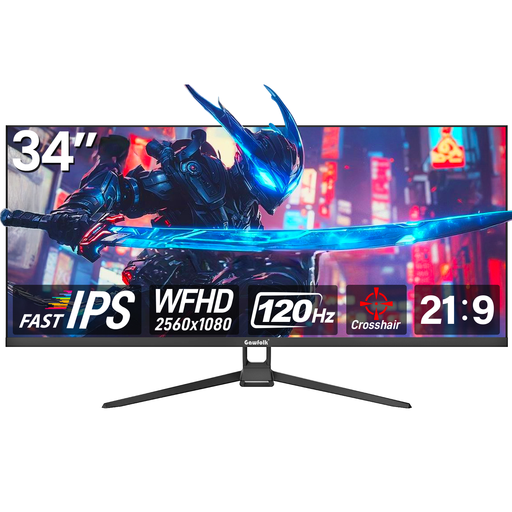 Image unavailable
Gawfolk GF340H, 34-inch
A wide screen with a lower stated resolution than the 3440 × 1440 models in this selection; check that it suits your game and PC.
21:9, WFHD 2560 × 1080, 120 Hz, Fast IPS and FreeSync.
Joybuy
 Image unavailable
ASUS TUF Gaming VG34VQ3B, 34-inch
For a wide single-monitor view; test how easy the cockpit displays are to read at your chosen resolution.
21:9, 3440 × 1440, VA panel and 180 Hz. The product name specifies FreeSync, ELMB and 1 ms MPRT.
Joybuy
Frequently asked questions
How should you set up your monitor to learn the controls?
Start by setting the native resolution and a refresh rate supported by your connection. Then check in the game you plan to play whether the HUD, text and menus are easy to read from your seating position, and compare the fps you can achieve with your graphics settings. For Star Citizen, Roberts Space Industries points to an estimated graphics memory usage display in the graphics options; this doesn’t tell you anything about other games.
How should you use an OLED monitor when instruments stay on screen for long periods?
Use the OLED care features provided and, where your setup allows, avoid leaving unchanged displays on screen for unnecessarily long periods. ASUS describes its care features as a way to reduce the risk; they don’t prove that every type of use is risk-free. Also check the warranty terms for the specific model.
What should you compare when it comes to running costs and your rights?
Compare the power consumption figures for specific monitors on the EU energy label, rather than looking only at their size or energy efficiency class. The European Commission explains the labelling of electronic displays. If you buy as a consumer in the EU, you’re generally entitled to a minimum of two years’ legal guarantee from the seller, as explained by Your Europe; this is separate from any additional manufacturer’s warranty. According to Verbraucherzentrale, online purchases usually come with a 14-day right to cancel.
How should you dispose of an old gaming monitor in Germany?
An old monitor shouldn’t go in your household rubbish. The German Environment Agency recommends taking waste electrical equipment to a separate collection point, such as a local recycling centre.


