A speakerphone can work for a shared design review around a table, provided its microphone coverage, seating distances and connections suit the group and the specific model variant. If you’re speaking alone or discussing confidential information, a quieter place to take the call or personal audio may be a better option. A speakerphone won’t block out office noise for you, nor will it stop people nearby from hearing the playback.
Who is a speakerphone right for?
Design team around a table
When you’re discussing details together with remote participants, clear contributions from different seats and smooth turn-taking matter. DXOMARK and the manufacturer specifications from Jabra and EPOS describe relevant device features.
One person in a noisy office
If you’ll be taking the call mostly on your own, consider separately how clearly your voice is transmitted and how much nearby conversations distract you. The Federal Institute for Occupational Safety and Health describes unwanted noise as a source of strain when working in an office.
Team discussing a confidential brief
Before discussing sensitive design details, work out who might be able to hear the speakerphone. Recordings are subject to additional legal restrictions under Section 201 of the German Criminal Code (StGB).
What should you look for when buying?
First, decide whether several people will be speaking around the table or whether you’ll be on the phone alone. This will help you work out whether an open speakerphone or personal audio is better suited to your call.
| What matters to you |
What to check before buying |
Who should pay particular attention |
| Clear audio with background conversations |
Check the microphone layout and noise processing on the specific variant, as well as where you plan to take the call. |
If remote participants need to follow design details despite office noise, voice pickup matters to me. Around 33% of consumers put clarity during background conversations first. |
| Picking up everyone around the table |
Compare the table size and speaker distances with the range and full-duplex specifications for the specific model. |
If several people in the room need to contribute, I make sure the device suits the seating arrangement. Around 27% of consumers prioritise picking up a group around the table. |
| Connections for different workspaces |
Check whether your computer has USB-A or USB-C, how Bluetooth works and what’s included with the full model variant. |
If I switch between a computer and mobile device or work in different spaces, I need a connection that suits my setup. Around 20% of consumers say connection flexibility is their top priority. |
| Confidentiality and open playback |
Before use, check who might be able to hear the call. For sensitive content, consider a suitable place to talk or personal audio. Check the legal requirements for recordings separately. |
When discussing confidential designs, I want to make sure others can’t overhear the conversation. Around 20% of consumers give confidentiality top priority. |
Common buying and usage mistakes
-
Confusing noise cancellation with a quiet office
Microphone processing affects the signal being transmitted. It won’t stop you hearing nearby conversations or being distracted by them.
When making your decision, consider the call itself and the room acoustics, as well as the device’s features.
-
Ordering from a model family without checking the variants
Features and connection options can vary between versions of the EPOS EXPAND 40 and Jabra Speak2 75.
Check the full model name, the connection you need and what’s included in the box.
Depending on the variant you choose, you may also need to buy a connection adapter or wireless dongle.
-
Assuming an accessory is a complete speakerphone
An expansion microphone may be designed for use with an existing conference system and may not include its own speaker and microphone as a standalone device.
Check the product description to see what’s included and whether you can use the device without a separate conference system.
Key brands at a glance
Jabra
The Speak2 75 is designed for calls on the move and smaller groups around a table. Before buying, check the specific connection and adapter variant.
- Jabra lists four beamforming microphones, full-duplex audio and a microphone range of up to 2.5 m for the Speak2 75. These are manufacturer specifications, not a guarantee of performance at a particular noise level.
- Computer connections and Bluetooth adapters vary by version, so check the full model name and specifications.
EPOS
The EXPAND 40 is designed for mobile meetings around a table, with USB-C or Bluetooth connectivity.
- EPOS lists three beamforming microphones and simultaneous speaking and listening.
- The EXPAND 40, 40+ and 40T differ in their dongle and Teams certification. Compare the exact variant with how you plan to use it.
HP Poly
The Poly Sync 20 is positioned as a personal, portable USB and Bluetooth speakerphone. The documented USB-A version should be distinguished from other variants.
- For the USB-A version of the Sync 20, HP lists three microphones, full-duplex audio and up to 20 hours of talk time. These specifications apply to the version described.
- Before buying, check that USB-A and the connection you need are compatible with your devices.
Microsoft
The Modern USB-C Speaker is designed for a fixed Windows and Teams workspace.
- Microsoft documents USB-C, a mute button and Teams certification for this device.
- Check that your computer and conference service suit the intended setup. USB-C alone doesn’t tell you whether a device is suitable for a group around a table.
Joybuy products for group discussions and one-to-one calls
This selection includes personal audio for one-to-one calls, as well as speakerphones and conference devices for meetings with remote participants. A personal device is no substitute for shared speaker playback around a table.
 No image available
JBL Tune Beam 2 (Black)
Positioned as a personal audio option for one-to-one calls; not for a group who all need to listen through a speakerphone on the table.
View at Joybuy
 No image available
Insta360 Wave AI Conference Speakerphone, Black
Positioned for group discussions around a table with remote participants; the product title lists Bluetooth as a connection option.
View at Joybuy
 No image available
EMEET 8-Mic Bluetooth Conference Speaker
Positioned for group meetings. The product title lists eight microphones, 360° voice pickup and AI noise cancellation; these product claims don’t guarantee clear audio at any particular noise level.
View at Joybuy
 No image available
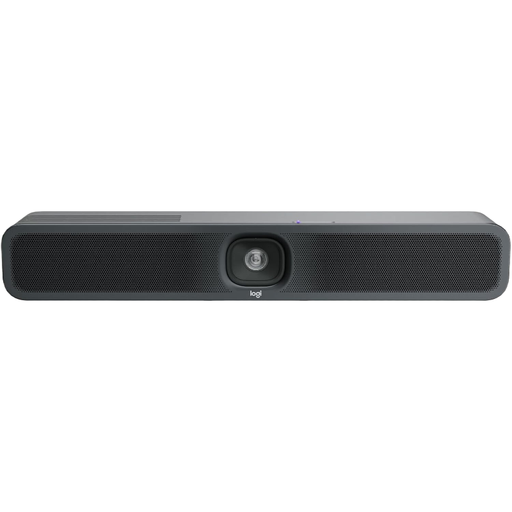
Logitech MeetUp 2, 4K All-in-One Conference Camera
Positioned as a conference bar for small meeting rooms, when an all-in-one device suits your setup better than a compact tabletop speakerphone. The product title lists an integrated microphone and speaker, as well as USB.
View at Joybuy
 No image available
Dell Pro Desktop Speakerphone SP3022
Positioned for a personal desktop setup with remote participants. Before buying, check that the connections on the specific version are compatible with your computer.
View at Joybuy
Frequently asked questions
Where should I place the device for a shared design review?
Position it according to where people will actually be speaking and the stated range of the specific model. Jabra lists a microphone range of up to 2.5 m for the Speak2 75; background conversations and room acoustics can still affect how clear the audio is.
Why can’t remote participants hear anything after I connect the device?
Select the connected device as both the speaker and microphone in your conference software. Microsoft describes this audio selection for the Modern USB-C Speaker in Teams; AnkerWork also notes that you need to select the audio device on your computer or in the software when using the PowerConf S500.
What should I know about battery life and accessories?
Compare the connection type and what’s included with the specific variant rather than assuming every version in a model family is the same. HP lists up to 20 hours of talk time for the Poly Sync 20 USB-A; EPOS offers EXPAND 40 versions both with and without a USB Bluetooth dongle.
What legal requirements apply to a Bluetooth speakerphone in Germany?
Devices covered by relevant EU harmonisation legislation and placed on the EU market must carry a CE marking. The Federal Network Agency lists checks including labelling, traceability, required information in German and conformity documents as part of its market surveillance. A CE marking alone does not confirm any particular microphone performance.
Can I simply record a design review?
Not without taking further steps: Section 201 of the German Criminal Code (StGB) makes it a criminal offence to record another person’s non-public speech without authorisation. Make sure you have the necessary permission before recording. Simply using a speakerphone without recording is not automatically covered by this rule.


