Relevant brands at a glance
The product ranges mentioned here offer different connection options. Information about individual models shouldn’t be taken as a blanket recommendation for a brand’s entire range.
Jabra
The Speak2 40 and Speak2 55 offer different connection options.
- Jabra lists four beamforming microphones and full-duplex audio for the Speak2 40.
- Manufacturer claims don’t independently prove how clearly voices will come through in a noisy flatshare. Features of the Speak2 55 can’t be assumed to apply to the Speak2 40.
HP Poly
The Sync range is designed for laptop-based meetings. The documented Sync 20 USB-C is an option if you switch between a PC and smartphone.
- For this version, HP lists a USB-A cable for connecting to a PC, Bluetooth for a smartphone, full-duplex audio and a microphone range of up to 2 m.
- The range is a manufacturer claim for this model. Check the connector and exact version.
AnkerWork
The PowerConf S330 and PowerConf S3 can be compared as USB or USB-C and Bluetooth options respectively.
- Anker lists four microphones and a USB-C-to-USB-A adapter for the S330, and six microphones and Bluetooth for the S3.
- Manufacturer claims about noise cancellation don’t prove how clearly a presentation will come through in your room.
EPOS
The EXPAND 20 range is wired, while the EXPAND 40 range includes USB-C and Bluetooth.
- EPOS lists three beamforming microphones for the EXPAND 40.
- The EXPAND 40, 40+ and 40T differ in their optimisation, certification and whether a dongle is included. Check the exact version.
beyerdynamic
According to the manufacturer, SPACE combines USB and Bluetooth and is designed for calls on the go as well as music playback.
- For SPACE Nordic Grey, beyerdynamic lists up to 20 hours of battery life and calls with up to six people.
- These claims apply to the specified model. Music playback performance doesn’t indicate how clearly the microphone will pick up a presentation.
Related products at Joybuy
This selection includes portable conference and hands-free solutions, as well as a wired desktop speakerphone. Before buying, check that the exact version works with your device and conference service.
 No image available
Insta360 Wave AI Conference Speakerphone, White
Could be worth considering for a presentation on the go if it works with your conference service. Test how clearly it picks up voices from the spot you plan to use.
Bluetooth is mentioned in the product name. The product description also lists eight microphones, a pickup range of up to 16.4 feet and a built-in battery offering 12 hours of use.
With audio played out loud, flatmates may hear it in the room. Follow the legal requirements if you make a recording.
View at Joybuy
 No image available
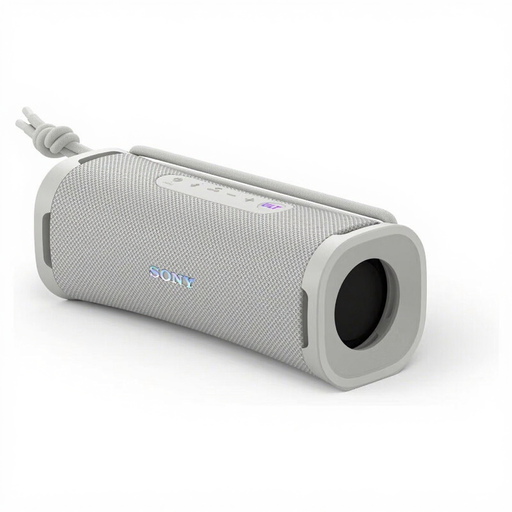
Sony ULT Field 1, Off-White (SRSULT10W.CE7)
This portable speaker may be suitable for calls if its hands-free function works with your conference service. Test the microphone and speaker together before your presentation.
The product name lists Bluetooth, 30 W, IP67 and 12 hours of battery life. These specifications don’t tell you how clearly the microphone will pick up voices in a flatshare.
Audio played through an open speaker may be audible in a shared room.
View at Joybuy
 No image available
EMEET Lunaplus 8-Mic Bluetooth Conference Speaker
Could be suitable for a group around a table if the microphone picks up voices from all the seating positions in the room. Make a test call beforehand with the people who will be speaking.
The product name lists eight microphones and 360° Voice Pickup. The product description also mentions USB-C and Bluetooth 5.3.
Audio played through an open speaker may be audible in a shared room.
View at Joybuy
 No image available
Dell Pro Desktop Speakerphone SP3022
Could be a good choice for a fixed spot at your computer if the wired connection is compatible with your device. Test both audio input and output with your conference service.
The product description lists USB-A and USB-C, as well as full-duplex audio. A wired connection requires a compatible, available port on your computer.
Audio played through an open speaker may be audible in a shared room.
View at Joybuy
Frequently asked questions
Where should I place the speakerphone for my presentation?
For a test call, place it where the speakers will actually be sitting. Then test the microphone and speaker separately on the connected computer. HP’s claim of up to 2 m microphone range applies to the documented Sync 20 USB-C; it isn’t a general guarantee for other rooms or models.
What should I check before using a portable speakerphone for a presentation?
Check the battery level and which audio source is currently connected. After switching devices, test the microphone and speaker again. For the EPOS EXPAND 40 range, whether a dongle is included depends on the specific bundle.
Is a manufacturer’s guarantee the same as your statutory rights?
No. Your statutory rights are against the seller, while a manufacturer’s guarantee is voluntary and subject to its own terms. According to the Verbraucherzentrale, if a product is faulty, you should first ask the seller to remedy the issue.
Can I simply record a research meeting using the speakerphone?
No. The fact that a device can technically make a recording doesn’t mean you’re allowed to do so. Section 201 of the German Criminal Code (StGB) makes it a criminal offence to record another person’s non-public spoken words without authorisation, and also covers certain uses of such recordings. Get agreement from everyone involved before making a recording; a normal live call is not the same as a recording.
What should I check to make sure a Bluetooth device sold in Germany complies with product requirements?
The Bundesnetzagentur lists checks including CE marking, an identifiable product, correct manufacturer details, German-language instructions and a declaration of conformity. A product page alone doesn’t prove that a particular listing complies.


