What should you look for when buying?
When choosing a speakerphone for a language lesson in a shared office, consider how clearly you can speak, how well you can hear, how it connects to your devices and whether you can use it in different locations.
USB speakerphone for a fixed workstation
Suitable if: you take most lessons on your computer and prefer a direct wired connection.
Consider: The cable limits where you can place it, and people nearby will still be able to hear the loudspeaker.
Portable Bluetooth or USB speakerphone
Suitable if: you move between suitable lesson locations or devices where you can use a loudspeaker.
Consider: Connectivity, accessories and battery life vary by model and version. Bluetooth will not reduce background noise while you are listening or prevent sound from being heard by others.
Headset or quieter room
Suitable if: other people’s conversations distract you while you are listening, or you do not want others to hear the lesson.
Consider: Check the microphone, comfort and rules at your workplace too. A headset is not automatically better for every situation.
| Need |
What to check when buying |
Who it matters most to |
| Speak clearly during the lesson |
Check microphone noise processing, echo cancellation and an easy-to-reach mute button for the exact model; then make a test call at your intended location. |
If I practise pronunciation often, I want to speak clearly despite background conversations. Around 36% of consumers put the clarity of their own contributions first. |
| Hear the teacher without disturbing others |
Check in advance whether you can use a loudspeaker at your lesson location and hear the teacher clearly there; if not, consider a headset or a quieter spot. |
If I study in a shared office, I want to follow the lesson without disturbing others with the sound. Around 29% of consumers say that being able to listen without interruptions and without disturbing others is their top priority. |
| Connection to your lesson device |
Check USB-A, USB-C, Bluetooth and any adapter you may need for the exact version of the model; select the microphone and loudspeaker in your lesson app. |
If I take lessons on a particular computer, the connection needs to work with my device. Around 21% of consumers put straightforward device compatibility first. |
| Move between lesson locations |
Check battery life, cable and included accessories for the version you choose, and make sure the new location is suitable for loudspeaker use before moving. |
If my lessons take place in different suitable locations, I want to be able to take the device with me easily. Around 14% of consumers prioritise moving between lesson locations. |
Speakerphones at Joybuy
This selection includes portable Bluetooth or USB speakerphones and a USB model for a fixed computer workstation. For each device, check that its connections, your lesson app and loudspeaker use are suitable for your location.
 No image available
EMEET Lunaplus 8-Mic Bluetooth Conference Speaker
For different lesson locations, if you want to use a Bluetooth or USB-C connection.
The product details list eight microphones, noise reduction, USB-C, Bluetooth, mute and up to 10 hours of talk time. These claims do not prove how clearly you will come through at a particular office workstation.
View at Joybuy
 No image available
Insta360 Wave AI Conference Speakerphone, White
For a lesson location that changes, if you want to use Bluetooth and a built-in battery.
The product details list eight microphones, noise cancellation, automatic echo cancellation, beamforming modes, a touchscreen and a built-in 12-hour battery. Claims about noise processing are no substitute for testing it at your intended location.
View at Joybuy
 No image available
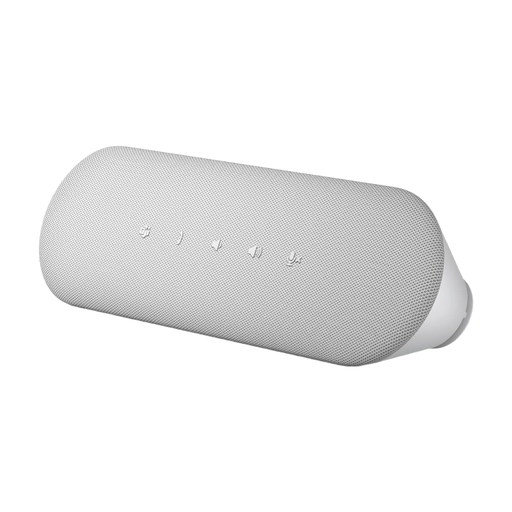
DELL Pro Desktop Speakerphone SP3022
For a fixed computer workstation, if you want to use a direct USB connection.
The product details list USB-A and USB-C ports, a Microsoft Teams button, AI noise cancellation, full-duplex audio and echo cancellation. Check that your lesson app is set to use the right microphone and loudspeaker.
View at Joybuy
Frequently asked questions
How can I check that my speakerphone is set up correctly before a lesson?
Select the speakerphone as your microphone and loudspeaker in your lesson app, check the mute function and make a test call at your intended location. For the Jabra Speak2 55, the manufacturer describes a button for switching microphone mute on and off.
Does microphone noise cancellation also make the office quieter for me?
No. A claim about filtering your transmitted voice does not mean that it will. If you struggle to hear your teacher at your workstation, try a quieter room or listening through headphones rather than relying solely on the speakerphone’s noise processing.
Can I simply record my language lesson and conversations in the office?
A speakerphone alone does not give you permission to record. Section 201 of the German Criminal Code (StGB) makes it an offence to record another person’s words spoken in private without authorisation. Whether a particular lesson recording is allowed depends on the circumstances and any permissions required. The Federal Commissioner for Data Protection and Freedom of Information also points out that users are responsible for personal data shared during video calls.
What should I check to make sure a Bluetooth device complies with regulations?
The German Federal Network Agency checks radio equipment for things such as CE marking, traceability, manufacturer details, German-language instructions and a declaration of conformity. Check these details for the specific product listing; general information about a product range does not prove that an individual device complies.
What should I do if the device is faulty or I want to cancel an online purchase?
If a product is faulty, you have statutory rights against the seller; these are separate from any manufacturer’s guarantee. Online consumer contracts usually come with a 14-day right to cancel, although exceptions may apply and the terms of the specific contract are decisive.


