Who these devices may suit

Reading aloud alone

If you’re reading alone and want quiet passages to come through clearly online, test the sound from your actual workspace. If office noise is a problem, a headset or quieter room may also be a good option; Germany’s Federal Institute for Occupational Safety and Health treats noise reduction as part of office planning.

A small reading group around a table

If several people are taking turns reading aloud, seating positions and microphone placement are key to choosing a device. Jabra recommends placing the Speak2 40 in the centre of the table and keeping participants within certain distances. Even so, test every seat at the volume you’ll actually use for the reading.

Hosts switching between devices

If you switch between an office computer, laptop and mobile phone, check the connection and exact model variant in advance. Jabra lists USB connections to a computer and Bluetooth to a mobile phone for the Speak2 55.

What to consider when choosing

Wired tabletop speakerphone

A good fit if: The reading is taking place at a fixed computer and several people will be speaking around the table.

Trade-off: The cable limits where you can place the device, and the Speak2 40 mentioned here doesn’t have Bluetooth.

Portable USB and Bluetooth speakerphone

A good fit if: You switch between a computer and mobile phone, or move between different meeting spaces.

Trade-off: The connection, adapter and exact model variant need to work with the device you plan to use. Manufacturers’ claims about noise processing don’t prove that every reading will be clear.

Headset or quieter room

A good fit if: One person is reading aloud alone, or you want colleagues at work to hear as little as possible.

Trade-off: A headset won’t pick up a whole group around a table, while moving to another room changes the event setup.

What matters What to check before buying Who it matters most to
Clear audio in a noisy office Check the microphone setup and noise processing on the specific model. Beforehand, try transmitting quiet and more emphatic passages from the place you intend to use. If I want quiet verses and changes in emphasis to come through online despite office conversations, what matters is how clear the actual audio sounds. Around 33% of consumers are likely to put this first.
Several readers around a table Include seating positions and distances in your test. Jabra recommends placing the Speak2 40 in the centre, 0.5 to 2.3 m from participants; HP lists a microphone range of up to 2 m for the Poly Sync 20. If several people are reading from their own seats, I want to test how well everyone is picked up. Around 27% of consumers are likely to prioritise a shared reading around a table.
Connections and switching devices Check the USB connection, Bluetooth, model suffix and any dongle you may need against the devices you plan to use. EPOS notes that the EXPAND 40 has different variants. If I switch between a computer and mobile phone for the reading, I want the speakerphone to connect to both. Around 20% of consumers are likely to care most about switching between devices.
Being overheard in a shared office Consider whether playing audio through a tabletop speaker is appropriate in your workplace. If not, consider a headset or quieter room too. Germany’s Federal Institute for Occupational Safety and Health treats office noise reduction as a planning consideration. If I want colleagues to hear as little as possible, I’d also consider a different type of device. Around 20% of consumers are likely to prioritise minimising disruption to others.

Common buying and usage mistakes

  • Assuming noise cancellation guarantees clear verses

    Manufacturers’ claims about noise processing don’t independently prove how a quiet voice and background conversations will come through together in your particular room.

    Before the event, test quiet and more emphatic passages from the workspace you plan to use. If they’re not clear enough, consider a quieter room or a different type of device as well.

  • Confusing a tabletop speakerphone with a PA system

    The devices described are designed for calls and meetings, with a microphone and speaker. That doesn’t mean they’ll be powerful enough for an audience attending in person only.

    First, decide whether remote listeners will be joining. For an in-person reading only, you’ll need to plan separate sound amplification.

  • Overlooking model variants or a dongle

    Variants in the EPOS EXPAND 40 range differ in several ways, including the dongle and UC compatibility.

    Check the full model name and what’s included against your computer’s connection and the conferencing software you use.

    Depending on the variant, you may need an additional adapter or dongle.

Brands to consider

Jabra

The Speak2 40 is designed for a wired tabletop setup; the Speak2 55 connects to computers and mobile phones.

  • Jabra lists four beamforming microphones, noise reduction and full duplex for both models.
  • These features and range claims don’t prove how well the devices perform independently in a noisy office. The Speak2 40 is wired.

Poly

The Sync 20 is a USB and Bluetooth speakerphone for an individual workspace or a smaller group around a table.

  • For the USB-C variant, HP lists an adjustable three-microphone array, full duplex and up to 20 hours of talk time.
  • These specifications apply to the specific variant and aren’t test results for a poetry reading.

EPOS

The EXPAND 40 is designed for setups that switch between USB-C and Bluetooth.

  • EPOS lists three beamforming microphones and the ability to speak and listen at the same time.
  • Variants differ in several ways, including the dongle and UC compatibility. The manufacturer’s claims don’t independently prove how well quiet verses will come through in an office.

AnkerWork

The PowerConf S3 is a portable tabletop option, provided its connections and specific variant suit your setup.

  • The manufacturer lists six microphones, USB-C, Bluetooth and up to 24 hours of talk time for this model.
  • These are model and manufacturer specifications, not confirmation that a specific variant is available or how it will perform in an office. AnkerWork recommends trying a USB connection as one way to troubleshoot interference.

Yealink

The SP92 is a USB and Bluetooth option for a desk or portable office setup.

  • Yealink lists noise reduction, full duplex and echo cancellation for the SP92.
  • The SP92-Lite version mentioned on the manufacturer’s website shouldn’t be assumed to be the same as the SP92 without checking.

Joybuy product selection

This selection includes speakerphones for online readings around a table or at a computer, including portable Bluetooth models and a desktop model.

Insta360 Wave AI conference speakerphone, Bluetooth, white

Insta360 Wave AI Conference Speakerphone, Bluetooth, White

May suit an online reading with different devices, if Bluetooth works with the setup you plan to use.

The product name specifies Bluetooth and the colour white.

View at Joybuy

EMEET 8-mic Bluetooth conference speaker, Lunaplus

EMEET 8-Mic Bluetooth Conference Speaker, Lunaplus

May suit an online group reading around a table, if Bluetooth and the specific model variant fit the way you plan to run it.

The product name specifies eight microphones, Bluetooth, 360° voice pickup, AI noise reduction, dual connection and a 5W speaker.

View at Joybuy
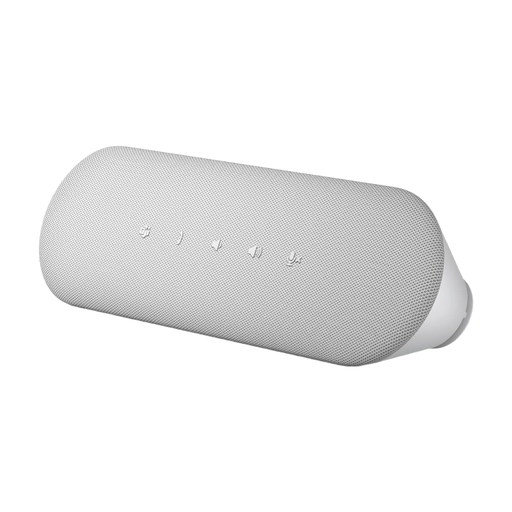
Dell Pro Desktop Speakerphone SP3022

Dell Pro Desktop Speakerphone SP3022

May suit an online reading at a desktop if you plan to connect it directly to the computer you’ll be using.

The product name identifies it as a desktop speakerphone.

View at Joybuy

Frequently asked questions

How should I position a speakerphone for several people reading aloud?

Jabra recommends placing the Speak2 40 in the centre of the table, 0.5 to 2.3 m from participants. This is a manufacturer recommendation for that specific model; test every seat at the volume you’ll actually use for the reading.

What can I check if there’s interference during the call?

Compare a USB connection with Bluetooth on your computer and make a test call from the spot you plan to use. AnkerWork recommends trying a USB connection as one troubleshooting step for its PowerConf models; you may still need a quieter place to record.

Are a manufacturer’s guarantee and statutory consumer rights the same thing?

No. For a consumer purchase, your statutory rights for faulty goods are against the seller. A manufacturer’s guarantee is an additional, voluntary offer subject to its own terms. Germany’s consumer advice centre explicitly distinguishes between these rights and offers. Before buying, check who the seller is and which variant will be supplied.

What should I check on the labelling of a Bluetooth speakerphone in Germany?

Germany’s Federal Network Agency lists CE marking, product identification, manufacturer details, German-language instructions and a declaration of conformity among the things it checks when monitoring the market. According to the European Union, the CE mark is the manufacturer’s declaration that the product meets the relevant EU product requirements; it isn’t an independent quality mark.

Can I simply record the reading being streamed online?

Not just because you’re using a speakerphone. In a resolution dated 23 March 2018, the Conference of the Independent Data Protection Authorities of the Federation and the Länder stated that, under data protection law, recording telephone conversations is generally only permitted with the consent of external participants as well. Additional requirements may apply to employees; check the specific reading, participants and conferencing service separately.