Which speakerphone is right for you?

Leading a round-table discussion

If remote participants need to hear quieter members clearly from different seats, seating arrangements and microphone range are important factors to consider. Jabra and HP provide range figures for their specific devices.

Clubs that use different laptops for meetings

If you set up the computer before the meeting, make sure the connection suits the available port and the conferencing app you use. Jabra recommends connecting the Speak2 55 to a computer via USB; HP offers different USB versions in its Sync range.

Teams organising meetings on the move

If you move between rooms or occasionally use a mobile phone, factor in placement, connection and charging when choosing a device. Jabra and HP list USB and Bluetooth connections for some models.

What should you look for when buying?

What matters What to check when buying Who is it important to?
Picking up everyone’s voice around the table Distance between the furthest seats and the speakerphone, plus the stated microphone range; test the seats at the edges. If remote participants need to hear quieter members clearly at the far end of the table, coverage of the seating arrangement matters to me. Around 33% of consumers prioritise picking up voices from every seat.
Connection and conferencing app Choose USB or Bluetooth to suit your laptop or mobile phone; check the app’s audio input and output settings. If I need to set up the device before a meeting using different laptops or a mobile phone, I want to find the right way to connect quickly. Around 27% of consumers prioritise a straightforward connection.
Conversation flow and muting Check that the specific model supports full duplex and has an easily accessible mute button; test people speaking at the same time. If several members respond to one another spontaneously, I want to be able to manage speaking and muting easily. Around 20% of consumers prioritise a smooth flow of conversation.
Portable use Compare the stated talk time with the planned meeting duration and check how to charge the device before using it. If our team moves between rooms or there’s no suitable power supply at the table, I need a setup that works for the way we meet and a clear charging plan. Around 20% of consumers prioritise portable use.

What should you watch out for when buying and using one?

  • Confusing Bluetooth range with microphone range

    The distance from the wireless source doesn’t tell you whether people at the other end of the table will be picked up clearly.

    Compare the stated microphone range with your seating arrangement and test the furthest seats on a call.

  • Assuming every product in a range comes with the same accessories

    HP lists different adapters for the Sync 40 versions; according to HP, the charging stand for the Sync 40+ is sold separately.

    Check the full model name and what’s included with the specific version.

    If you need a PC adapter or a compatible extension cable, this may mean extra time and effort to source and set up. The charging stand is sold separately for the Sync 40+ version mentioned.

  • Buying a used AnkerWork PowerConf S3/A3302 without checking for a recall

    AnkerWork has reported potential battery problems that could pose a fire risk in some A3302 devices made in March and April 2023. This doesn’t automatically affect the entire product range.

    Check the model and serial number against AnkerWork’s recall information. If your device is affected, follow the manufacturer’s instructions.

Key brands at a glance

Jabra

The Speak2 55 is an option for small round-table meetings, with USB and Bluetooth connectivity.

  • Jabra lists four microphones and a microphone range of up to 2.3 m for the Speak2 55.
  • Jabra recommends connecting it to a computer via USB. According to the instructions, a standard Bluetooth connection to a computer isn’t certified and may sound different. These are manufacturer claims, not the results of an independent listening test.

HP Poly

The Sync range includes different sizes and connection options. HP recommends the Sync 40 for small meeting rooms and flexible workspaces.

  • HP lists three microphones and a microphone range of up to 2.5 m for the Sync 40.
  • The Sync 40 and Sync 40+ come with different accessories. The German Sync 40+ version lists a BT700 adapter; features included with one version don’t automatically apply to the whole range.

EMEET

The OfficeCore M2 is a USB and Bluetooth speakerphone that, according to the manufacturer, can be expanded by connecting a second M2.

  • EMEET lists four microphones and voice pickup of up to 3 m. A compatible cable is specified for the daisy-chain connection.
  • Check that the version you want and the connection cable you need match the specific offer.

Yealink

The CP700 is described as a compact personal USB and Bluetooth speakerphone, making it better suited to very small groups.

  • Yealink lists two omnidirectional microphones, a 1.5 m pickup range and nine hours of talk time.
  • Check the seating arrangement against the stated pickup range before planning to use this personal device for the whole table.

AnkerWork

The PowerConf range offers several portable conference speakers. If you’re considering a used PowerConf S3/A3302, it’s important to check for a recall.

  • AnkerWork lists several PowerConf models on its German website.
  • AnkerWork has reported potential battery problems and a fire risk in some A3302 devices made in March and April 2023. The notice doesn’t automatically apply to the entire product range.

Speakerphones at Joybuy

This selection includes Bluetooth speakerphones for flexible connections, as well as a desktop speakerphone for your meeting laptop.

Insta360 Wave AI Bluetooth speakerphone, white

Insta360 Wave AI Bluetooth speakerphone, white

Bluetooth is a good starting point if you want to connect the speakerphone to a mobile device or computer. Check that it’s compatible with your meeting app.

View at Joybuy
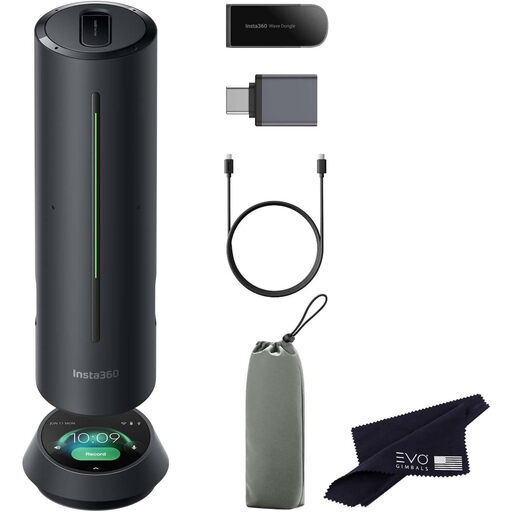
Insta360 Wave AI Bluetooth speakerphone, black

Insta360 Wave AI Bluetooth speakerphone, black

Bluetooth is a good starting point if you want to connect the speakerphone to a mobile device or computer. Check that it’s compatible with your meeting app.

View at Joybuy
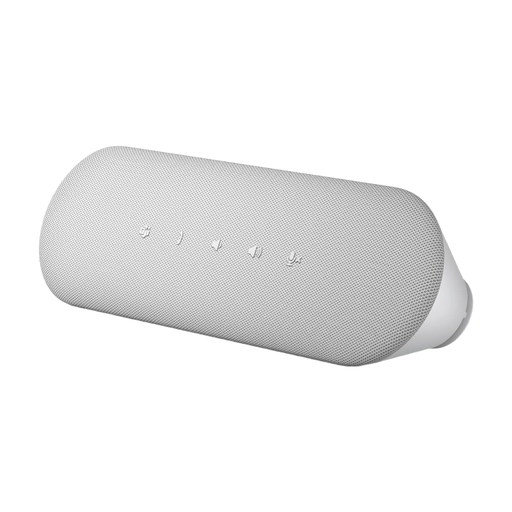
Dell Pro Desktop Speakerphone SP3022

Dell Pro Desktop Speakerphone SP3022

This desktop speakerphone is an option for a computer-based meeting space. Before buying, check that its connections suit your existing equipment.

View at Joybuy

Frequently asked questions

How should I position a speakerphone for a round-table meeting?

Measure the distance from the furthest seats to the planned position and make a test call before the meeting. For the Speak2 55, Jabra recommends placing it in the centre of the table, no more than 2.3 m from each participant and at least 0.5 m away. These figures don’t automatically apply to other devices.

What should I check if remote participants can’t hear anything?

Check which device is selected for audio input and output in both the operating system and the conferencing app. The Jabra instructions list this as a possible setup step for the Speak2 55.

Do I need two speakerphones straight away for a small room?

Not necessarily. First check the distances and audio coverage from every seat. Expanding the setup is only an option if the specific model explicitly supports it. HP lists wireless pairing for the Sync 40, while EMEET describes connecting two M2 units with a daisy-chain cable.

What accessories should our club check before buying?

Check whether the specific version includes any adapters or connection cables you need. HP says the charging stand for the Sync 40+ is sold separately; EMEET specifies a daisy-chain cable for expanding the M2 setup.

What compliance information matters for a device in Germany?

Products covered by relevant EU harmonisation legislation must carry CE marking when placed on the market in the EU. The German Federal Network Agency lists marking, product identification, German-language instructions and a declaration of conformity among the points to check. This doesn’t mean that any specific offer or item mentioned here has been checked.