Speedrunners on a gaming PC
If your game and presentation software are running on the same Windows computer, try OBS Game Capture before setting up additional HDMI hardware. OBS Project recommends this source for games.


If your game is running on your Windows recording PC, try OBS Game Capture first; OBS Project recommends this source for games running on the computer. For a console or a second gaming PC, a capture card with a compatible HDMI input may be suitable. Then check separately which signal you want to pass through to your monitor and which recording format you need, and make sure the USB connection, audio routing and cables are compatible with your setup.
If your game and presentation software are running on the same Windows computer, try OBS Game Capture before setting up additional HDMI hardware. OBS Project recommends this source for games.
If your gameplay comes from a separate console, you can add it to OBS using a video capture device. OBS Project lists capture cards as possible video sources.
If you want to combine game audio and your voice, or connect a separate gaming PC, set up your video and audio sources separately in OBS. OBS Project explains audio sources, while NZXT also treats audio as a separate setup step for two-PC configurations.
First, check where the game is running and whether OBS can capture the picture directly. Then focus on the gaming monitor, recording format, audio and connections.
| What you need | What to check before buying | Who is this particularly relevant to? |
|---|---|---|
| Do I need additional hardware? | Where are the game and presentation software running? If the game is on the same Windows PC, try OBS Game Capture first; a separate HDMI source needs a suitable signal path. | If I play the game directly on my recording PC, I want to avoid unnecessary devices and cables. Around 33% of consumers put the question of whether additional recording hardware is needed at the top of their list. |
| Gameplay and recording format | Compare monitor passthrough and the specific model’s recording format separately. Elgato lists up to 2160p60 passthrough for the HD60 X, but recording up to 2160p30. | If I want to play at a particular resolution and frame rate while recording a presentation to match, both signal paths need to support them. Around 27% of consumers prioritise gameplay and recording format. |
| Game audio and commentary | Check the capture card audio source and microphone in OBS. OBS Project notes that setting up duplicate audio sources can cause echo; a test recording will reveal missing or duplicated audio. | If I want my voice to be clear alongside the game in the presentation, I need to test the audio sources separately. Around 20% of consumers say audio and commentary are their main concern. |
| Connections and cables | Check the USB connection, required software and any HDMI cables you already have against the specifications for the specific model. Elgato notes that the Game Capture Neo does not include an HDMI cable. | Before buying, I want to know whether the card will work with my recording computer and existing cables. Around 20% of consumers first look at the connections and what’s included. |
Passthrough to your gaming monitor and recording on your computer use different signal paths. The Elgato HD60 X supports passthrough up to 2160p60, but recording only up to 2160p30; Elgato lists the Game Capture Neo as recording up to 1080p60.
For the exact model name, compare the monitor mode you want with the stated recording format.
A visible video source doesn’t confirm that the game audio and microphone will be recorded as intended. OBS Project also warns that duplicate audio sources can cause echo.
Before your speedrun, make a short test recording with game audio and commentary, then listen to the whole thing.
Elgato states that its capture devices cannot record HDCP-protected HDMI signals.
Check which gameplay signal is available for your specific console and content. Don’t assume that protected media can be captured.
Connecting the Game Capture Neo to a separate screen requires HDMI connections; according to Elgato, an HDMI cable is not included with the card.
Check the cables and connections you already have against what’s included with the specific product.
You may need an additional HDMI cable if you don’t already have a suitable one.
The external HDMI cards covered here support different recording formats. The following specifications come from the manufacturer and are not independent performance measurements.
The external Live Gamer ULTRA 2.1 GC553G2 is designed for setups with demanding HDMI monitor formats.
The TUF Gaming Capture Box CU4K30 specifies its monitor, recording and audio connections separately.
NZXT says the Signal range is designed for console and two-PC setups, among others. The manufacturer recommends the Signal HD60 or Signal 4K30 depending on the picture modes you need.
The following Joybuy products are HDMI capture cards. When choosing between them, look at the stated recording, passthrough and connection specifications.
 No image available
A possible option for an external HDMI gameplay source if recording in 1080p60 suits your presentation format.
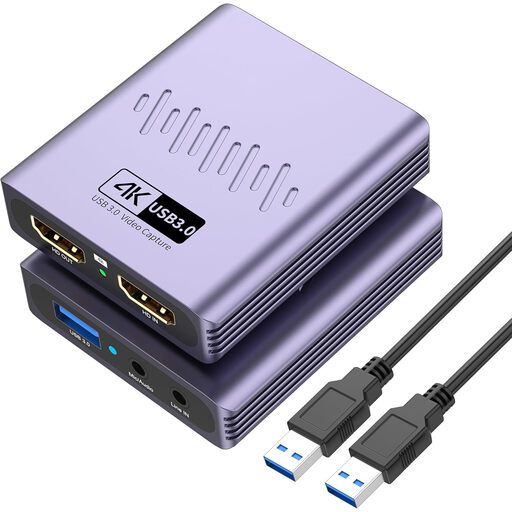
The product title specifies USB 3.0 and an HDMI input of up to 4K 30 Hz. The product description also lists microphone and headphone connections.
 No image available
The specifications may suit a setup with a separate HDMI gameplay source, if 1080p recording and HDMI passthrough work with your planned signal path.
The product title specifies 1080p recording, 4K HDMI passthrough and USB 3.0. It lists Windows, macOS and Linux as compatible systems.
 No image available
This version may suit you if you want to connect an HDMI source with a recording format of up to 1080p and the audio connections listed in the title.
The product title specifies USB 3.0, video recording at up to 1080p, 4K HDMI passthrough, UVC and UAC, as well as a microphone input and headphone output.
 No image available
Another option for an HDMI gameplay source, if the stated recording and passthrough formats work with your monitor and presentation.
The product title specifies 4K passthrough, video recording at up to 1080p, a microphone input and a headphone output. It also states that installation is driver-free.
Add a video capture device as a source in OBS and select your capture card. Check the resolution and frame rate in the device settings; an unsupported resolution may mean no picture appears. OBS Project explains how to set up video capture sources.
Check the audio mode for the video capture device in OBS, then check your selected microphone source separately. With ‘Capture Only’, you won’t hear the device’s audio yourself unless audio monitoring is enabled; duplicate sources can cause echo. Listen back to a test recording. This guidance comes from the OBS documentation on video and audio sources.
Not through the usual dock-to-HDMI signal path: Nintendo states that the Switch Lite does not support TV mode. For other consoles, check the video output actually available before choosing an HDMI capture card.
The capture card alone doesn’t determine whether you’re allowed to use all the content in a public stream. Under §§ 15 and 19a UrhG, public performance and making a work available to the public are rights held by the author. Whether a particular stream is permitted depends, among other things, on the game, music and third-party content used, and the applicable usage rights.
When you buy as a consumer in the EU, you have statutory rights against the seller if goods are faulty. The European Union’s consumer information states that these rights generally apply for at least two years from the date you receive the goods. Any additional manufacturer’s guarantee does not replace these rights.