A controller is suitable for split-screen racing in the bedroom only if the device, exact game version and local game mode support it. First, check how many players the mode allows and which input devices you already have. Then decide based on seating distance, cable routing, connection and ease of use. An extra controller alone won’t unlock split-screen mode.
Who is this guide for?
Console racing gamers
If you want to play together on one screen using a Switch, Switch 2, PS5 or Xbox, start by checking the exact console generation, racing game and local mode. Nintendo, PlayStation and Microsoft provide details about their respective console and controller options.
PC split-screen gamers
For a Windows racing game, the game needs to recognise the controllers, and each player needs access to one. Check the details for the specific game version and the connection options for your devices.
Gamers with limited space
If you’re sitting close together or your computer is further away, the cable route, wireless receiver and power supply all need to suit the room. Microsoft, PowerA and 8BitDo offer details on different wired and wireless connection options.
What should you look for when buying?
First, check whether your device and game support the local mode you want. Then consider the number of inputs, the connection at your seat and ease of use.
| What matters when buying |
What to look for |
Who should pay particular attention? |
| Compatibility |
Check the console generation, exact controller variant, game version and support for local play. |
If I want to be sure my device and racing game work together, I’d check compatibility first. Around 36% of consumers would give particular weight to the device, game and controller. |
| Inputs for every player |
Check the player limit in the specific local mode and count any controllers you already have, including Joy-Con that can be used individually. |
If you want to give every player their own controls, consider the in-game player slots alongside the devices you already have. For around 29% of consumers, the number of usable inputs would be the main consideration. |
| Connection at your seat |
Measure the cable route and seating distance, or, for wireless models, check the connection, receiver and available port. |
If your seat is further away from the device, I’d make sure the wired or wireless connection is suitable. Around 21% of consumers would pay particular attention to connection and positioning. |
| Ease of use and power |
Check the grip and how easy the buttons are to reach; also find out what power supply and charging cable you’ll need. |
If a comfortable grip and suitable power supply matter to me, I’d try out any controllers I already have first. Around 14% of consumers would prioritise ease of use and power supply. |
Common buying mistakes
-
Assuming the number of connectable controllers equals the split-screen player limit
A console may support several controllers, but that doesn’t mean every racing game offers the same number of split-screen slots. Nintendo and Sony provide details about specific games and the number of controllers that can be used at once; these figures aren’t interchangeable.
Check the local mode and player limit for your specific racing game before buying extra controllers.
-
Assuming similarly named Ultimate 2C variants have the same compatibility
8BitDo lists different platforms for the connection options offered by its Wireless and Bluetooth variants. The name alone doesn’t tell you whether a model will work with your device.
Compare the full model name with the connection table for the specific variant.
-
Choosing a cable based only on its stated length
The 3-m cable specified by PowerA needs to reach from the device to your seat and be practical to route around the room.
Measure the actual route in your room rather than estimating the direct distance between the device and your seat.
If the route doesn’t work, you may need a longer cable or a different controller variant.
Brands and model ranges to consider
Nintendo
Joy-Con and compatible gamepads for supported multiplayer play on Switch and Switch 2.
- Nintendo says a Joy-Con held horizontally can be used on its own. For Mario Kart World, Nintendo says up to four people can play on one Switch 2.
- According to Nintendo, the Switch 2 Pro Controller is designed for Switch 2 only. Also check that the control method is suitable for the game.
Sony PlayStation
DualSense controllers for PS5 and supported PC games.
- PlayStation says up to four PS5 controllers can be used at the same time.
- On PC, some features depend on the game. PlayStation says haptic feedback requires a USB connection on PC.
Microsoft Xbox
Xbox Wireless Controllers for compatible Xbox consoles and Windows PCs.
- Microsoft lists USB, Bluetooth and the Xbox Wireless Adapter as connection options for Windows.
- These connection options don’t replace checking whether the specific game supports the controller and whether your PC has the ports you need.
PowerA
Wired controllers for specified Xbox platforms and Windows.
- PowerA lists a detachable 3-m USB cable and programmable extra buttons for the Enhanced Wired Controller.
- How far away you can sit depends on whether the cable can be routed suitably around the room.
8BitDo
Ultimate 2C variants with different platform and connection specifications.
- For the Ultimate 2C Wireless, 8BitDo lists a 2.4-GHz receiver and a wired connection for Windows; the Bluetooth variant is listed for Switch.
- The similarly named models aren’t interchangeable just because their names are alike. Check the exact variant and your device.
Joybuy controllers for different devices
The Joybuy products below include wired and wireless controllers for specified PC and console platforms. Before buying, check the exact game version, device compatibility and connection against your setup.
 No image available
The G-Lab K-PAD-HELIUM-WL Wireless 2.4 GHz PC Controller
An option if you want to play wirelessly on a Windows PC and can connect the receiver to your device.
The connection is listed as 2.4 GHz via a USB receiver. Windows 10/11 and PlayStation 3 are also listed as platforms.
The product title mentions a rechargeable battery and two rear buttons.
View at Joybuy
 No image available
Razer Wolverine V3 Tournament Edition White
A good fit for an Xbox or Windows PC setup if you want a wired controller and can sit within reach of the cable.
Xbox Series X|S, Xbox One and Windows 10/11 are listed as compatible platforms.
The description mentions a detachable 3-m USB-C cable and four rear paddles. Check the actual cable route in your room.
View at Joybuy
 No image available
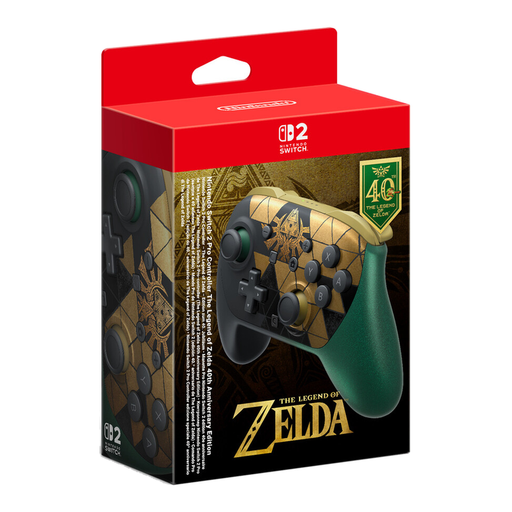
Nintendo Switch 2 Pro Controller – The Legend of Zelda 40th Anniversary Edition
An option for split-screen racing on Switch 2, provided the specific game supports the local mode you want.
This wireless controller is listed for Nintendo Switch 2 only. Nintendo also states that the Switch 2 Pro Controller is designed exclusively for this console.
Features listed include HD Rumble 2 and mappable GL/GR buttons. According to Nintendo, a USB charging cable is included.
View at Joybuy
 No image available
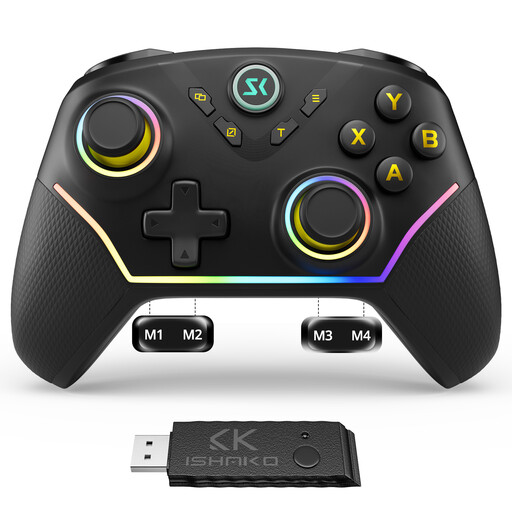
CHENGDAO Wireless Controller for PC and Nintendo Switch, Black
For a PC or Switch setup, if the wireless version is suitable for your game and device.
The title lists four rear buttons, as well as Hall effect sticks and triggers.
According to the product description, this controller isn’t compatible with Xbox, PlayStation or GeForce Now.
View at Joybuy
 No image available
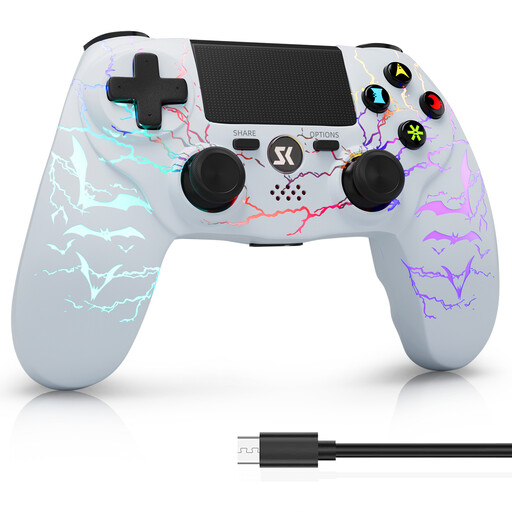
CHENGDAO Wireless Controller for PS4/Pro and PC, White Bit
A wireless option if you’re looking for a controller for PS4/Pro or a Windows PC and have checked that your specific game supports it.
The description lists Bluetooth, a 1000-mAh battery, dual vibration and 6-axis motion control.
View at Joybuy
Frequently asked questions
Is a second controller automatically enough for split-screen?
No. The local mode and player limit for the specific game need to support it. Nintendo says up to four people can play Mario Kart World on the same Switch 2; you can’t assume the same player limit applies to other racing games.
Can I connect an Ultimate 2C Wireless to my Windows PC using Bluetooth?
For the Ultimate 2C Wireless on Windows, 8BitDo lists a 2.4-GHz connection via USB receiver or a wired connection; the manufacturer lists Bluetooth for Android. The differently named Ultimate 2C Bluetooth variant is listed for Switch.
How can I check whether a wired controller’s cable will reach my seat?
Measure the cable route from the device to your seat and consider how it can be routed around the room. PowerA lists a detachable 3-m cable for the Enhanced Wired Controller; whether it’s long enough depends on your setup.
Does the Nintendo Switch 2 Pro Controller also work with the original Switch?
Nintendo lists the Switch 2 Pro Controller for Switch 2 only. If you have a different console generation, check that the specific controller and racing game are compatible before you decide.


