Choose a controller that suits your existing platform and the specific racing game. A gamepad alone won’t guarantee split-screen play or the number of players you want. Next, count the controllers you already have that can each be used individually. Wireless models keep walkways clear, while a wired controller is only suitable if the connection and cable route work safely for your seating area. Nintendo says Mario Kart World supports up to four players on one Switch 2. Following the update of 2 September 2026, Mario Kart 8 Deluxe supports up to eight players on the same screen on Switch 2, provided you have enough compatible controllers.
Which controller is right for you?
Racing with a Switch you already own
If you have a Switch, check whether the Joy-Con you already own can be used individually in the Mario Kart game you’re playing, and whether you have enough for everyone. Nintendo gives different player counts for same-screen racing depending on the game and console.
Households with a PS5, Xbox or PC
If you’re planning to play with a second person, you’ll need a controller that works with your platform. You’ll also need to check whether the specific racing game supports local multiplayer.
Limited space to sit and move around
If space is tight, consider whether a wireless controller would keep your seating area clear, or whether you can route a cable safely from the console to where you’re sitting.
What should you consider when choosing?
First, check that the game, platform and controller are compatible. Then count the input devices you already have and decide whether a wired or wireless controller is a better fit for your room.
The percentages are a rough guide to the concerns that matter most to consumers in this situation.
| What matters |
What to check before buying |
Who it matters most to |
| Platform and game compatibility |
Check the platform, exact model variant, connection method and the racing game’s multiplayer details separately. |
If I want to use a controller with my existing console or PC, I’ll first check the exact model variant and the game. Around 29% of consumers put compatibility first. |
| Enough controllers for everyone |
Count the devices that can be used individually and check the game mode. Nintendo says Mario Kart World supports up to four players on one Switch 2, while Mario Kart 8 Deluxe supports up to eight on Switch 2 following the update of 2 September 2026. |
If I want to get a certain number of people playing on the same screen, I’ll want to know exactly how many input devices we’re missing. Around 24% of consumers prioritise player count. |
| Cable routing and freedom to move |
Measure the distance to your seat and plan the cable route to avoid creating a trip hazard. The documented PowerA Advantage Wired for Switch 2 has a 3 m cable and only works with the console docked. |
If the room is tight, I want to be able to play from my seat without running a cable across a walkway. Around 23% of consumers prioritise keeping walkways clear. |
| Feel and features |
Check which features the specific game supports and which ones the controller variant actually offers. Sony says DualSense haptic feedback and adaptive triggers depend on the game. |
If grip and specific control features matter to me, I don’t want to plan around features my racing game won’t use. Around 12% of consumers prioritise how the controller feels. |
| Charging and power |
Check how the controller charges or gets its power. According to Nintendo, older Joy-Con can be used wirelessly with Switch 2, but can’t be charged on the console. |
If I’m planning a longer session with several wireless controllers, I’ll want to check their power requirements in advance. Around 12% of consumers prioritise charging and power. |
Common mistakes when buying a controller
-
Confusing local multiplayer with split-screen on one console
Multiplayer modes using several consoles aren’t the same as split-screen on a single console. For Mario Kart 8 Deluxe, the player count also depends on the console and game version.
Check the player count for the specific game, console and, where applicable, installed update.
-
Choosing a wired model based only on cable length
The PowerA Advantage Wired for Switch 2 comes with a 3 m cable, but according to the manufacturer, it only works with the Switch 2 docked and doesn’t support motion controls or HD Rumble.
Before buying, check the connection, whether you’ll be using the dock and the distance to your seat. Make sure you can route the cable safely.
-
Assuming similarly named controller variants are the same
8BitDo lists different platform compatibility for the Ultimate 2 Bluetooth and the Ultimate 2C Wireless. The Ultimate 2 Bluetooth also requires a firmware update for Switch 2.
Check the full model name and the compatibility details for the exact variant.
A guide to relevant brands
Nintendo
A relevant choice for households with a Nintendo console, existing Joy-Con or a Switch 2 Pro Controller.
- Nintendo gives different local player counts for Mario Kart World and Mario Kart 8 Deluxe. According to Nintendo, older Joy-Con can be used wirelessly with Switch 2.
- Older Joy-Con can’t be charged on Switch 2. Player counts and control options apply to the specific game and console mentioned.
Sony PlayStation
DualSense controllers are an option for PS5 households and supported PC games.
- Sony says up to four controllers can be used at the same time on PS5.
- The number of controllers alone doesn’t confirm that a particular racing game supports split-screen. According to Sony, haptic feedback and adaptive triggers depend on the game.
Microsoft Xbox
Xbox Wireless Controllers are listed as compatible with Xbox consoles and Windows PCs.
- Xbox lists USB, Bluetooth and the Xbox Wireless Adapter as connection options for Windows.
- Check whether the game supports local multiplayer separately from controller compatibility.
PowerA
The Advantage Wired for Switch 2 is a wired option for a seating area with a suitable cable route.
- PowerA lists a 3 m USB-C cable and programmable buttons for this model variant.
- According to PowerA, the model only works with the Switch 2 docked and doesn’t offer HD Rumble or motion controls.
8BitDo
Compatibility varies by model variant, with different ranges designed for different platforms.
- 8BitDo lists the Ultimate 2 Bluetooth as compatible with Switch and Windows, as well as Switch 2 after a firmware update.
- According to the manufacturer, the Ultimate 2C Wireless is designed for Windows and Android. Compatibility details for the two variants aren’t interchangeable.
Controllers for split-screen racing at Joybuy
The models listed are intended for gaming on Switch 2, Windows PC or Xbox. Before choosing, check compatibility with your specific platform and game. A controller alone doesn’t confirm local split-screen support.
 No image available
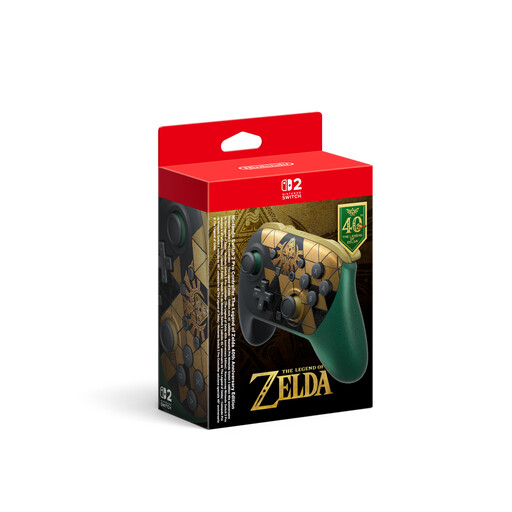
Nintendo Switch 2 Pro Controller The Legend of Zelda 40th Anniversary Edition
For a Switch 2 session when you need an extra controller. Check that the specific racing game supports split-screen.
The product name lists HD Rumble 2, Mouse Controls, amiibo and GameChat.
View at Joybuy
 No image available
VIELLAN Wireless Gaming Controller for PC, PS5 Button Layout
For racing on a PC, provided the game supports the controller. A PS5 button layout alone doesn’t confirm PS5 compatibility.
The product name lists Hall-effect joysticks, 255-level Hall triggers, programmable back buttons, RGB lighting, a 1000-mAh battery and USB-C.
View at Joybuy
 No image available
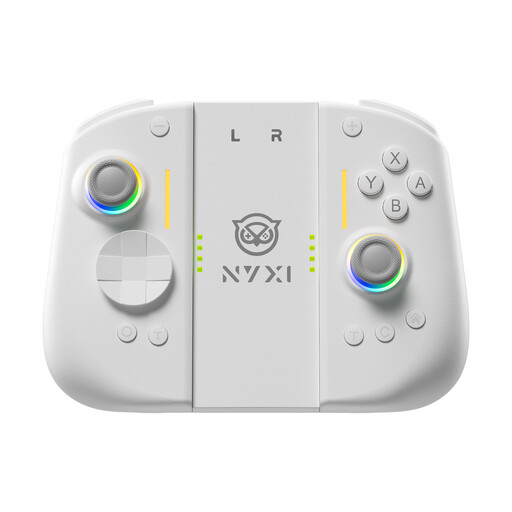
NYXI Wireless Controller for Switch 2 Hyperion 3
For a Switch 2 session if you’re looking for an extra controller with the motion controls listed in the product name. Check the features supported by your specific game.
The product name lists a 9-axis gyroscope, Hall-effect joysticks, fully mechanical buttons and two back buttons.
View at Joybuy
 No image available
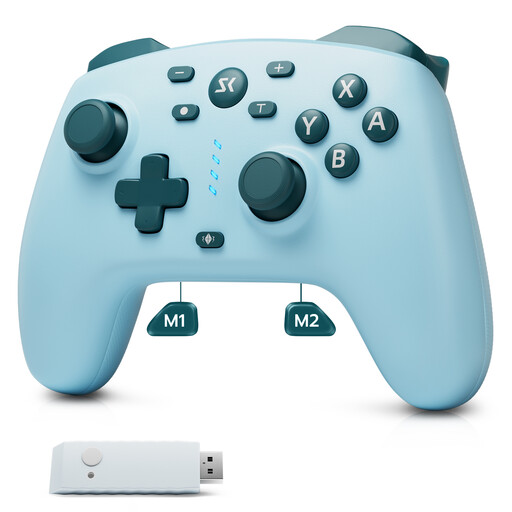
CHENGDAO Wireless Controller for Nintendo Switch, Switch 2 and Windows, Light Blue
For gaming on one of the platforms listed in the product name. Before buying, check that the game’s requirements match this specific controller variant.
The product name lists a 2.4G receiver and two back buttons.
View at Joybuy
 No image available
Microsoft Official Xbox Series X/S Wireless Controller, Deep Pink
For racing on Xbox or PC, provided the platform listed in the product name matches your existing hardware. Check that the specific game supports local multiplayer.
The product name lists Xbox One, Xbox Series X/S and PC as compatible platforms.
View at Joybuy
Frequently asked questions
Do we automatically need another controller for two people to play Mario Kart?
Not necessarily. Check the control options in the specific game and count the controllers you already have that can be used individually. Nintendo says Mario Kart World supports up to four players on one Switch 2. For Mario Kart 8 Deluxe, following the update of 2 September 2026, Nintendo says Switch 2 supports up to eight players on the same screen, provided you have enough compatible controllers.
How do I set up an additional PS5 controller?
For the first time you pair a DualSense, Sony says to connect it to your PS5 using a USB cable while the console is switched on, then press the PS button. You can use up to four controllers at the same time. Whether the racing game supports split-screen for that number of players also depends on the game.
Can I use and charge older Switch Joy-Con on a Switch 2?
According to Nintendo, older Joy-Con can be used wirelessly with Switch 2, but can’t be charged on the console. Nintendo lists a Switch console or suitable charging accessories as ways to charge them.


