First, choose a controller that’s compatible with your platform and the specific racing game. If you’re sitting off to the side, a suitable wireless connection can save you from running a cable across the room. It won’t improve your view of the screen, though: check that you can see both halves of the screen from the seats you plan to use before deciding on a particular controller or extra buttons.
Who is this choice relevant to?
Console split-screen players
If you’re looking for an extra controller for a local multiplayer racing game, the game, console generation and supported controllers all need to match. Nintendo says Mario Kart World supports races with up to four players on a Switch 2.
Players sitting off to the side
If you’re sitting to the side of the sofa or armchair, a suitable wireless connection can save you running a cable across the room. Your view of your half of the screen depends on the display and your seat, regardless of the connection.
PC racing players with specific control preferences
If you’re comparing connection types and controls for PC, check that they’re supported by your game and device. Sony lists USB and Bluetooth connectivity for the DualSense on PC; according to Sony, haptic feedback requires a supported game and a USB connection.
What should you look for when buying?
| What to consider |
What to check |
Who will find this especially important? |
| Game and platform compatibility |
Check the console generation, local multiplayer mode and full model name, and make sure the connection type is compatible with that platform. |
If I’m looking for an extra controller for a particular racing game, I want to be sure the game and system support it. Around 36% of consumers put compatibility first. |
| Seating position and view |
Check both halves of the screen from the seat you plan to use; if you’re using a wired controller, check where the cable will run. |
If I’m sitting off to the side, I want to be able to see my half of the screen without tripping over a controller cable. Around 29% of consumers prioritise seating position and connection type. |
| Type of controls |
Check which controls the racing game supports and whether extra features work with your chosen model and device. |
If I want to choose controls for the accelerator, steering or assignable buttons to suit the racing game, I pay particular attention to the inputs it supports. Around 21% of consumers prioritise the type of controls. |
| Power |
Compare the batteries or rechargeable batteries used, charging method and what’s included with the specific model. |
If I want to have several controllers ready, I need to plan for charging and battery changes before the race. Around 14% of consumers focus primarily on power and ongoing upkeep. |
Common misconceptions
-
“Wireless” doesn’t mean it works with every platform
According to the manufacturer, the GameSir G7 Pro connects to Xbox by cable, while on PC you can connect it by cable or using a 2.4 GHz receiver.
Check the connection type specifically for your console or PC and the seat you plan to use.
If you want to play wirelessly, you may need to choose a different controller. Otherwise, take the cable route to your seat into account.
-
Models with similar names aren’t the same
The 8BitDo Ultimate 2 Bluetooth, Ultimate 2 Wireless and Ultimate 2C Wireless have different compatibility details. Nintendo also distinguishes between the Switch and Switch 2 Pro Controllers.
Before buying, check the full model name and the platforms it’s listed as compatible with.
-
A wireless controller won’t fix a poor view
A controller can save you running a cable across the room, but it won’t change how clearly you can see the track and on-screen information from an angle.
Check how well you can see both halves of the screen from every seat you plan to use before relying on a gamepad to solve the problem.
-
Plan for power if you’re adding extra players
According to Xbox Support, rechargeable AA batteries inserted in the Xbox Wireless Controller won’t charge while they’re in the controller.
Before using several controllers, check which batteries or rechargeable batteries each model needs and how they’re charged.
Depending on the model, you may need batteries, a compatible battery pack or a separate charger.
Relevant brands at a glance
Nintendo
Pro Controllers for Nintendo Switch and Switch 2; compatibility depends on the console generation.
- Nintendo confirms that the older Switch Pro Controller can be used wirelessly with Switch 2.
- According to Nintendo, the Switch 2 Pro Controller is only compatible with Switch 2.
Microsoft Xbox
According to Microsoft, the Xbox Wireless Controller is designed for Xbox consoles and Windows PCs.
- Microsoft lists Xbox consoles, Windows PCs and Bluetooth as supported options.
- According to Xbox Support, rechargeable AA batteries in the controller won’t charge there.
Sony PlayStation
The DualSense is suitable for PS5, supported PC games and other compatible devices.
- Sony documents USB and Bluetooth connections for the DualSense on PC.
- According to Sony, haptic feedback on PC requires a supported game and a USB connection.
8BitDo
Compatibility varies between the different Ultimate models.
- The manufacturer lists the Ultimate 2 Bluetooth as compatible with Switch and Windows; according to the manufacturer, a firmware update is needed for Switch 2.
- According to the manufacturer, the Ultimate 2 Wireless and Ultimate 2C Wireless are listed for different platform combinations and aren’t identical Switch variants.
GameSir
According to the manufacturer, the G7 Pro is designed for Xbox, PC and Android, with the connection type varying by platform.
- GameSir lists TMR sticks and switchable triggers for this model.
- According to the manufacturer, the Xbox connection is wired; the features listed are manufacturer claims, not the results of our own comparison test.
Joybuy products
This selection includes controllers for split-screen racing on Nintendo Switch, Switch 2 and Windows PC. Check the listed platform and model name against the game you want to play.
 No image available
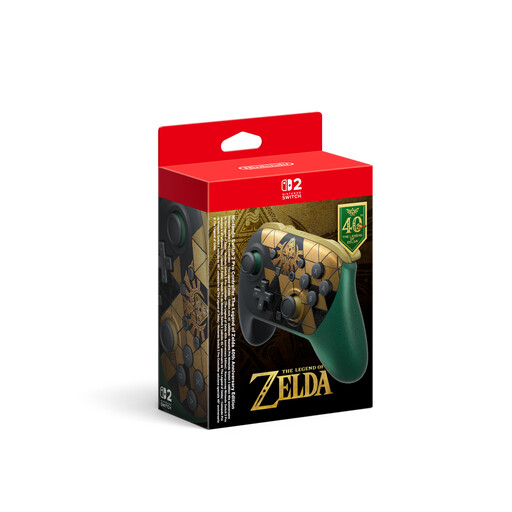
Nintendo Switch 2 Pro Controller – The Legend of Zelda 40th Anniversary Edition
This model could be an option for a racing game on Switch 2; Nintendo describes the Switch 2 Pro Controller as compatible with Switch 2.
Product name features: HD Rumble 2, Mouse Controls, amiibo and GameChat.
View at Joybuy
 No image available
VIELLAN Wireless Gaming Controller – PC, PS5 button layout
If you want to play wirelessly on PC, the product name lists this controller for PC; check that it works with the specific game you want to play.
Features listed include Hall-effect joysticks, 255-level Hall triggers, programmable rear buttons, a 1000-mAh battery and USB-C.
View at Joybuy
 No image available
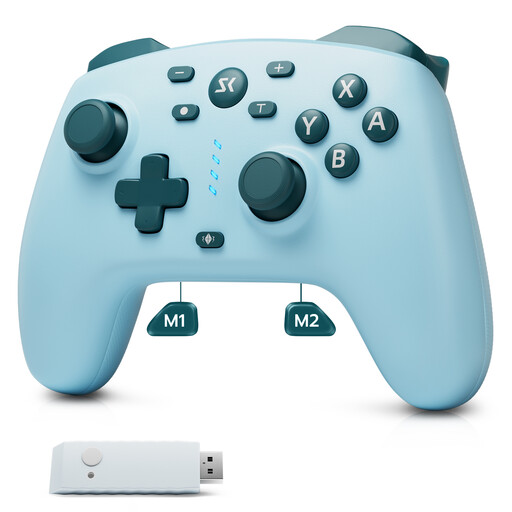
CHENGDAO Wireless Controller – Nintendo Switch, Switch 2 and Windows, light blue
This model may be suitable for a game on one of the platforms listed in the product name; check the full name against your racing game’s requirements.
The product name lists a 2.4 GHz receiver, two rear buttons, Hall-effect joysticks and Hall-effect triggers.
View at Joybuy
 No image available
BEITONG KP70 Elite Wireless Gaming Controller
The product name lists this model for PC, Nintendo Switch, Switch 2, Steam and Android. Check that the connection you want to use works with your game and device.
Features listed include Haptic Feedback Triggers, joysticks with adjustable resistance and six programmable buttons.
View at Joybuy
Frequently asked questions
Will a wireless controller improve a poor view from a seat off to the side?
No. It can save you running a cable between the console and your seat, but it won’t improve your viewing angle. How clearly you can see your half of the screen from the side depends on the display and where you’re sitting.
Can I use a Switch 2 Pro Controller with the original Switch?
No. Nintendo says the Switch 2 Pro Controller is only compatible with Switch 2. Nintendo does confirm that the older Switch Pro Controller can be used wirelessly with Switch 2.
How do I connect and power extra controllers before the race?
Set up each controller according to the instructions for that specific model, and check the power supply before you start playing. Nintendo describes wireless pairing or syncing via the dock for the older Switch Pro Controller; according to Xbox Support, rechargeable AA batteries in the Xbox Wireless Controller need to be charged separately.
Who should I contact in Germany if a new controller is faulty?
Your statutory consumer rights are against the seller. If a product is faulty, you may initially be entitled to have it repaired or replaced. A voluntary guarantee is separate, as the consumer advice centre explains.
How do I dispose of an old controller or its batteries in Germany?
Electrical items must not go in household rubbish. The German Environment Agency lists recycling centres and suitable retail take-back points, among other options; used batteries and rechargeable batteries should go to designated collection points. Remove them before returning the device if you can do so easily.


