Players with a dedicated console
You need a separate input for player two and want to avoid choosing a controller for the wrong console generation. Nintendo, Sony and Microsoft explain which of their respective platforms are supported.


Choose an extra controller that suits your console or PC and the specific racing game. Nintendo, Sony and Microsoft document controller support for their respective platforms, but that doesn’t automatically mean a game supports split-screen. Check how subtitles appear on the actual split-screen; changing controllers alone won’t make the text larger.
You need a separate input for player two and want to avoid choosing a controller for the wrong console generation. Nintendo, Sony and Microsoft explain which of their respective platforms are supported.
You want to read dialogue and prompts while racing together. Check the local play mode, subtitle options and how text appears on the split-screen together. Sony’s PS5 settings include features such as zoom and subtitles.
You may be sitting further away from your device, so you’ll need to decide whether a suitable wireless connection or a cable will reach your seat. Microsoft lists USB, Bluetooth or an Xbox Wireless Adapter as ways to connect an Xbox controller to a Windows PC.
| What to consider | What to check before buying | Who is it important to? |
|---|---|---|
| Compatibility and player two | Check that your console model, controller model and the local mode of the specific game version are compatible. | If I’m setting up a second player, I want to know that my controller works with my console and game. Around 36% of consumers would prioritise compatibility and having a dedicated place for a second player. |
| Readable subtitles | Check the subtitle options in the specific game and see how the text looks from where you normally sit. | If I want to read prompts or dialogue during a race, the text needs to remain legible on the split-screen. Around 29% of consumers would make subtitle readability a priority. |
| Connection where you sit | Check the cable length, whether a USB port is within reach and which wireless connections are supported. | If I’m sitting further away from the device, I need a connection that works reliably from there. Around 21% of consumers would prioritise the connection between their seat and gaming device. |
| Controls and power | Consider the grip and triggers. For wireless models, check charging requirements; for wired models, think about cable management. | If I’m playing longer races, I look for controls that feel right for me and consider how the controller is powered. Around 14% of consumers would prioritise controls and power. |
A console may support several controllers without the racing game you want offering local multiplayer.
Check whether the exact game version supports local play separately from controller compatibility.
Subtitles and zoom are game or system settings, not a documented feature of a different gamepad. Sony’s documented PS5 settings don’t guarantee that every game’s text can be enlarged.
Check the text size in the actual split-screen from your usual seat, and look at the options available in the game.
Nintendo distinguishes between the compatibility of its two Pro Controller generations: the Switch 2 Pro Controller only works with Switch 2.
Before buying, compare the full model name with your console. Nintendo says the older Switch Pro Controller can be used wirelessly with Switch 2.
The Switch Pro Controller is an option as an extra controller for racing games played together on Switch. Nintendo also says it can be used wirelessly with Switch 2.
An extra DualSense is an option for PS5 racing games that support the local play mode you want.
The Xbox Wireless Controller is listed as compatible with supported Xbox consoles and Windows PCs.
PowerA says the Advantage Wired Controller with Hall Effect is designed for certain Xbox systems and Windows.
According to 8BitDo, the Ultimate 2C Wired is a wired option for Windows and Android.
The Joybuy products below include controllers for PS5, Switch 2, Xbox and PC. Before buying, check the platform details against your console, PC and the specific racing game.
 No image available
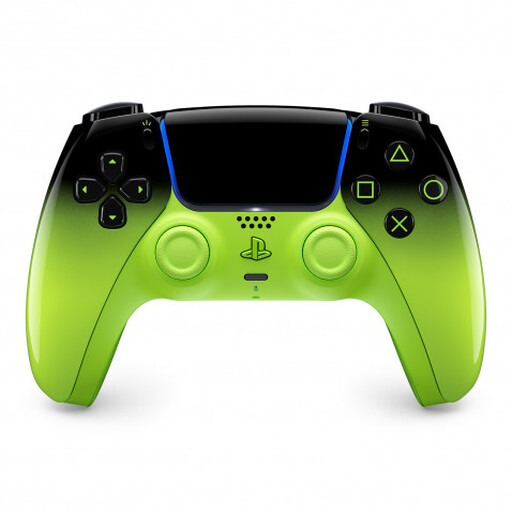
An extra controller for PS5 racing; the product title also lists MAC, Android, iOS and PC as platforms.
The description lists Bluetooth, USB-C, a built-in battery, adaptive triggers and haptic feedback. It also mentions a USB-C cable.
 No image available
The product title lists Switch 2, PC, iOS and Android as platforms. Check these details against the game you want to play.
Features listed include a 2000 Hz polling rate, mechanical buttons, a 6-axis gyroscope and switchable Hall Effect or microswitch triggers. A 3.5 mm audio jack is also listed.
 No image available
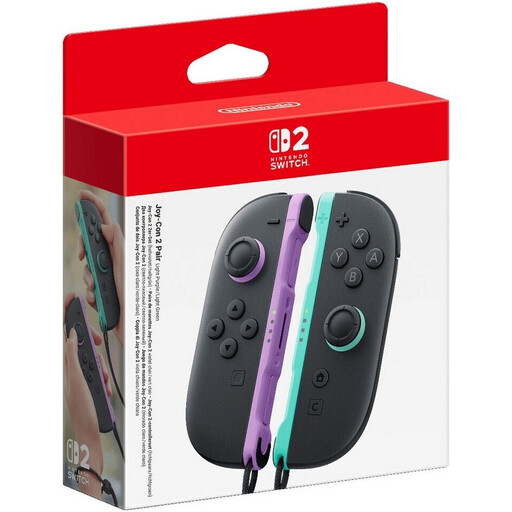
A pair of Joy-Con 2 controllers for local multiplayer in compatible Switch 2 games.
The description lists motion controls, HD Rumble 2 and included wrist straps. Whether they can be used for local multiplayer depends on the game.
 No image available
The product title lists Xbox Series S, Xbox Series X and PC as platforms for this USB controller.
The description lists Hall Effect sticks, HyperTriggers, four rear paddles and six assignable buttons. The detachable USB-C cable is 3 m long, so check that it will reach your seat.
 No image available
The product title lists PC as a compatible platform. A PS5-style button layout doesn’t prove PS5 compatibility.
Features listed include Hall Effect sticks, 255-step Hall Effect triggers, programmable rear buttons, RGB lighting, a 1000 mAh battery and USB-C.
Not through any controller feature documented here. Instead, check the subtitle and display options in the specific game. Sony documents accessibility settings on PS5; Electronic Arts’ information about F1 25 applies specifically to the US English version and shouldn’t be assumed to apply to the German version or every game mode without checking.
No. Nintendo says the Switch 2 Pro Controller only works with Switch 2. According to Nintendo, the older Switch Pro Controller can connect wirelessly to Switch 2.
Sony says to connect the controller with a USB cable and press the PS button to pair it for the first time. According to Sony, PS5 can use up to four controllers at once, but the racing game still needs to support the local mode you want.
No. The specific racing game also needs to support separate inputs and the local multiplayer mode you want. Check the game’s details, regardless of how many controllers the console can pair.
Check compatibility with your PC and the specific racing game, and make sure your device has the connection you plan to use. For the Xbox Wireless Controller on a Windows PC, Microsoft lists USB, Bluetooth or, where necessary, an Xbox Wireless Adapter as connection options.