Start by checking which console or PC you have and whether your specific racing game supports split-screen: an extra controller can’t unlock a mode the game doesn’t offer. Then count the controllers you can already use, and check your seating distance and power requirements. With compatible Switch games, a single Joy-Con you already own may save you from buying another controller, while a wired controller needs a suitable port and a safe cable route.
Which controller is right for you?
Shared house with a Switch and a changing group
If you want to combine your existing Joy-Con with other controllers, check whether you have the original Switch or a Switch 2, and which game modes are supported. Nintendo sets out the compatibility requirements for each setup.
Shared house with a PS5 and no second controller
An extra DualSense may be suitable for a racing game you can play locally on PS5. Sony says you can use up to four controllers at once; the number of players on screen still depends on the game.
Xbox or PC shared house playing on one screen
If you’re choosing between wireless and wired, consider the device’s connections as well as your seating arrangement. Microsoft lists several ways to connect to Windows, while GameSir describes the G7 SE as a wired option for certain Xbox consoles and Windows.
What should you look for when buying?
First, check that the platform, controller version and local game mode are compatible. Then you can decide whether your existing controllers will do, or whether connection type, seating distance and power requirements make an extra controller a better choice.
| What matters |
What to check before buying |
Who is this important to? |
| Platform and game |
Check your console or PC, the exact model version and the racing game’s local mode. |
If I want to avoid buying the wrong controller for my console or game, specific compatibility comes first; around 31% of consumers put this concern at the top of their list. |
| A controller for everyone |
Count the players sharing one screen, rather than using a multi-console mode; check whether existing Joy-Con can be used individually. |
If everyone in the group wants to play at once, I want to know which existing devices can be used as individual controllers. Around 25% of consumers prioritise the number of usable input devices. |
| Seating distance and cables |
Check the cable route and USB port near your seat; for the PowerA version mentioned, bear in mind that the Switch needs to be docked. |
If we’re playing on the sofa or moving between seats, I need a connection that reaches where I’m sitting; around 19% of consumers prioritise this placement consideration. |
| Power |
For the exact model, check the batteries, compatible battery pack or charging cable, and any accessories you already have. |
If we don’t want the game to stop because the batteries have run out, I want to plan for power in advance. Around 13% of consumers put this first. |
| Controls and extra features |
Check the features of the exact version and whether the game supports the functions you want. |
If particular buttons or triggers matter to me, I want to know whether my racing game supports them; around 12% of consumers prioritise controls and extra features. |
Avoiding buying and compatibility pitfalls
-
Don’t confuse “eight players locally” with eight people sharing one screen
For Mario Kart 8 Deluxe on the original Switch, Nintendo lists up to four players in split-screen, but up to eight in local wireless play. Support for up to eight players in split-screen on a Switch 2 applies to the updated game and console combination.
Check the game, console generation, software version and, specifically, whether the mode uses a single screen.
-
Don’t assume “for Switch” means every feature and game mode is supported
PowerA specifies that the Enhanced Wired version described is for use with the Switch while docked. Among other things, it doesn’t support motion controls or games that require Joy-Con only.
Check the limitations of the exact version against your game and setup.
-
Don’t assume “wireless” means you can play without planning for batteries or charging
Microsoft says the Xbox Wireless Controller can run on AA batteries or a compatible battery pack. The controller won’t charge rechargeable AA batteries itself.
Before your gaming session, check the battery type and whether you have suitable charging accessories.
A guide to the main controller brands
Nintendo
For Nintendo consoles and local multiplayer setups.
- Nintendo explains how older Joy-Con and the Switch Pro Controller can be used wirelessly with Switch 2, subject to the conditions listed.
- Older Joy-Con can’t be attached directly to Switch 2; you’ll need another suitable solution to charge them.
PlayStation
The DualSense is an extra controller for a PS5 session with a supported local racing game.
- Sony explains how to pair additional DualSense controllers and says you can use up to four at once.
- Haptic feedback and adaptive triggers require support from the game you’re playing.
Xbox
The Xbox Wireless Controller for Xbox consoles and Windows PCs.
- Microsoft lists a USB cable, Xbox Wireless Adapter or Bluetooth as ways to connect to a Windows PC.
- For battery power, you’ll need AA batteries or a compatible battery pack; the controller won’t charge rechargeable AA batteries itself.
GameSir
The G7 SE is a wired alternative for the Xbox consoles and Windows 10/11 listed by the manufacturer.
- GameSir lists Hall-effect sticks, analogue Hall triggers and a USB-C wired connection.
- The manufacturer’s description of Hall-effect sticks isn’t an independently verified guarantee against stick drift over time; make sure the cable reaches your seat.
PowerA
The Enhanced Wired Controller is a wired Switch option for a docked setup.
- For the version described, PowerA lists a detachable 3-m cable and mappable buttons.
- This version doesn’t offer HD rumble, motion controls or amiibo NFC, and isn’t designed for games that only work with Joy-Con.
8BitDo
The Ultimate 2C Bluetooth is a wireless option designed with Switch in mind.
- 8BitDo lists Hall-effect sticks and compatibility with Switch 2 from the system version specified.
- For use with Switch 2, the manufacturer specifies a firmware update; this doesn’t mean this Bluetooth version is generally compatible with PC.
Joybuy controllers for local racing sessions
This selection from Joybuy includes gamepads with different platform specifications and connection types. Before buying, check the exact model version, connection and split-screen mode supported by your racing game.
 No image available
EasySMX D10 wireless gamepad for PC, Switch, Android and iOS
Could be worth considering if you’re looking for a gamepad for one of the platforms listed in the title; check that your specific racing game supports it.
Listed in the product title: Bluetooth, TMR joystick, dual-mode triggers, 1000Hz polling rate and RGB backlighting.
View at Joybuy
 No image available
NAXSIR wireless Bluetooth gamepad with phone holder
A possible option if you’re looking for a gamepad with a phone holder and use one of the platforms listed in the title.
Listed in the product title: Bluetooth 5.2, 2.4G wireless, dual vibration, Turbo function, and Android, iOS, PC, Smart TV, PS3 and Switch.
View at Joybuy
 No image available
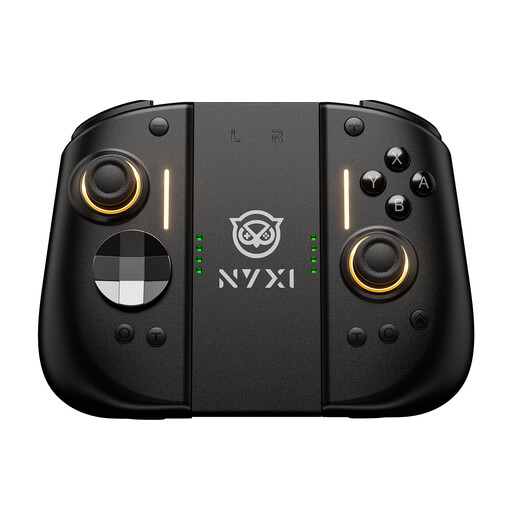
NYXI Hyperion 3 wireless controller for Switch 2
Could suit a Switch 2 session if you’re looking for a full-size wireless controller with extra buttons; check that this version is compatible with your game.
Listed in the product title: 9-axis gyro, Hall-effect joysticks, mechanical buttons and two back buttons.
View at Joybuy
 No image available
BIGBIG WON Rainbow 3 wireless controller
Could be worth considering if you’re looking for a wireless gamepad for one of the platforms listed in the title; check that your specific racing game supports it.
Listed in the product title: PC, Switch 2, iOS and Android, 2000Hz polling rate, capacitive joystick, 16 mechanical buttons and switchable Hall/micro-switch triggers.
View at Joybuy
 No image available
BIGBIG WON GALE HALL wireless controller
Could be a good fit if you’re looking for a wireless controller for PC or mobile devices and want to use extra buttons.
Listed in the product title: PC, iOS and Android, Hall triggers and four customisable buttons.
View at Joybuy
Frequently asked questions about controllers for split-screen racing
Are two Joy-Con enough for two players?
It depends on the software and how you play: according to Nintendo, on Switch 2 each Joy-Con 2 can be held horizontally and used as a single controller. Also check that your specific racing game supports local split-screen.
How do I set up another DualSense on PS5?
Sony explains how to pair another DualSense. You can connect one controller using a USB cable; for an additional one, Sony directs you to the Bluetooth accessories settings and the Create and PS buttons.
Can I keep using older Switch controllers with Switch 2?
According to Nintendo, the original Joy-Con and Nintendo Switch Pro Controller work wirelessly with Switch 2. The original Joy-Con can’t be attached to the Switch 2 console; you’ll need another suitable solution to charge them.
What else do I need to get a controller ready?
It depends on the model: the Xbox Wireless Controller takes AA batteries or a compatible battery pack; it won’t charge rechargeable AA batteries itself. Nintendo says the Switch 2 Pro Controller comes with a USB charging cable.
How do I dispose of a faulty controller in Germany?
According to the German Environment Agency, electrical and electronic waste must not go in household rubbish. Check your local disposal options and follow the relevant drop-off instructions.


