First, check whether your specific version of the racing game supports split-screen on the console or PC you have, and how many people can play on one device. Depending on the platform and game, you may be able to use individual Joy-Con, dedicated gamepads or a wired model; with a wired controller, make sure the cable can reach the seats. Spectators don’t need their own controller.
Who’s playing?
Host of a racing session
You want to know in advance how many people can actually play on one device, and whether your existing controllers can be used individually. Nintendo distinguishes between multiple people playing on one system and local play across multiple systems.
Player sitting further away
You need a connection that works from the intended seat, or a safe route for a cable that’s long enough. The connection type can vary by platform, even for the same controller model.
Buying an extra gamepad
You want to add a dedicated gamepad for the platform you already have. The model, connection and features you need must all be compatible with your device and racing game.
What should you consider when buying?
Start by checking the game and platform, then count the people who’ll actually be playing, and finally plan the connection and seating.
| What you’re looking for |
What to check |
Who is this important for? |
| Platform and game version |
Check the console or PC, exact game version, game mode and full model name. |
If I want to make sure the controller, device and racing game are compatible, I check these details first. Around 27% of consumers prioritise compatibility with their platform and game version. |
| Separate controls |
Count players, not spectators, and check the number of players supported on one system. Nintendo says whether a Joy-Con can be used individually depends on the game and how you hold it. |
If everyone racing needs their own controls, I count only the people who’ll actually be playing. Around 33% of consumers prioritise having enough separate controls. |
| Connection and seating |
Check the connection type for your platform, cable length and a safe route for any cables. With Bluetooth audio on Switch 2, Nintendo specifies a maximum of two wireless controllers synced at the same time. |
If people are sitting in different places, I plan how to connect each playing position and keep cables clear of the seating area. Around 20% of consumers prioritise connection and seating arrangements. |
| Handling and existing devices |
Make a note of the controllers you already have, then check how many more you need, the power supply, and your preferred grip and button layout. |
If I’m choosing between existing Joy-Con and extra dedicated gamepads, I also consider how each one feels to use and how it’s powered. Around 20% of consumers focus on handling and the need for extra equipment. |
Common buying mistakes
-
Assuming that connected controllers equal split-screen players
The number of controllers you can connect doesn’t automatically tell you how many people can play on one screen. Nintendo says that Mario Kart 8 Deluxe supports up to four people on one console in TV or tabletop mode; local play across multiple consoles is a separate mode.
Check the number of players supported on a single system in the exact game version, and count only those who’ll be racing.
-
Assuming Joy-Con and Joy-Con 2 are interchangeable
Compatibility between the two console generations doesn’t work both ways. Original Joy-Con can be used wirelessly with Switch 2, but they can’t be attached directly to the console or charged there. Joy-Con 2 aren’t compatible with the original Switch.
Decide which console generation you have and how you’ll charge the controllers before you buy. Nintendo says you’ll need an original Switch or suitable charging accessories to charge original Joy-Con for use with Switch 2.
-
Overlooking Bluetooth audio when using multiple wireless controllers
Nintendo limits the number of wireless controllers synced at the same time to two when Bluetooth audio is connected to a Switch 2.
Check your audio setup and how many wireless controls you need before the session begins.
-
Assuming “wireless” means wireless on every platform
Connection options can vary by platform. Turtle Beach says the Stealth Pivot can only be used with Xbox via a cable. The PowerA Advantage we looked at requires a docked Switch 2.
Check the connection type and operating mode for the exact device you want to play on. With a wired model, make sure the cable can reach the seat safely.
Key brands to consider
Nintendo
Joy-Con and Pro Controller are worth considering for the Switch generation they support when you need extra controls on one system.
- Nintendo confirms that a Joy-Con can be used individually, depending on the game and play style. Original Joy-Con can be used wirelessly with Switch 2.
- Joy-Con 2 aren’t compatible with the original Switch. With Bluetooth audio connected, a maximum of two wireless controllers can be synced at the same time with Switch 2.
Xbox
The Xbox Wireless Controller is specified for compatible Xbox consoles and Windows PCs.
- Xbox lists Bluetooth connectivity and customisable button mapping.
- Check the power supply and support in your specific racing game before buying. Platform compatibility doesn’t guarantee an advantage in a particular game.
PlayStation
The DualSense is an extra dedicated controller for PS5 and supported PC games.
- Sony lists USB and Bluetooth connections for supported devices.
- On PC, haptic feedback and adaptive triggers depend on the game. Sony says a USB connection is also required for haptic feedback on PC.
PowerA
The Advantage Wired Controller we looked at is a wired model for a docked Switch 2.
- PowerA specifies a 3 m USB-C cable and two programmable buttons for this model.
- This model can only be used with a docked Switch 2 and doesn’t support motion controls, among other features. These specifications don’t apply to every PowerA controller.
8BitDo
The Ultimate 2 Bluetooth Controller is specified by the manufacturer for Switch and Windows.
- 8BitDo says a firmware update is required to use it with Switch 2.
- This doesn’t confirm support for every racing game or the same platform compatibility across all the brand’s controllers.
Joybuy products for local racing sessions
This selection includes Joy-Con that can be used individually with Switch and Switch 2, as well as dedicated wireless and wired gamepads for the platforms specified for each product.
 No image available
Nintendo Switch 2 Joy-Con 2 2-Piece Set (Blue/Light Yellow)
This set of two Joy-Con 2 could suit local multiplayer sessions on a compatible Switch 2, provided the game supports separate use.
Joy-Con 2 aren’t compatible with the original Switch. According to Nintendo, a maximum of two wireless controllers can be synced at the same time when a Bluetooth audio device is connected.
View at Joybuy
 No image available
The G-Lab K-PAD-HELIUM-WL
This dedicated gamepad could work for a PC gaming session, provided your system is one of the listed compatible platforms.
The product description lists Windows 10 and 11, as well as PlayStation 3. Check that your specific racing game is supported before you play.
View at Joybuy
 No image available
EasySMX D10 PC Controller
This model is described as a wireless controller for racing sessions on one of the listed platforms.
The product title lists PC, Switch, Android and iOS, as well as Bluetooth. Check support for your specific game version and platform.
View at Joybuy
 No image available
Razer Wolverine V3 Tournament Edition White
This wired gamepad could be a good option if you can route the cable safely from the gaming device to your seat.
The product details list Windows and Xbox Series S/X, along with a detachable 3 m USB-C cable.
View at Joybuy
 No image available
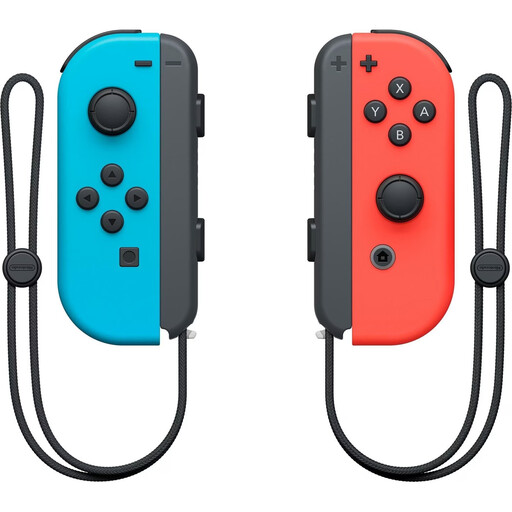
Nintendo Switch Joy-Con Controller Pair (Neon Red/Neon Blue)
This pair of Joy-Con can provide extra controls for a compatible Nintendo Switch, provided the game and grip style allow them to be used separately.
Nintendo notes that whether a single Joy-Con can be used depends on the software and play style.
View at Joybuy
Frequently asked questions
Do eight connected controllers mean eight people can play split-screen?
No. Nintendo says Mario Kart 8 Deluxe supports up to four people sharing a screen in TV or tabletop mode on one console; this is different from the player count for local play across multiple consoles. For Mario Kart World, Nintendo specifies one to four players on a single Switch 2 system. Check the player count for your exact game version.
Can we play on Switch 2 with four wireless controllers while Bluetooth headphones are connected?
Not in this setup: Nintendo allows a maximum of two wireless controllers to be synced at the same time when a Bluetooth audio device is connected. Plan your audio and the controls you need together.
Can I keep using original Switch Joy-Con with Switch 2, and charge them there?
Nintendo confirms that original Joy-Con can be used wirelessly with Switch 2, but they can’t be attached directly to or charged on the Switch 2 console. Nintendo says you’ll need an original Switch or suitable charging accessories to charge them. Joy-Con 2, on the other hand, aren’t compatible with the original Switch.
What should I know about cancellations and faulty products before buying online?
The Verbraucherzentrale explains that online contracts generally come with a 14-day right to cancel, and distinguishes your statutory rights against the seller from a voluntary guarantee. Check the terms of your specific purchase; an optional protection plan isn’t the same as your statutory rights.


