Choose a controller that suits your console, racing game and preferred number of players first. Lighting alone doesn’t make a model suitable for split-screen gaming. In a dark room, player indicators or adjustable LED zones can help you tell controllers apart, but they don’t mean the button symbols are illuminated. For wired models, make sure the cable is long enough and can be routed safely to your seat.
Which controller is right for you?
Split-screen gaming on a console
If several people are racing on the same screen, start by counting the input devices you already have. Then check how many players are supported by your specific game and console version. Nintendo lists different player numbers for Mario Kart 8 Deluxe, depending on the version.
Gaming in a dark living room
If you want to tell your controllers apart in low light, check whether the model has player indicators, illuminated casing or genuinely backlit buttons. These features aren’t the same thing.
Racing games on PC or Xbox
If you have a fixed seat, you can choose between a wired connection and wireless use based on what’s practical to connect where you play. Microsoft lists USB, Bluetooth and Xbox Wireless as connection options for Xbox Wireless Controllers on Windows PCs.
What should you look for when buying?
First check your console and game, then work out how many compatible controllers you need. After that, compare suitable models based on lighting, controls and cable routing.
| What you’re looking for |
What to check |
Who it matters most to |
| Compatibility |
Check your console model, game version, local multiplayer mode and controller compatibility together. |
If the controller needs to work with a particular device and your chosen racing game, platform compatibility comes first. Around 29% of shoppers put compatibility at the top of their list. |
| A controller for every player |
Count the devices you already have and check the player limit for your specific console and game version. |
If you’re planning a game on the same screen, you’ll want a suitable input device for everyone. Around 24% of shoppers prioritise the number of players they need to accommodate. |
| Controls in low light |
Check exactly which parts of the specific model are illuminated and whether you can adjust the brightness. |
If you want to distinguish buttons and controllers in a dark room, it’s important to know which parts are actually lit. Around 18% of shoppers put this at the top of their list. |
| Feel and control while racing |
Check the triggers, sticks and button layout on the specific model. The game must support any extra features. |
If you have particular preferences for sticks, triggers or custom button layouts while racing, check that the game supports them. Around 18% of shoppers prioritise racing controls. |
| Cables and power |
Check the cable route, connections, what’s included and any charging accessories you’ll need before buying. |
If you need to connect or charge several controllers, make sure the cables and power supply suit your shared gaming space. Around 11% of shoppers pay particular attention to power and overall costs. |
Avoid common buying mistakes
-
Don’t mistake RGB lighting for backlit buttons
LED zones on the casing don’t prove that the button symbols light up too. PowerA describes the Spectra Infinity as having adjustable lighting across three zones; GameSir describes the Kaleid Flux as illuminated.
Check exactly which parts are illuminated on the specific version, rather than assuming “RGB” means the buttons are backlit.
-
Don’t assume the player limit is the same across console versions
Nintendo says Mario Kart 8 Deluxe supports up to four players in split-screen on the original Switch. The option for up to eight players, announced after the update on 2 September 2026, applies specifically to Switch 2 and requires compatible controllers.
Check your console model, game version and number of compatible controllers together.
This helps you avoid buying extra controllers for a game your specific setup doesn’t support.
-
Don’t count just the controllers—check your whole gaming setup
You’ll need enough compatible input devices for everyone in your planned game. Sony says the DualSense version in question doesn’t include a charging cable; Nintendo says original Joy-Con can’t be attached to a Switch 2.
Make an inventory of your controllers and accessories before deciding what else you need for your game.
Key brands at a glance
Nintendo
Joy-Con 2 can be used as individual input devices for supported Switch 2 games. The Switch 2 Pro Controller is another option if you’d prefer a dedicated, full-size controller.
- Nintendo describes a pair of Joy-Con 2 as suitable for local multiplayer in compatible games.
- Player numbers depend on the console, game version and other requirements. The Switch 2 feature doesn’t automatically apply to the original Switch.
- Nintendo says the Switch 2 Pro Controller has customisable GL and GR buttons.
Microsoft Xbox
The Xbox Wireless Controller is a wireless option for compatible Xbox consoles and Windows PCs.
- Microsoft lists USB, Bluetooth and Xbox Wireless for connecting to Windows. A data-capable cable is needed for USB.
- These connection options don’t confirm that the button symbols are illuminated or that a particular racing game supports split-screen.
Sony PlayStation
The DualSense is a possible controller option for local multiplayer games on PS5.
- PlayStation describes player indicators and the simultaneous use of up to four controllers.
- Haptic feedback and adaptive triggers depend on game support and, in some cases, the connection. Sony says the Chroma Indigo version in question doesn’t include a charging cable.
GameSir
According to the manufacturer, the Kaleid Flux is an illuminated, wired model for the Xbox and Windows systems listed.
- GameSir describes the model as Xbox-authorised and lists Hall Effect sticks and analogue triggers.
- These manufacturer claims aren’t independent tests of durability or precision. Make sure the cable length and illuminated areas suit your gaming space and lighting needs.
PowerA
The Spectra Infinity Enhanced Wired Controller is a wired option for Xbox Series X|S if adjustable LED zones are important to you.
- PowerA describes three LED zones with adjustable brightness, as well as assignable rear buttons.
- Illuminated zones don’t prove that the button symbols are backlit too; the model in question is wired.
Joybuy controllers for the right setup
The Joybuy products below include controllers for Switch 2 and PS5, as well as models whose titles list PC or multiple platforms. Before buying, check that your specific racing game supports the controller in local multiplayer mode.
 No image available
Nintendo Switch 2 Joy-Con 2 two-pack (Blue/Light Yellow)
This pair is designed for local multiplayer, provided the Switch 2 game supports Joy-Con used individually.
Includes one left and one right Joy-Con 2; the product name specifies Nintendo Switch 2.
View at Joybuy
 No image available
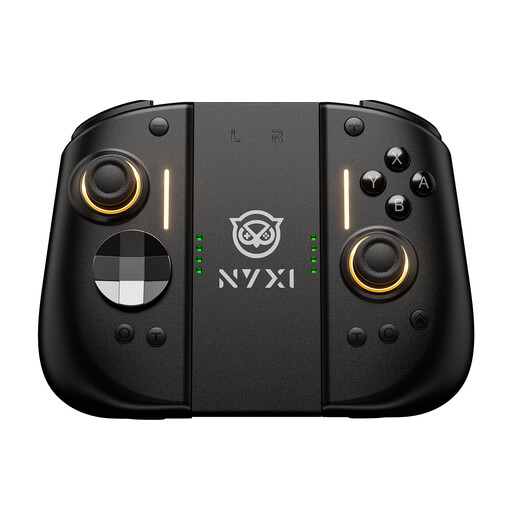
NYXI Hyperion 3 Wireless Controller for Switch 2
A wireless option for a Switch 2 setup; check compatibility with your specific racing game.
The product name lists Hall Effect joysticks, mechanical buttons, two rear buttons and adjustable vibration.
View at Joybuy
 No image available
BIGBIG WON Rainbow 3 Wireless Controller
The product name lists PC and Switch 2 as platforms; check that your racing game supports it.
The title lists 14 customisable RGB lights and a 6-axis gyroscope. The lighting doesn’t mean the button symbols are backlit.
View at Joybuy
 No image available
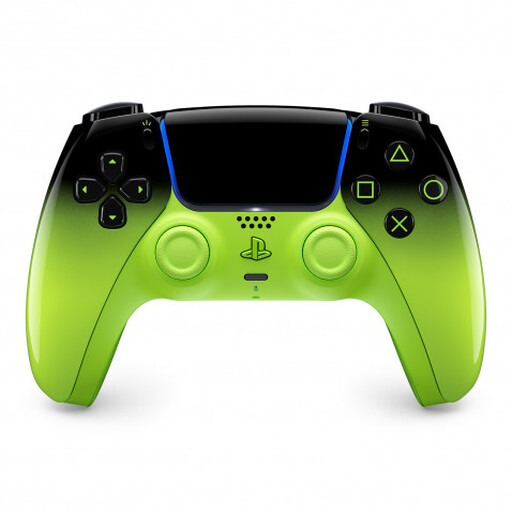
PlayStation DualSense Wireless Controller V3, Remix Green
For a PS5 setup; whether a local racing game supports multiple controllers depends on the game.
The description lists haptic feedback and adaptive triggers. These features require support from the game.
View at Joybuy
 No image available
BEITONG KP70 Elite Wireless Gaming Controller
The description lists PC and Nintendo Switch 2 as compatible platforms; check your specific game as well.
The title lists six programmable buttons and adjustable joystick resistance. The description lists wired, wireless and Bluetooth connections.
View at Joybuy
Frequently asked questions
After the Mario Kart 8 Deluxe update, can eight people play on the same screen on any Switch?
No. Nintendo specifies up to eight people in local split-screen on Nintendo Switch 2 with the free update released on 2 September 2026, and one compatible controller per person. For the original Switch, Nintendo lists up to four people playing on a shared screen in TV or tabletop mode.
How do I connect an extra controller before the race?
How you connect it depends on the model and device. PlayStation describes using a USB connection to pair a DualSense with a PS5 for the first time; Microsoft lists USB, Bluetooth or Xbox Wireless for the Xbox Wireless Controller on a Windows PC. Check the instructions for your specific model and test all input devices before you start playing.
What should I know about charging original Switch Joy-Con on a Switch 2?
Nintendo says original Joy-Con can be used wirelessly with the Switch 2, but can’t be attached to it. Nintendo lists a Switch console or suitable licensed charging accessories as charging options.


