Which keyboards are right for you?

Writers working with two text views

If you keep dialogue and scene notes open side by side, handy shortcuts can make it easier to switch between them without reaching for the mouse so often. Which shortcuts work depends on your writing software and operating system. Literature & Latte describes split views for Scrivener.

Frequent writers at a fixed desk

For long writing sessions, you can choose between a familiar flat design, a single split keyboard or two halves that you can position independently. The design alone does not guarantee relief from discomfort. Logitech and ZSA describe different types of split keyboard.

Writers working near a microphone

If you’re recording while editing, your choice of switches may matter. Perixx lists different switch options, but a description such as ‘quiet’ won’t tell you how loud the typing will sound through your microphone.

What should you consider when choosing?

Flat, conventional keyboard

A good fit if: you want to start typing straight away on a familiar layout and don’t need movable halves.

The trade-off: You can’t position your hands independently. Logitech describes customisable keys on the MX Keys S, while CHERRY lists scissor-switch keys on the KC 6000 SLIM.

Single split keyboard

A good fit if: you want to try a different hand position without having to arrange two separate halves on your desk.

The trade-off: The keyboard can’t be divided into two independently movable halves. F.A.Z. notes that the Logitech ERGO K860 has no key backlighting and can’t be used with a cable.

Mechanical keyboard with customisable keys

A good fit if: you want to assign your own keys to frequently used commands and are happy to set them up. Keychron describes QMK/VIA support for the K8 Pro.

The trade-off: The K8 Pro doesn’t have physically separate halves. Make sure the layout and specific switch variant match the one you want to order.

Keyboard with two movable halves

A good fit if: you want to position each hand independently and have enough desk space.

The trade-off: Setup and getting used to it take time. ZSA notes that using the ErgoDox EZ involves adjusting to a different layout from a conventional keyboard.

What matters What to check before buying Who is it important to?
Switching between editor views Check the shortcuts for your software and operating system, as well as the function keys and key-mapping options. When writing with dialogue and scene notes side by side, I want to switch focus using a shortcut rather than reaching for the mouse so often. Around 36% of consumers prioritise switching between editor views when choosing a keyboard.
Hand position during long writing sessions Check whether a single split keyboard will do, or whether you want independently positionable halves. When I write for long periods at a fixed desk, I want to choose a comfortable hand position without assuming it will have a particular effect. Hand position during long writing sessions is the main priority for around 29% of consumers.
Typing noise at your recording setup Check the exact switch variant and, if possible, assess the sound where you plan to position your microphone. When working near a microphone, I want to choose my switches carefully rather than relying on the description ‘quiet’ alone. Around 21% of consumers mainly base their choice on typing noise at their recording setup.
Desk space or switching between devices Check your desk width and which separate keys you need. If you use several devices, confirm whether you can actually switch between them. With limited space or several work devices, I want to know which keys I need and whether I really need to switch between devices. Desk space or switching between devices is the main keyboard criterion for around 14% of consumers.

Buying decisions worth checking

  • Confusing a split editor with a split keyboard

    Two views in writing software are independent of the keyboard’s design. You don’t automatically need two keyboard halves to use editor shortcuts.

    First decide whether shortcuts or a different hand position matter more to you. If you choose two halves, also factor in the extra setup and adjustment time.

    Getting used to an unfamiliar keyboard layout can take time.

  • Assuming the model name means it has a German layout

    A model may be available in different language variants. For example, the Joybuy product page for the CHERRY KC 6000 SLIM lists a US layout, while Keychron offers several ISO language variants.

    Before ordering, check the specific variant and the key legends you want, such as QWERTZ or ISO-DE.

  • Assuming ‘quiet’ means silent typing

    Your choice of switches matters, but it can’t guarantee that key noise won’t be picked up in your particular recording environment.

    Check the exact switch variant and, if possible, assess the sound with your planned microphone setup.

Key brands at a glance

Logitech

The MX Keys S has a flat design with customisable keys, while the ERGO K860 features a single, ergonomically split keyboard.

  • Logitech describes customisation options for the MX Keys S. The ERGO K860 has a split keyboard.
  • F.A.Z. notes that the ERGO K860 has no key backlighting and can’t be used with a cable. These limitations apply to this model.

CHERRY

The KC 6000 SLIM is a flat, wired option with scissor-switch keys.

  • CHERRY describes its scissor-switch keys and slim design.
  • The Joybuy product page for this variant lists a US layout. Check the language version before ordering.

Keychron

The K8 Pro is designed for writers who want mechanical switches and customisable keys.

  • Keychron describes QMK/VIA support and offers ISO-DE as a layout option.
  • The layout and switches depend on the specific variant. Check your selected configuration before ordering.

Perixx

The PERIBOARD-335 combines a single split keyboard with a choice of switches.

  • Perixx lists German QWERTZ and quiet linear, quiet tactile and clicky switch options.
  • According to the product details, the downloadable key-mapping software is only available for Windows. The switch description doesn’t measure how loud the keyboard will be at your recording setup.

ZSA

The ErgoDox EZ is an option for writers who want two independently positionable keyboard halves.

  • ZSA describes separate halves and configuration options.
  • Setup and adjustment differ from using a conventional keyboard. Check the key legends and variant you want to order.

Joybuy keyboards for your writing setup

These keyboards suit different writing setups, including QWERTZ typing, customisable features and a split keyboard. Check the specific layout and feature set for each one.

Inateck Foldable Mini Keyboard N0153BK with QWERTZ layout

Inateck Foldable Mini Keyboard N0153BK, QWERTZ

For compact typing and frequent keyboard shortcuts, if you’re looking for a foldable model.

The product details list QWERTZ, a touchpad, three Bluetooth channels, an extra row of function keys and dedicated shortcut keys. Compatible systems include iPadOS, Android and Windows.

View at Joybuy

Logitech ERGO K860 with QWERTZ layout and split keyboard

Logitech ERGO K860, QWERTZ

For longer writing sessions, if you’d like to try a single split keyboard.

The product details list a split key layout, a palm rest and adjustable tilt legs. According to the product description, you can customise Fn keys and app-specific shortcuts using Logitech Options software. Connection: Bluetooth or USB receiver.

View at Joybuy

CHERRY XTRFY K5V2 Compact with German QWERTZ layout

CHERRY XTRFY K5V2 Compact, German QWERTZ

For a compact writing setup, if you’re looking for a mechanical keyboard with a German layout.

The product details list a 65% design, replaceable linear MX2A RED switches and RGB lighting. Media and macro functions are on secondary keys and controlled using key combinations.

View at Joybuy

AJAZZ AK820 MAX 75 with US QWERTY layout

AJAZZ AK820 MAX 75, US QWERTY

For frequently used custom commands and a compact writing setup with function keys.

The product details list a 75% layout with arrow keys and an F-key row, plus customisable keys and macros with onboard storage. The layout is explicitly US QWERTY, not German QWERTZ.

View at Joybuy
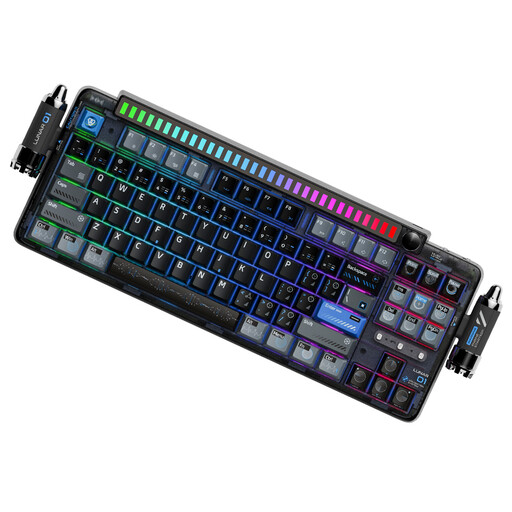
KEYSME Lunar 01 80 with US QWERTY layout

KEYSME Lunar 01 80, US QWERTY

For programmable features and switching between several work devices, if the US layout suits you.

The product details list 87 keys, programmable keys, macros and a programmable rotary knob. It supports Bluetooth, 2.4 GHz wireless and USB-C, and can switch between up to five devices. The layout is US QWERTY.

View at Joybuy

Frequently asked questions

Do I need a physically split keyboard for a split editor?

No. In Scrivener, a split editor means two views within the software, as described by Literature & Latte. A keyboard with separate halves is a separate choice for hand positioning; check your writing software’s features and shortcuts separately.

What should I check before assigning an editor command to a key?

First check that the command works with your version of the software and operating system. Then find out whether the keyboard and its software support the key mapping you want. According to the product details, the downloadable key-mapping software for the PERIBOARD-335 is only available for Windows.

What should I consider when choosing a keyboard with two halves?

Make room for both halves and allow time for setup and adjustment. For the ErgoDox EZ, ZSA recommends adjusting the distance between the halves to suit your position. It may take some getting used to compared with a conventional keyboard.

How can I make sure the keyboard layout suits the text I write?

Check the language variant for the specific item you’re ordering, not just the model name. For the variants described here, QWERTZ or ISO-DE is not the same as US QWERTY.

Will a keyboard described as ‘quiet’ be inaudible when recording?

No. The description doesn’t guarantee silent typing at your recording setup. Choose the exact switch variant carefully and, if possible, assess the typing noise with your planned microphone setup.