Choose your controller based on the specific game and platform first. Nintendo Switch Sports requires Joy-Con or Joy-Con 2, depending on the sport, and doesn’t support Pro Controllers. For other games, a standard gamepad may be suitable. Also check how much room you have to move, how many controllers you need, and whether wireless or a safely routed cable is more practical from your seat.
Who is this guide for?
Players with limited room to move
If you’re sitting alongside other people, check that you can safely make the movements required for each sport from where you’re sitting. Nintendo describes Nintendo Switch Sports as using motion controls with Joy-Con.
Guests joining local multiplayer
You need an extra controller and want to know in advance whether the game allows one Joy-Con per player or requires a full gamepad. In Nintendo Switch Sports, the controller setup depends on the sport.
Gamepad players on the sofa or in a side seat
If your game supports a standard gamepad, you’ll need to choose between a suitable wireless connection and a cable that reaches your seat.
What should you consider when buying?
Joy-Con for Nintendo Switch
Suitable if: You’re playing Nintendo Switch Sports on a Nintendo Switch and the sport you want to play uses the designated Joy-Con controls.
Consider: Nintendo doesn’t support Pro Controllers for this game. Use the appropriate wrist straps with individual Joy-Con.
Joy-Con 2 for Nintendo Switch 2
Suitable if: You have a Nintendo Switch 2 and a game that supports Joy-Con 2.
Consider: Nintendo lists Joy-Con 2 as controllers for Switch 2. Joy-Con 2 wrist straps don’t fit the original Joy-Con.
Wireless standard gamepad
Suitable if: The specific Xbox, PlayStation or PC game you’re playing supports a standard gamepad and you’d rather not run a cable to your seat.
Consider: Connecting a controller to a platform doesn’t automatically mean the game or all its extra features will support it.
Wired gamepad
Suitable if: The cable can safely reach from your device to your seat and your game supports the controller.
Consider: Measure the route before buying and position the cable so no one can trip over it.
| What matters when buying |
What to check |
Who is this especially important for? |
| Game and platform compatibility |
Game title, console generation and supported controllers for the sport you want to play. |
If I want to make sure the game and platform both support the same controller, I check both before buying. Around 25% of consumers put compatibility first. |
| Room to move |
The movements required for the sport and the distance from people and objects. |
I want enough space to make the required movements from my side seat. Around 25% of consumers prioritise the space available to move. |
| Connection from your seat |
Supported connection type, distance to your seat and a safe cable route. |
If I don’t want to run a cable through a walkway to my side seat, I look for a suitable wireless connection. Around 19% of consumers prioritise the connection from their seat. |
| Number of controllers for local multiplayer |
Game mode, number of players and input devices needed per person. |
I want to know whether there are suitable controllers for everyone and whether individual Joy-Con will do. Around 19% of consumers prioritise the number of controllers for local games. |
| Additional costs |
Controllers you already own, what’s included and the game mode you need. |
If I only want to play locally, I check which devices are actually needed and which ones I already have. Around 12% of consumers pay particular attention to possible extra costs. |
Avoid common buying mistakes
-
Buying a generally compatible gamepad as a replacement for Joy-Con in Nintendo Switch Sports
A controller may connect to a console and still be unsuitable for a particular game. Nintendo doesn’t support either the Nintendo Switch Pro Controller or the Nintendo Switch 2 Pro Controller with Nintendo Switch Sports.
Before buying, check the controller requirements for the specific game and sport you want to play.
-
Mixing up Joy-Con and Joy-Con 2, or their wrist straps
Nintendo lists Joy-Con 2 as controllers for Switch 2. Joy-Con 2 wrist straps aren’t compatible with the original Joy-Con.
Check the console generation and the exact accessory name. If you’re using individual controllers, make sure you have the right wrist straps.
-
Assuming a wireless connection guarantees full game and feature support
A connection alone doesn’t prove that a particular game supports a controller. Sony says that haptic feedback on PC requires both a compatible game and a USB connection.
Check game support and the extra features you want separately from the connection type.
-
Confusing a manufacturer’s guarantee with your statutory rights
For goods bought in Germany, EU consumer information states that you have a statutory guarantee of at least two years from receiving the goods, which you can claim against the seller. This is separate from any voluntary manufacturer’s guarantee.
Keep your proof of purchase. If something is faulty, check your statutory rights separately from any additional guarantee terms.
Key brands to consider
Nintendo
Joy-Con and Joy-Con 2 are relevant for supported Switch games with motion controls.
- Nintendo describes different Joy-Con setups for Nintendo Switch Sports, depending on the sport.
- Joy-Con 2 are designed for Switch 2. Check the game, sport and controller setup separately.
Microsoft Xbox
Xbox Wireless Controller for supported Xbox, Windows and mobile games.
- Microsoft lists Xbox Wireless, Bluetooth and a hybrid D-pad.
- These specifications don’t confirm that a particular sports game supports the controller or Joy-Con motion controls.
Sony PlayStation
DualSense gamepad for PS5 and supported PC and mobile games.
- Sony lists USB and Bluetooth connections for supported devices.
- According to Sony, haptic feedback on PC requires a compatible game and a USB connection.
PowerA
Wired controllers for selected Xbox and Windows games.
- PowerA lists the Advantage Plus as compatible with Xbox Series X|S, Xbox One and Windows 10/11, with a cable around 3 m long.
- It won’t replace Joy-Con when a game such as Nintendo Switch Sports requires Joy-Con controls.
8BitDo
Controllers designed for specific platforms, with different model versions to check carefully.
- 8BitDo lists the Ultimate 2C Wireless for Windows and Android, and the Ultimate 2C Bluetooth for Switch and, after a firmware update, Switch 2.
- These platform details don’t confirm that the Bluetooth version is compatible with Nintendo Switch Sports.
GameSir
G7 HE wired controller for supported Xbox and Windows games.
- For the white version, GameSir lists a detachable 3-m USB-C cable and Hall effect sticks.
- The manufacturer’s specifications don’t provide an independent durability assessment or confirm support for motion-controlled Nintendo sports games.
Joybuy products for compatible games
This selection includes wireless standard gamepads for compatible PC, Switch and Xbox setups, plus a pair of Joy-Con for compatible Nintendo Switch games. Whether a controller is suitable still depends on the specific game and its controls.
 No image available
EasySMX D10 Wireless Gamepad
An option for games that support a standard gamepad and are played on the listed platforms.
Listed for PC, Switch, Android and iOS; Bluetooth, TMR joystick, dual-mode triggers, mechanical buttons, 1000 Hz polling rate and RGB lighting.
Joybuy
 No image available
BIGBIG WON Rainbow 3 Wireless Controller
Could be suitable for a compatible game that supports a standard gamepad. A platform being listed doesn’t, by itself, confirm support for a particular game.
Listed for PC, Switch 2, iOS and Android; 2000 Hz polling rate, capacitive joystick, 16 mechanical buttons and a 6-axis gyroscope. The Switch 2 listing doesn’t confirm compatibility with a specific sports game.
Joybuy
 No image available
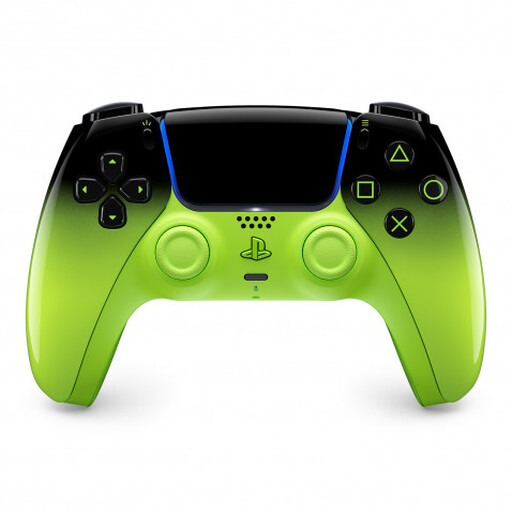
PlayStation DualSense Wireless Controller V3, Remix Green Edion
A possible choice for a game that supports the DualSense as a standard gamepad.
Listed for PS5, Mac, Android, iOS and PC. Check support for additional features separately for each device and game.
Joybuy
 No image available
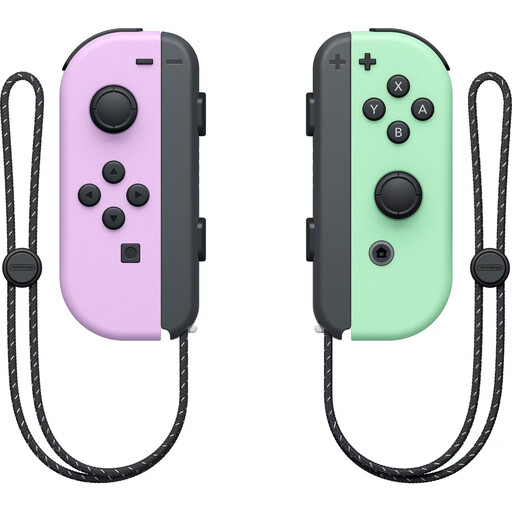
Nintendo Switch Joy-Con Pair, Pastel Purple/Pastel Green
For a compatible Switch game with Joy-Con controls. For Nintendo Switch Sports, the right setup depends on the sport.
Joy-Con pair for Nintendo Switch. Use the appropriate wrist straps when holding the Joy-Con individually.
Joybuy
 No image available
Microsoft Xbox Wireless Controller, Ice Breaker Special Edition
An option for supported Xbox or PC games that use standard gamepad controls.
Listed for Xbox Series X/S, Xbox One and PC; wireless controller.
Joybuy
Frequently asked questions
Can I play Nintendo Switch Sports with a Pro Controller?
No. Nintendo doesn’t support either the Nintendo Switch Pro Controller or the Nintendo Switch 2 Pro Controller with this game. Instead, check which Joy-Con or Joy-Con 2 setup is required for the sport you want to play.
How do I set up the controllers for a game from a side seat?
First, choose the sport in the game and select a controller setup it supports. If you’re using individual Joy-Con, attach the appropriate wrist straps. Before you start moving, check that you have enough clear space around you and other people.
Do I need Nintendo Switch Online for local games?
Nintendo’s requirement for online competitions doesn’t mean you need a membership to play locally. However, you do need an active Nintendo Switch Online membership to use the online features of Nintendo Switch Sports described by Nintendo.
What should I do if a controller bought from a retailer in Germany is faulty?
According to EU consumer information, when you buy goods in Germany, you have a statutory guarantee of at least two years from receiving them, which applies against the seller. Any additional manufacturer’s guarantee advertised is separate.


