A shared flat with a Switch and motion games
If you play sports that use swinging or motion controls, make sure you choose Joy-Con or Joy-Con 2 to suit your console and game. Nintendo sets out the requirements for each game and sport.


Choose your controller based on the game you’re playing and the system you have, not just Bluetooth or motion controls. Nintendo Switch Sports requires Joy-Con or Joy-Con 2 depending on the sport; traditional sports games on PS5, Xbox or PC need a gamepad that’s compatible with both the system and the game. Also check how many people can play, which input devices you’ll need and how much space you have in your shared flat.
If you play sports that use swinging or motion controls, make sure you choose Joy-Con or Joy-Con 2 to suit your console and game. Nintendo sets out the requirements for each game and sport.
For a local sports game, each player needs a gamepad that’s compatible with the system and supported by the game. Sony and Microsoft list their respective controllers for compatible consoles.
On PC, you’ll need to check both how the controller connects and whether the specific game supports multiple gamepads. Sony and 8BitDo provide details of the connections and platforms supported by their respective models.
A good fit when: You’re playing Nintendo Switch Sports on a Switch, or a sport that Nintendo says requires Joy-Con.
Worth noting: On Switch 2, original Joy-Con can only be used wirelessly and can’t be charged directly on the console.
A good fit when: Your shared flat has a Switch 2 and you’re playing a compatible motion-control game. Nintendo lists Joy-Con 2 for Nintendo Switch Sports Resort and, depending on the sport, for Nintendo Switch Sports.
Worth noting: Joy-Con 2 aren’t compatible with the original Switch or the leg strap for Nintendo Switch Sports. A pair is already included with the Switch 2.
A good fit when: The sports game you want to play supports local gamepad controls and you’re using a compatible console or PC.
Worth noting: A PC connection alone doesn’t guarantee that the game supports the controller or all its features. This option isn’t a substitute for Joy-Con in Nintendo Switch Sports.
| What matters | What to check before buying | Who is this especially important to? |
|---|---|---|
| Game and system compatibility | Check the console or PC, exact game title, game mode and controller type required. | If I want to avoid buying the wrong controller for a game I already own, I check the game’s controller requirements first. Around 36 % of consumers focus above all on compatibility with the game and system. |
| Enough input devices | Check the number of players and the controls needed for the sport, and count the controllers you already have. | If another person is joining a local game, I first count the input devices we already have. Around 29 % of consumers prioritise having the option for more people to join in. |
| Safe use of motion controls | If you’re using Joy-Con separately, have the right wrist strap ready and clear enough space to move. | If we’re playing a motion-controlled game in a shared-flat bedroom, I want to clear some space and use the right wrist strap. Around 21 % of consumers prioritise using motion controllers safely. |
| Power and connection | Check the cable route, available ports and charging options. Original Joy-Con can’t be charged directly on the Switch 2 console. | If I want to avoid interruptions and an unsuitable connection, I check the cable route and power supply in advance. Around 14 % of consumers pay particular attention to connections and power. |
For Nintendo Switch Sports, Nintendo lists Joy-Con as the suitable controllers, depending on the sport; Nintendo Switch and Switch 2 Pro Controllers aren’t compatible with the game. Some DualSense features on PC depend on the game; Sony specifies a USB connection for haptic feedback on PC.
A gamepad might work with the console without offering the controls required for this game. Nintendo rules out Pro Controllers for Nintendo Switch Sports; PowerA says its Enhanced Wired Controller model isn’t suitable for games that require Joy-Con.
Before buying, check the controller requirements for the specific game and sport you want to play.
Joy-Con 2 are designed for Switch 2, while original Joy-Con can’t be charged directly on the Switch 2 console. Original Joy-Con are required for the leg strap in Nintendo Switch Sports.
Check that your console generation, game accessories and charging options all match. You may need a separate compatible charger to charge original Joy-Con with Switch 2.
Some DualSense features on PC depend on the game and the type of connection. Sony specifies USB as a requirement for haptic feedback on PC.
For the PC game you want to play, check both whether it supports local controllers and which connection is needed for the features you want to use.
For Nintendo Switch Sports, Nintendo lists Joy-Con or Joy-Con 2 as controller options, depending on the game and sport.
The DualSense is an option for local sports games on PS5 and supported PC games.
The Xbox Wireless Controller is designed for Xbox consoles and supported Windows games.
Ultimate-2C models vary by version and the platform they’re designed for.
The wired Enhanced Wired Controller is designed for supported Switch games that use traditional gamepad controls.
This selection includes Joy-Con for Switch and Switch 2, as well as traditional gamepads for Xbox, PS5 and Windows PC.
 No image available
For compatible local games on Switch 2; the product description mentions motion controls.
The set includes one left and one right Joy-Con 2, plus two wrist straps. For Nintendo Switch 2 only. If you’re playing a motion-control game, clear the area and use the wrist straps provided.
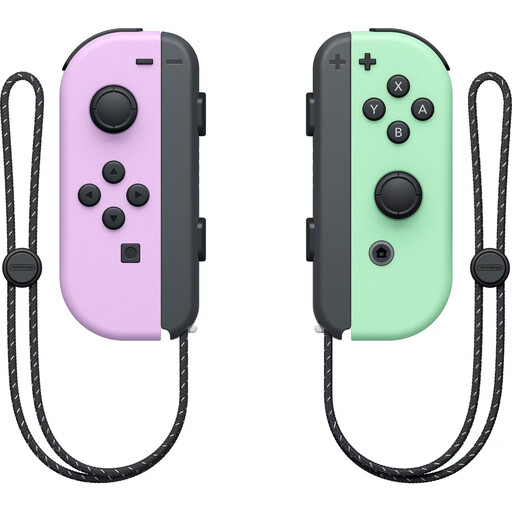 No image available
For Switch games with motion controls, provided the specific game supports these controllers.
The pair features an accelerometer and gyroscope and includes two wrist straps. On Switch 2, original Joy-Con can only be used wirelessly and can’t be charged directly on the console.
 No image available
For traditional gamepad controls on supported Xbox systems or Windows PCs. Also check that the game supports local play.
The product description lists Xbox Wireless and Bluetooth, and includes two AA batteries.
 No image available
For local sports games on PS5 and supported PC games. Check whether the specific game supports multiple controllers.
Bluetooth and USB-C are listed. On PC, haptic feedback and adaptive triggers depend on the game; Sony specifies USB as a requirement for haptic feedback.
 No image available
For traditional gamepad games on the listed Xbox systems or a supported Windows PC.
Wired, with a 3-m USB-C cable; the product name mentions Hall Effect sticks. Check that the cable reaches your gaming device and that the game supports local controllers.
No. Nintendo says that neither the Switch Pro Controller nor the Switch 2 Pro Controller is compatible with this game. The right Joy-Con setup depends on the sport.
Clear the immediate area around you and, when using Joy-Con or Joy-Con 2 separately and wirelessly, attach the right wrist strap to each one. Nintendo advises attaching the straps; the two generations aren’t interchangeable.
Nintendo says a membership is required to play Nintendo Switch Sports online. That requirement alone doesn’t mean you need a membership to play locally.
The Verbraucherzentrale distinguishes between statutory consumer rights and a voluntary manufacturer’s warranty. If there’s a fault, contact the seller to ask for a remedy. The Federal Ministry for the Environment points out that unwanted electrical equipment must be taken to an authorised collection point or a retailer required to take it back under the law, not put in household rubbish.