Motion-controlled sports players
If you want to control swings or throws with your movements, check the controller requirements for the specific game. Nintendo recommends using Joy-Con for Nintendo Switch Sports.


For Nintendo Switch Sports, you’ll need Joy-Con or Joy-Con 2, depending on your console and the sport. Nintendo rules out both generations of Pro Controller for this game. For traditional sports games on PS5, Xbox or PC, your gamepad needs to work with both your platform and the specific game. If you’re playing with others, consider how many individual controllers you’ll need and whether you have the right straps. If the screen is hard to see in daylight, adjusting its position and your TV settings can help; changing controller won’t.
If you want to control swings or throws with your movements, check the controller requirements for the specific game. Nintendo recommends using Joy-Con for Nintendo Switch Sports.
If you’re playing sports games with others on one console, consider how many individual controllers you’ll need and whether you have the right wrist straps. Nintendo recommends using straps when Joy-Con are used separately.
For sports games controlled with buttons and sticks on PS5, Xbox or PC, compatibility with your platform and support from the specific game are the priorities.
First, check whether your game requires motion controls or a traditional gamepad. Assess visibility in a bright room separately.
| Consideration | What to check before buying | Who it matters most to |
|---|---|---|
| The right type of controls | Check the controller requirements and game mode; don’t plan to use a Pro Controller for Nintendo Switch Sports. | If I want to use motion rather than buttons, I first check which controls the specific game requires. Around 28% of consumers put the right type of controls first. |
| Platform and game | Check that your console model, controller and game are compatible; on PC, also check the connection and supported features. | If you want to avoid buying the wrong controller for your console or chosen game, check that both are compatible. Around 28% of consumers put platform compatibility first. |
| Other players and accessories | Count the controllers you already have and check whether the game mode requires extra devices or suitable straps. | For a local multiplayer session, I want to know whether everyone can use a suitable individual controller. Around 22% of consumers base their choice primarily on what’s available for other players. |
| Visibility in a bright room | Check the screen position and TV settings; Samsung’s advice for bright rooms applies to Samsung TVs. | If the picture is hard to see in daylight, I first look at the screen and the room, rather than the gamepad. Around 11% of consumers prioritise visibility in a bright living room. |
| Connection and ongoing costs | Check charging accessories, the connection you need and any requirements for the online mode you want to use. | If you want to use the charging accessories you already own and avoid extra connection or online costs, check the requirements beforehand. Around 11% of consumers focus primarily on running and ongoing costs. |
Just because a controller connects to a Switch console doesn’t mean every game supports it. Nintendo rules out both generations of Switch Pro Controller for Nintendo Switch Sports.
Check the controller requirements for the specific game before you buy, and make sure you choose a leg strap that’s compatible with your Joy-Con generation.
Depending on the sport or game mode, you may need an additional compatible Joy-Con.
Joy-Con 2 are designed for Switch 2. Older Joy-Con can be used wirelessly with it, but can’t be attached to the console or charged through it. The straps for the two generations aren’t interchangeable.
Make sure your controllers and straps are from the same generation, and check how to charge older Joy-Con when using them with Switch 2.
To charge older Joy-Con with Switch 2, you’ll need a Nintendo Switch or suitable charging accessories.
In daylight, visibility is affected by the screen, ambient light and picture settings, not the input device.
Check the picture in your usual gaming spot and adjust the settings on your current TV.
Your statutory rights when a product is faulty are separate from a voluntary guarantee. The cover and terms may differ.
Keep your proof of purchase and contact the retailer if there’s a fault.
Joy-Con for Switch and Joy-Con 2 for Switch 2 are relevant controller ranges for the motion-controlled sports games described by Nintendo.
Xbox Wireless Controllers are an option for sports games with traditional gamepad controls on compatible Xbox consoles and Windows devices.
DualSense is a potential gamepad option for compatible PS5 and PC sports games.
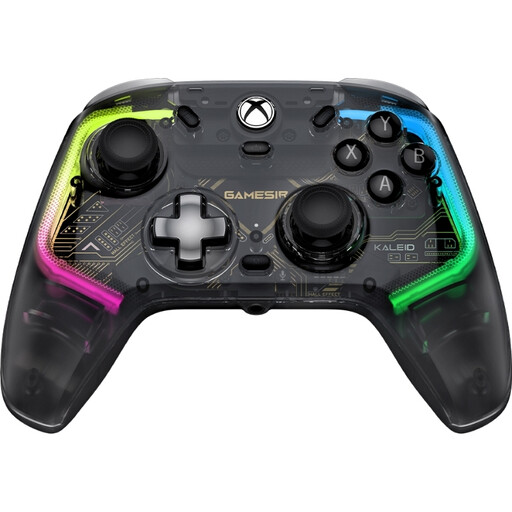
The G7 HE is a wired alternative for compatible Xbox and Windows games.
This selection includes Joy-Con sets for motion-controlled games on Nintendo Switch and Switch 2, as well as gamepads for the platforms listed. Before buying, check that your specific sports game supports the controller.
 No image available
For motion-controlled games on Nintendo Switch 2, provided the specific game supports Joy-Con 2.
Set of two Joy-Con 2; colour: Blue/Light Yellow.
 No image available
For traditional gamepad controls, provided the relevant game and device support the controller.
Bluetooth; TMR joystick; dual-mode triggers; mechanical buttons; 1000Hz polling rate; listed for PC, Switch, Android and iOS.
 No image available
For motion-controlled games and local multiplayer sessions on Nintendo Switch, provided the game mode supports Joy-Con controls.
Pair with one left and one right Joy-Con; colour: Neon Blue/Neon Yellow.
 No image available
For traditional sports games on Xbox or Windows, provided the specific game supports the controller and a wired connection suits your setup.
Listed as wired; platforms: Xbox Series X/S, Xbox One and Windows 10/11.
 No image available
For traditional gamepad sports games on a listed Xbox platform or PC, provided the specific game is compatible.
Wireless controller; colour: Shock Blue; listed in the product title for Xbox One, Xbox Series X/S and PC.
No. Nintendo rules out both the Nintendo Switch Pro Controller and the Nintendo Switch 2 Pro Controller for Nintendo Switch Sports. For another sports game, check its controller requirements.
According to Nintendo, you can use older Joy-Con wirelessly with Switch 2, but you can’t attach them to the console. You’ll need a Nintendo Switch or suitable charging accessories to charge them.
Nintendo recommends attaching and locking the right wrist straps when using Joy-Con separately, then securing them around your wrists. Make sure you also leave enough space between yourself, other people and objects when moving.
No, not for a local multiplayer session. Nintendo requires an active Nintendo Switch Online membership for online competitions around the world.
No. A controller won’t affect screen reflections or picture brightness. First, check your screen position and TV picture settings; Samsung’s advice for bright rooms applies to Samsung TVs.