
Lieferung heute & morgen

Qualitätsgarantie

Willkommens-Angebote freischalten: KOSTENLOSE Lieferung | Bis zu 80 % RABATT | Kostenlose 30-Tage-JoyPlus-Testphase
App herunterladen
Choosing the right SSD can dramatically improve the performance of a computer or console. However, the market is flooded with technical specs and marketing promises that make an informed decision difficult. Many users invest in features they can't use or overlook critical flaws that shorten the drive's lifespan. As your Joybuy Product Recommendation Officer, I'll help you navigate these pitfalls and find an SSD that truly fits your needs.
Before we dive into the technical details, let's look at the most common mistakes that lead to disappointment and unnecessary expense.
To make an informed decision, focus on the following three core aspects.
The first decision is whether you need an internal SSD to upgrade your PC or console, or an external SSD for portable data transfer.
Internal SSDs:
External SSDs:
The required capacity depends heavily on your use case.
Speed is measured in megabytes per second (MB/s) for sequential read and write operations and in IOPS (Input/Output Operations Per Second) for random access. High IOPS values are important for booting the operating system and launching programs. High sequential rates are crucial for copying large files.
The TBW value is an indicator of durability. A higher value means a longer expected lifespan. For an average PC user, a TBW of 150-300 for a 500 GB SSD is sufficient. Those who write large amounts of data daily (e.g., video editing) should consider a model with a TBW of 600 or more.
Here are some recommendations tailored to specific user groups and their requirements.
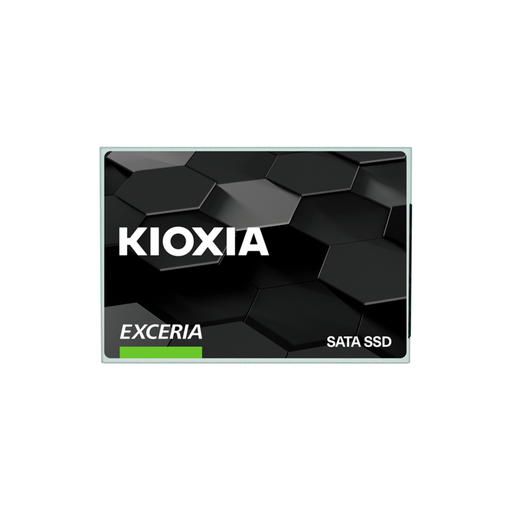
Why This Fits Their Persona: Ideal for users looking to breathe new life into an older laptop or desktop PC. The 2.5-inch form factor is widely compatible, and the performance boost over an old HDD is immediately noticeable without breaking the bank.
It avoids the speed trap by offering solid SATA performance that perfectly matches the capabilities of older systems. You're not paying for NVMe speeds that your device can't use anyway.
Balanced price-to-performance ratio. The 120 TBW rating is more than sufficient for everyday use and light office work.
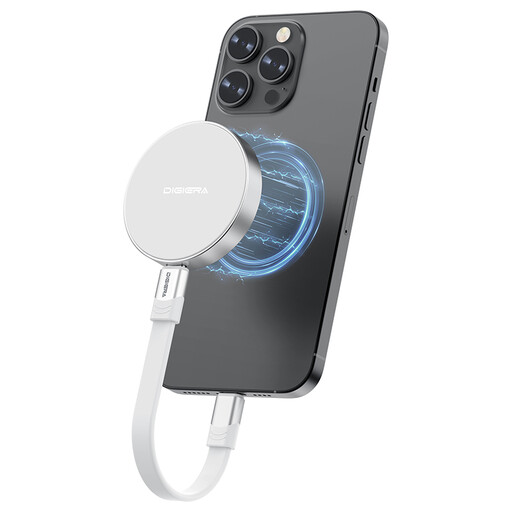
Why This Fits Their Persona: Perfect for videographers and photographers who work on the go, especially with an iPhone 15/16 Pro. The magnetic mount allows for direct recording of 4K ProRes video to the SSD without filling up the phone's internal storage.
Solves the compatibility problem for a specific use case. The combination of high speed (up to 2000 MB/s) and magnetic attachment is precisely tailored to the needs of mobile filmmakers.
Extremely high transfer speed thanks to USB 3.2 Gen 2x2. The lightweight and shock-resistant housing protects data even during mobile use.

Why This Fits Their Persona: Engineered for maximum performance in high-end gaming PCs and the PlayStation 5. Its PCIe 4.0 speeds reduce loading times to a minimum and accelerate demanding applications like 4K video editing.
Addresses the problem of thermal throttling. The integrated heatsink ensures the SSD maintains its high performance even under sustained load, which is often not the case with cheaper NVMe SSDs without cooling.
Sequential read speeds of up to 7,450 MB/s. Fully compatible as a storage expansion for the PS5. The 2TB capacity offers ample space for a large game library.
We've compiled a full, real-time updated list of products that fully meet these strict selection criteria and all relevant safety regulations.
A heatsink is generally not necessary for 2.5-inch SATA SSDs. However, for fast M.2 NVMe SSDs, especially models with PCIe 4.0 or 5.0, a heatsink is highly recommended. It prevents overheating during intensive use (thermal throttling), which can lead to a significant drop in performance. Many motherboards already have integrated M.2 heatsinks, and a heatsink is a requirement for a PS5 SSD.
The installation is straightforward:
The lifespan of an SSD is indicated by the aforementioned TBW (Terabytes Written) value and the MTTF (Mean Time To Failure) in hours. For a typical home user, it would take many years to reach the TBW rating of a modern SSD. Even with a budget 500 GB SSD with a TBW of 150 TB, you would need to write about 40 GB of data every day for over 10 years to reach that limit. In normal use, technological obsolescence is therefore often a bigger factor than physical wear and tear.