What should you look for when buying?
First compare camera types based on the view you want. Then check whether you can position them securely and without taking up too much space at a shared bedroom table.
Mirrorless camera with macro lens
A good fit if: Very fine cut edges in a fixed table view are your priority and you have room for a lens and mount.
Things to consider: The LUMIX G 30 mm F2.8 Macro is sold separately; the G100D kit includes a 12–32 mm standard zoom lens.
Compact camera with a fixed lens
A good fit if: You want to film without changing lenses. Sony lists the ZV-1 II’s focusing range as starting at around 5 cm from the front of the lens.
Things to consider: A short focusing distance doesn’t prove the stamp will look large enough from your table position; Canon’s stand hasn’t been tested as an overhead mount.
USB webcam connected to a computer
A good fit if: You mainly record on a PC or want to show your work surface live. Logitech describes the MX Brio as having a Show Mode that tilts downwards and 4K recording at 30 frames per second.
Things to consider: Show Mode doesn’t confirm how clearly it will capture the fine details of stamp carving; the focus and working distance need to suit your setup.
Compact gimbal camera
A good fit if: You want to capture moving perspectives as well as a fixed view of your table.
Things to consider: Stabilisation doesn’t replace a secure, fixed camera position. DJI lists the Osmo Pocket 3’s focusing range as starting at 0.2 m; check whether the stamp will appear large enough.
| What matters to you |
What to check when buying |
Who it matters to |
| Carving details |
Check the subject size and sharpness at your actual working distance; a macro lens must be compatible with the camera mount. |
If I want to show fine cut edges, the stamp needs to remain large and sharp enough from my fixed camera position. In this scenario, around 33% of consumers put this level of detail first. |
| Space and mounting |
Leave room for your hands, tools and lighting; test the mount and viewing angle at the table. |
If I need to put my camera away quickly after filming, the setup mustn’t permanently get in the way of our shared workspace. In this scenario, around 27% of consumers make this their main priority. |
| Sound and privacy |
Test speech and room noise from the planned position, and keep the picture and sound focused on your work area. |
If I want to explain what I’m doing without recording the other person’s conversations, the microphone position and framing are crucial. In this scenario, around 20% of consumers put sound and privacy first. |
| Lighting at the table |
Test whether the stamp is well lit with your hands, tools and planned camera position in place. |
If I want to show clear cuts in the available light, my hand mustn’t cast a shadow over the subject. In this scenario, around 13% of consumers prioritise lighting at the table. |
| Recording on a PC |
Check computer compatibility, the software you’ll need and the view of your work surface. |
If I record directly on my PC or teach live, I want to monitor the view of my table without unnecessary extra steps. In this scenario, around 7% of consumers make this their main priority. |
Joybuy products for this activity
This selection includes webcams for recording on a PC and compact cameras for mobile or moving perspectives. For each model, check whether the framing, focus and mounting will suit your stamp carving at your working distance.
 No image available
Full HD 1080p webcam with microphone
For recording your work surface on a PC, this webcam’s USB plug-and-play connection and built-in tripod could make it a simple option to set up.
Specifications include Full HD 1080p video, a built-in microphone, a lens that rotates through 360° and a flexible built-in tripod. Check the framing and sharpness at your own table to make sure it captures fine carving details.
Joybuy
 No image available
DJI Osmo Pocket 3 Standard Combo + J.ZAO Pocket 3 Camera Filter Kit
This bundle may suit compact recording and additional perspectives; you’ll need to plan the position separately for a fixed view of your table.
The product name specifies a three-axis gimbal camera with 4K/120-fps recording and a J.ZAO filter kit. These specifications don’t tell you whether small carving details will appear large enough from your planned position.
Joybuy
 No image available
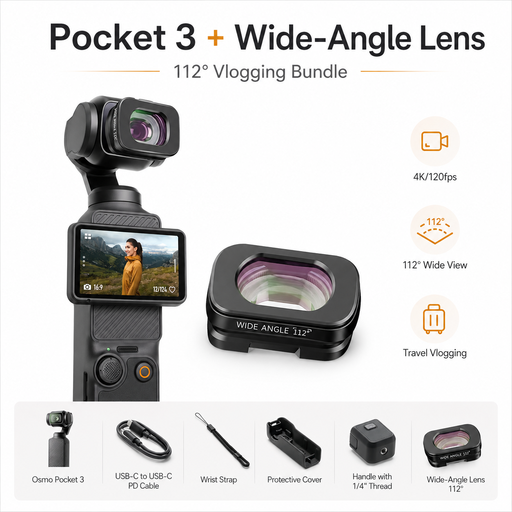
DJI Osmo Pocket 3 Standard Combo + ULANZI F35 112° Wide-Angle Lens
This bundle is an option if you’re looking for a compact camera for changing perspectives; a wider field of view doesn’t automatically give you a macro shot.
The product name specifies a three-axis gimbal camera with 4K/120-fps recording and a magnetically attachable 112° wide-angle lens. Check whether your chosen framing will show the stamp large enough.
Joybuy
 No image available
2K Pocket Vlogging Camera with 360° Rotating Lens
This portable camera may suit mobile video recording and changing viewing angles.
The product name specifies 2K video and a lens that rotates through 360°. Before buying, check whether you can mount it securely for a fixed, sufficiently close view of your table.
Joybuy
 No image available
AOC webcam for PC with microphone
This webcam may suit recording on a PC or at your table, provided you can position it appropriately in your workspace.
Specifications include 4K video, PDAF autofocus, two microphones and a 99° field of view. The description also lists 180° tilt, 360° rotation and plug-and-play; check whether the mount and framing work for your table.
Joybuy
Frequently asked questions
Are 4K and autofocus enough to show fine cut lines?
No, not on their own. What matters is whether the subject appears large and sharp enough from the camera position available to you. Sony Germany lists the ZV-1 II’s focusing range as starting at around 5 cm from the front of the lens, while DJI lists the Osmo Pocket 3’s as starting at 0.2 m. Panasonic Germany specifies 1:1 magnification for its separately available 30 mm macro lens. Compare these figures with the framing you want at your table.
How can I test the setup in a shared bedroom?
Mark out your work area and check where the camera, mount, your hands and the lighting can go. Canon describes the PowerShot V10 as having a built-in stand, while Logitech describes the MX Brio as having a Show Mode for desk content. Without testing them at your own table, neither proves they’re suitable for an overhead close-up.
What should I plan for sound, cleaning and accessories?
Try a short speech and room-noise test at your planned recording position, and check which memory card, power supply, mount or extra lighting your setup will need. The 30 mm macro lens mentioned for the Panasonic G100D kit is sold separately. Check the manufacturer’s instructions for the relevant model for details on compatible memory cards and cleaning.
What should I know about statutory rights and the manufacturer’s guarantee?
The Verbraucherzentrale distinguishes statutory rights against the seller from a voluntary guarantee offered by the manufacturer or retailer. If you’re offered a voluntary guarantee, check its specific terms and don’t confuse a guarantee promise with your statutory rights if the goods are faulty.
Can I film the other person in the bedroom or record their conversations?
There isn’t a blanket answer. Under § 201 of the German Criminal Code (StGB), recording another person’s private spoken words without their permission is a criminal offence. Subject to additional conditions, § 201a StGB covers unauthorised images of someone in a home where this violates their highly personal private sphere. Under § 22 of the German Copyright Act (KunstUrhG), publishing or publicly displaying someone’s image generally requires their consent; any legal exceptions must be considered separately. The Federal Ministry of Justice and the Federal Office of Justice list these provisions on “Gesetze im Internet”. Keep the picture and sound focused on your workspace, and ask the other person before recording them if you intend to include them.


