If you’ll mainly be filming your workbench from above and recording on a computer, a document camera is a good place to start. For particularly tiny details, consider a mirrorless camera with a suitable macro lens. At your planned mounting point, check the focusing distance, the area of the workbench in view and the recording setup: a high resolution alone won’t guarantee a sharp close-up. A webcam can simplify your computer-based workflow, while a gimbal camera is better suited to adding moving shots.
Which cameras are right for different users?
Carvers who focus on detail
If you want to show fine lines and cut edges in close-up, allow time to get the lens, camera position and working distance just right. Sony gives the SEL30M35 macro lens a minimum focusing distance of 0.095 m and a 1:1 magnification ratio; Canon gives the RF 35mm F1.8 Macro IS STM a 1:2 magnification ratio.
Overhead tutorial creators
If you regularly film your workbench from above, a fixed overhead set-up is practical. IPEVO gives the V4K PRO a maximum shooting area of 34.2 × 25.5 cm. Check that the view from your mounting point also captures your hands and tools.
Computer-based streamers
If you record or stream on a computer and want to switch between a workbench view and talking to camera, compare the available recording and positioning options. IPEVO describes the V4K PRO as having a USB connection and built-in microphone; Logitech says the MX Brio has a downward-facing Show Mode.
What should you look for when buying?
When filming stamp carving at home, your choice will mainly depend on whether you prioritise close-up details, an unobstructed overhead view, controllable studio lighting or a simple computer-based workflow.
USB document camera
A good fit if: you mostly film from above and want to connect the camera directly to your computer.
Things to consider: Check that the focus range and shooting area suit the height of your workbench and the available workspace.
Mirrorless camera with a macro lens
A good fit if: you want to show tiny cut edges in close-up and choose your lens and framing precisely.
Things to consider: You’ll also need to plan for the right lens and a clear, stable mounting position. A 1:1 ratio and a 1:2 ratio apply to different lenses.
USB webcam
A good fit if: you stream on a computer and want to combine a workbench view with talking to camera.
Things to consider: A desk-view mode doesn’t automatically mean fine carving lines will appear sharp from your mounting height.
Compact gimbal camera
A good fit if: you want to film moving introductions or other action in addition to a fixed workbench view.
Things to consider: For tight close-ups of your carving, the minimum focusing distance needs to suit the framing you want.
| What matters when buying |
What to check |
Who will find this important? |
| Sharp carving details |
Check the focusing distance and magnification ratio for the specific camera and lens combination. |
If I need to show fine cut edges in close-up, I check close-focus capability and magnification together. Around 36% of consumers put sharp carving details first. |
| Unobstructed overhead view |
Check the shooting area and mount with your actual workbench set-up. |
When I’m carving, I want both hands and my tools in shot. Around 29% of consumers prioritise a clear overhead view and plenty of workspace. |
| Studio lighting |
Test with the lights you plan to use and check which shutter speed settings are available. |
I want an even image without distracting flicker under my studio lights. Around 21% of consumers prioritise reliable recording under studio lighting. |
| Computer-based workflow |
Check the connection, recording software, available image format and microphone requirements. |
For recording or streaming on a computer, I want to set up the picture and any audio I need without a complicated changeover. Around 14% of consumers prioritise a simple computer-based workflow. |
Which buying and set-up mistakes should you avoid?
-
Comparing resolution alone
Even a high-resolution camera needs to focus from your planned distance and show the stamp large enough in the frame. Document cameras, macro lenses and gimbal cameras all have different focusing and imaging characteristics.
Measure the mounting height and the area you want in shot, then compare both with the specifications for the specific camera or camera and lens combination.
-
Assuming a camera body is a complete macro set-up
The magnification figures mentioned apply to specific lenses, not to the camera body on its own.
Compare complete, compatible set-ups. Remember to factor in the right lens, a mount and any other recording accessories you may need.
An interchangeable-lens set-up needs space above the workbench and must fit around the area you need for your hands and tools.
-
Only noticing flicker after a long recording
Certain lights can cause visible interference, and not every camera lets you adjust the shutter speed manually.
Test your planned lighting before a long session and check which settings are available on the specific model.
Which brands and camera ranges are worth considering?
IPEVO
The V4K PRO is a USB document camera designed to give you a computer-connected overhead view of your workbench.
- IPEVO gives it autofocus from 10 cm, a maximum shooting area of 34.2 × 25.5 cm and a built-in microphone.
- These maximum specifications don’t replace checking the camera against your workbench height and recording software.
Sony
The ZV-E10 II is an E-mount mirrorless camera designed for video; the separately available APS-C SEL30M35 macro lens is worth considering for close-up details.
- Sony lists interchangeable lenses and 4K 60p for the camera. For the SEL30M35, Sony gives a 1:1 magnification ratio and a minimum focusing distance of 0.095 m.
- You’ll need to plan for the lens and the clear space required above your workbench separately. These specifications don’t prove that all Sony cameras offer superior quality.
Canon
The video-focused EOS R50 V can be paired with an RF lens suited to close-up work.
- Canon lists a microphone and headphone socket among the EOS R50 V’s features. The compatible RF 35mm F1.8 Macro IS STM has a 1:2 magnification ratio, according to Canon.
- The macro specification applies to the lens, not the camera body on its own. Check the lens and mounting space together.
Logitech
The MX Brio is a USB webcam for computer-based recording, with a mode for showing your desk.
- Logitech lists 4K at 30 fps, 1080p at 60 fps and a downward-facing Show Mode.
- Show Mode doesn’t prove that tiny carving lines will appear sharp from every mounting height.
DJI
The Osmo Pocket 3 is a compact gimbal camera for filming at your workbench and on the move.
- DJI lists a three-axis gimbal and a focusing range from 0.2 m.
- For very tight, fixed overhead shots, this distance needs to suit the framing you want.
Joybuy products for workbench filming
The Joybuy products below include USB webcams for computer-based recording and a compact gimbal camera for adding moving shots. For close-ups, check that the focus and framing suit your actual set-up.
 No image available
Full HD 1080P webcam with microphone
For computer-based video recording or streaming, if Full HD meets your needs. The product title lists 1080p, USB plug and play and a built-in microphone; check close-up focus from your planned mounting position.
View at Joybuy
 No image available
AOC webcam for PC with microphone, 4K
For computer-based recording if you’re looking for a webcam with a 4K specification. The product title lists a 99° field of view and a microphone; check whether it can capture fine carving details from your planned distance.
View at Joybuy
 No image available
AOC 4K PRO webcam with Sony IMX363 sensor
For computer-based recording if you’re looking for an autofocus webcam. The product title lists a Sony IMX363 sensor, PDAF autofocus, two microphones and USB-A/USB-C; these specifications don’t guarantee macro-level sharpness at your carving station.
View at Joybuy
 No image available
Insta360 Link 2C Standard Bundle, Graphite Black
For computer-based streaming with a workbench view using DeskView. The product title lists 4K, HDR and Auto-Framing; according to the product information, the device is currently not compatible with ARM-based Windows systems.
View at Joybuy
 No image available
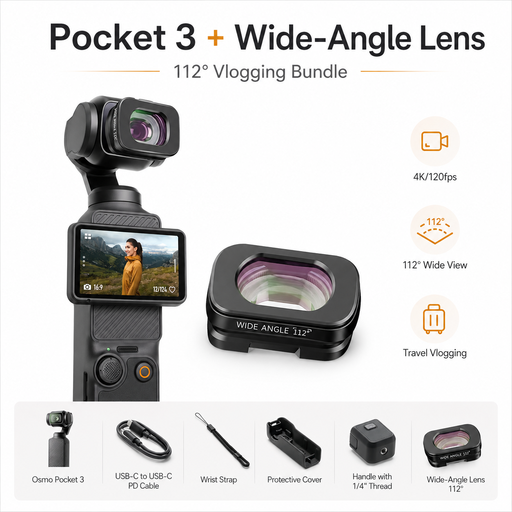
DJI Osmo Pocket 3 Standard Combo + ULANZI F35 112° wide-angle lens
For extra moving shots away from your carving station. The product title lists 4K/120fps and a 3-axis gimbal; DJI gives the Osmo Pocket 3 a focusing range from 0.2 m, which needs to suit your framing for very tight workbench close-ups.
View at Joybuy
Frequently asked questions
Is a 4K specification enough to show fine carving lines?
No, the 4K specification alone doesn’t tell you that. Check whether the camera can focus from your mounting position and whether the stamp looks large enough in your chosen framing. IPEVO gives the V4K PRO a focus range from 10 cm; for Sony’s SEL30M35, the minimum focusing distance and 1:1 magnification are listed separately.
What should I test when filming under desk lamps?
Record a short test under the exact lights you plan to use and check the footage for flicker. Sony notes that changing the shutter speed can reduce this effect under certain lights; not every camera offers this setting.
How can I keep my camera clean at my carving station?
Clear carving debris from your workspace before cleaning your camera or lens, and follow the care instructions for the device. Position the camera so your hands won’t touch it while you work.
What rights apply when buying a camera online?
For eligible distance purchases from a trader in the EU, you generally have a 14-day right to cancel from the date of delivery; exceptions and possible return costs should be taken into account. Your Europe also states that goods are covered by a legal guarantee for at least two years from receipt. This guarantee is separate from any voluntary manufacturer’s warranty.
Can I publish my carving videos filmed at home?
If other people are recognisable or can be identified indirectly, footage of them may involve personal data. The Berlin Commissioner for Data Protection and Freedom of Information distinguishes between use for purely private purposes and use outside the private sphere. Check the rights of anyone affected before publishing footage like this.


