Collectors who enter lots of numbers
If you record lots of stamps individually, you’ll want easy-to-reach keys for catalogue numbers and the other data fields.


If you often enter catalogue numbers and other figures, a full-size keyboard with a number pad is a natural starting point, although it takes up more desk space. If space is limited, a more compact model could suit you, provided you can do without an integrated number pad. Your catalogue software provides the data fields; customisable keys are only useful for actions that your application can actually trigger (Scoutsystems Software; CHERRY; Logitech).
If you record lots of stamps individually, you’ll want easy-to-reach keys for catalogue numbers and the other data fields.
If you often switch between the same fields or functions while cataloguing, check whether your software supports these actions using keyboard shortcuts.
If you need room for a mouse, album and stamps as well as your keyboard, a more compact model could be a good choice – provided you can do without an integrated number pad.
First, consider whether you often enter numbers or mainly need to save desk space. Then check whether customisable keys work with the specific catalogue software you use.
| What matters | What to check before buying | Who is this important to? |
|---|---|---|
| Entering numbers and data | Check the layout and whether the specific model has an integrated number pad. | If I often enter catalogue numbers, I want the number keys within easy reach. Around 40% of consumers put frequent number entry first. |
| Recurring tasks | Test in your catalogue software whether the action you want can be triggered with a keyboard shortcut; check the required configuration software and operating system. | If I repeat the same actions while entering records, I only want to customise them if my application allows it. Around 30% of consumers prioritise these recurring data-entry tasks. |
| Space for your work materials | Allow for the keyboard, mouse, album and documents together; if you’re considering a TKL model, remember that it doesn’t have a number pad. | If desk space is limited, I want to keep room for stamps and my album. Around 20% of consumers prioritise the available workspace. |
| Key layout | Try the split layout and see how it feels for you, if possible; allow time to get used to it. | For longer cataloguing sessions, I want a key layout that feels comfortable to use. Around 10% of consumers prioritise this personal fit. |
The catalogue software determines the field structure. A keyboard function can’t add missing fields, and it won’t automatically open every dialogue directly.
First, try using a keyboard shortcut to carry out a recurring action in your application. Then choose a keyboard with customisation features that support that action.
Setting up the software and key assignments may take extra time.
A TKL model such as the Kensington Pro Fit Ergo KB675 EQ TKL doesn’t have an integrated number pad; the CHERRY KC 1000 is an example of a full-size keyboard with a number pad.
Count how often you enter numbers in your records, then compare that with the desk space a larger keyboard takes up.
If you later find you need a number pad, you may have to buy a separate one.
A split key layout may take some getting used to. Manufacturers’ claims about reducing strain don’t prove an individual benefit and aren’t a substitute for professional advice if you have discomfort.
Try the layout and typing feel before deciding. Don’t treat an ergonomics label as a health promise.
The KC 1000 is a slim, full-size USB keyboard with a number pad; the KC 4500 ERGO has a curved key layout and a cushioned palm rest.
The MX Keys S is worth considering if you want to explore and potentially customise recurring tasks with Logi Options+.
The Pro Fit Ergo KB675 EQ TKL is a more compact German-layout keyboard for anyone who doesn’t need an integrated number pad.
The PERIBOARD-512 B is a wired split keyboard with a German layout and an integrated number pad.
This Joybuy selection includes keyboards for German QWERTZ typing, including models with a number pad, compact options and keyboard-and-mouse sets. Before buying, check that any customisable features work with your catalogue software.
 No image available
The QWERTZ layout and shortcut keys suit a workflow that uses recurring keyboard commands; your catalogue software needs to support the actions you want.
The description lists connections to up to three devices, along with a slim, lightweight design.
 No image available
With its integrated touchpad and foldable mini design, this is a compact option if you have limited space for input devices.
Product details list QWERTZ, three Bluetooth channels and compatibility with iPadOS, Android and Windows.
 No image available
The full-size layout, with a separate number pad and navigation keys, suits frequent manual number entry.
The product description lists 104 keys and Bluetooth, 2.4 GHz and USB-C connections. A multifunction key is described as configurable, but support for any specific catalogue software isn’t confirmed.
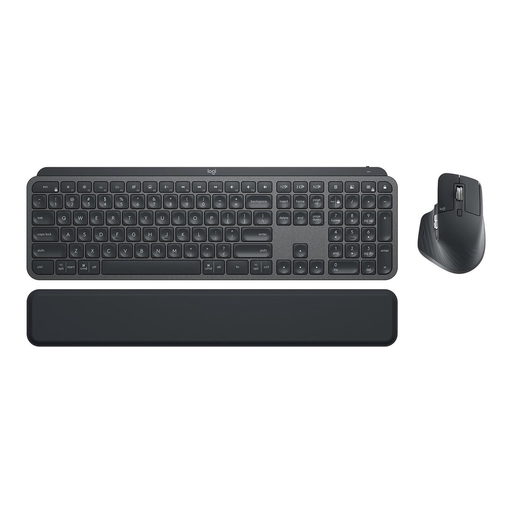 No image available
This set pairs a keyboard with an MX Master 3S mouse, so you can use both input devices together.
The description lists German QWERTZ, connections via Logi Bolt or Bluetooth, and device switching.
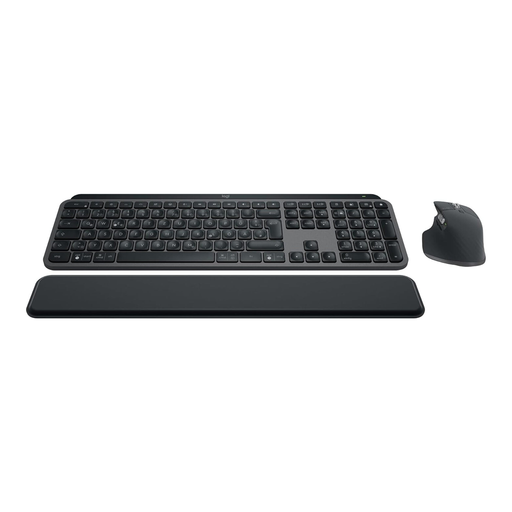 No image available
This keyboard-and-mouse set lists Smart Actions via Logi Options+ for recurring tasks. Check in your stamp catalogue software whether it can trigger the actions you need.
The product description lists Bluetooth and Logi Bolt, as well as support for up to three devices.
No. The fields need to be provided by the catalogue software you use. A keyboard may be able to trigger recurring actions; test in the specific application whether this works with the fields you want.
Plan where to place your mouse, album and documents alongside your keyboard. For workplaces covered by Germany’s Workplace Ordinance, its annex requires a work surface where input devices and work equipment can be arranged flexibly (Federal Ministry of Justice and Federal Office of Justice, Laws on the Internet). This isn’t a general product requirement for private collectors.
No. The German Environment Agency advises that old electrical equipment must not go in household waste and should instead be handed in separately. Removable batteries should be taken out and disposed of separately before you hand it in.
If possible, try the key layout before longer cataloguing sessions and follow the manufacturer’s cleaning instructions. A review of the Logitech Ergo K860 described a gap between the palm rest and keyboard that was difficult to clean; this doesn’t necessarily apply to other split models.