What should you look for when choosing?
First, check whether your cataloguing software supports the duplicate-related commands you need. Then consider how often you enter data, the German layout, hand position and the space available when choosing a keyboard design.
| What you need |
What to check before buying |
Who is it important for? |
| Recurring actions |
Check the specific software command and whether a customisable key can trigger it. |
If I want to simplify recurring tasks, my cataloguing software needs to support the relevant command. Around 36% of consumers prioritise repeated entries. |
| Numbers and catalogue numbers |
Look for a built-in number pad, a German layout and the exact model variant. |
A number pad that’s easy to reach is important when entering lots of numbers, quantities or values. Around 29% of consumers prioritise numeric entry. |
| Hand position during long sessions |
Compare the key layout and design at your workstation; unfamiliar layouts may take time to get used to. |
If I catalogue for long stretches, the keyboard needs to suit the way I position my hands. Around 21% of consumers prioritise hand position. |
| Desk space |
Measure the available space and weigh up a compact design against a built-in number pad. |
If space is limited, I want to know whether a more compact layout will work for the entries I make. Around 14% of consumers prioritise desk space. |
Keyboards at Joybuy
The Joybuy products below are keyboard options for recording stamp details. For the specific variant, check the layout, number pad and whether its features work with your cataloguing software.
 No image available
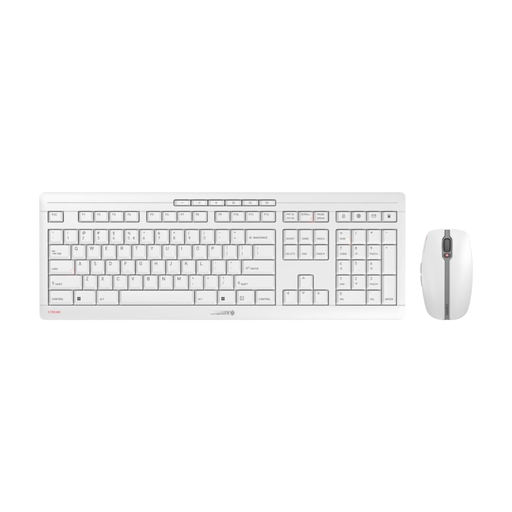
CHERRY Stream Desktop Recharge, keyboard and mouse set, EU-QWERTY
The customisable key function may be useful for recurring office tasks; check whether it can trigger the command you need in your cataloguing software.
Wireless set with 2.4 GHz connection, scissor keys and USB-C charging. The stated layout is EU-QWERTY.
View at Joybuy
 No image available
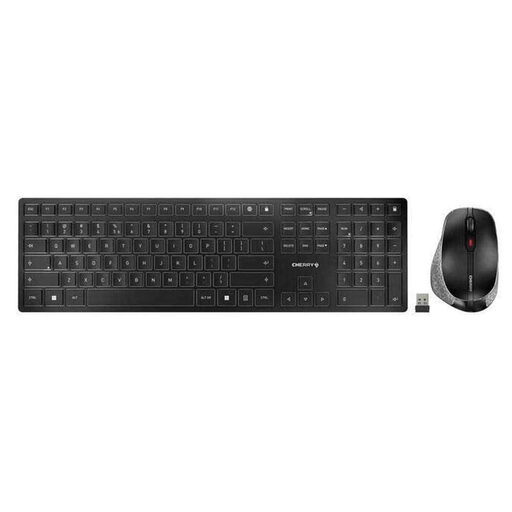
CHERRY DW 9500 SLIM, wireless keyboard and mouse set
If you want to work wirelessly and adjust the keyboard angle, check whether this set and its specific key layout suit your cataloguing workstation.
The product description lists Bluetooth or 2.4 GHz wireless, scissor switches and EU-QWERTY. Before ordering, check that this layout suits the entries you make.
View at Joybuy
 No image available
CHERRY MX 2.0S, mechanical keyboard, German QWERTZ layout
A wired mechanical keyboard may suit you if you prefer a German QWERTZ layout and a fixed connection.
The product description lists a wired model with full RGB backlighting. Check the exact version and make sure the layout suits the entries you make.
View at Joybuy
 No image available
CHERRY XTRFY MX 3.1, mechanical keyboard, white, German layout
If customisable controls matter for your cataloguing workflow, check whether the programmable media panel can handle the software commands you need.
The product description lists a wired USB keyboard with an aluminium frame and German layout. Check the exact variant before ordering.
View at Joybuy
 No image available
Logitech ERGO K860, wireless ergonomic keyboard, QWERTZ
The split key layout and built-in number pad may be useful for longer sessions with frequent number entry. Try it at your own workstation to see whether the shape suits you.
The product description lists Bluetooth or a USB receiver, with support for Windows and Mac. Check that the connection option and layout suit your setup.
View at Joybuy
Frequently asked questions
Can a keyboard automatically detect duplicate stamp entries?
No. The keyboard features described don’t provide duplicate detection on their own. Check whether your cataloguing software can search for, copy or merge existing entries; an assigned key can only trigger a command supported by the software.
What should I check before setting up a macro key?
First, check that your software can run the command you need. Then check the operating system, configuration software and key assignment for the variant you’ve chosen. Logitech says Smart Actions use Logi Options+; Keychron describes an app for key assignments and macros for the K10 Pro.
How should I clean and dispose of a keyboard?
Don’t use harsh cleaning products or allow liquid to get inside the device. Don’t put an old keyboard in your household rubbish. The German Environment Agency lists local collection points for waste electrical equipment among the available options.
What are my rights if a keyboard bought online doesn’t suit me or is faulty?
For most consumer purchases made at a distance, you have the right to cancel, usually within 14 days of receiving the goods; exceptions and the details of the contract should be taken into account. The Verbraucherzentrale also distinguishes statutory rights for faulty goods from a voluntary manufacturer’s guarantee.
What should I look for in a wireless or Bluetooth keyboard in Germany?
For market surveillance, the German Federal Network Agency lists checks including correct CE marking, an identifiable product, manufacturer details and a German-language instruction manual. A product description alone doesn’t prove that a particular offer meets these criteria.


