Note-takers with an existing computer
You want to add handwritten notes at your height-adjustable desk, use your existing monitor and put the input surface away afterwards. Microsoft Support explains how to write and draw in OneNote with a pen.


At a standing desk, a pen tablet without a screen is a good fit if you already work with a computer and monitor and want to put the input surface away afterwards. A connected pen display is worth considering if you want to write directly beneath the pen tip; if you want to take notes without a work computer, an independent pen tablet is the right type of device. The key factors are available desk space, compatible connections and how you take and export notes. The German Federal Institute for Occupational Safety and Health also notes that standing may be less suitable for tasks requiring fine motor skills.
You want to add handwritten notes at your height-adjustable desk, use your existing monitor and put the input surface away afterwards. Microsoft Support explains how to write and draw in OneNote with a pen.
You want to see your strokes appear directly beneath the pen tip and can make room for an extra screen with the right connections. Wacom and XPPen describe the pen displays mentioned here as connected devices.
You want to take notes independently of your work computer and then add them to your existing file workflow. Huion describes the Kamvas Slate 11 as a standalone Android tablet.
First, think about what matters most at your standing desk: keeping desk space clear, seeing your strokes directly, writing without a computer or being able to use your notes elsewhere.
A good fit if: You use a compatible computer and monitor and want to clear the input surface away after writing.
The trade-off: You won’t see your strokes beneath your hand; you’ll need to look at the monitor as you write.
A good fit if: You want to write directly where your notes appear and have room for an extra screen.
The trade-off: A screen you can write on doesn’t automatically make the device a standalone note-taking computer; check your computer’s connections.
A good fit if: You want to take notes without connecting a work computer.
The trade-off: Check that the note-taking app, file formats and transfer to your work computer fit your workflow.
| What matters | What to check before buying | Who it matters most to |
|---|---|---|
| Space and writing area | Compare the device’s overall dimensions with its active area, allow room for your hand and cable, and check where your monitor is positioned. Huion gives the Inspiroy H640P’s overall dimensions as 260 × 147,7 × 8 mm and its working area as 160 × 100 mm; XPPen lists an active area of 10 × 6,25 inches for the Deco 01 V3. | If I want to keep my keyboard and papers on the desk and put the device away afterwards, I compare its footprint with the usable writing area. Around 37% of consumers prioritise space and writing area. |
| Seeing strokes directly | Check whether you’re happy to look at a separate monitor as you write. For one-cable use of the Wacom One DTC141, Wacom requires Thunderbolt 3 or later, or DisplayPort Alt Mode. | I want to see my handwriting directly beneath the pen tip and can make room for a screen. Around 27% of consumers prioritise seeing their strokes directly. |
| Taking notes without a work computer | Check the standalone operating system, the note-taking app you need, and whether you can save and transfer a sample file of your own. Huion describes the Kamvas Slate 11 as an Android tablet that lets you take notes without a connected PC. | If I want to write independently of my work computer, the file workflow afterwards must also suit my devices. Around 18% of consumers consider independence from a computer their top priority. |
| Using your notes elsewhere | Test writing, saving, reopening and exporting in the version of the app you actually use. Microsoft notes that handwriting-to-text conversion isn’t available in OneNote for the web. | Before choosing a type of device, I want to know whether I can continue editing and share my notes in the software I need. Around 18% of consumers prioritise their note-taking and file workflow. |
The usable writing area isn’t the same as the device’s overall dimensions. You’ll also need room on your desk for your hand and the cable.
Measure the free space at your standing desk and compare both dimensions for the specific model. Set up the writing area so it’s easy to reach both when sitting and standing.
Being able to write directly on a display doesn’t mean it will work without a compatible computer connection.
First decide whether you need a connected screen or a standalone tablet. Then check the connections and accessories for the specific version. Wacom says the stand for the One DTC141 is sold separately and lists a separately available Converter Kit for computers without a compatible video connection.
Your ability to edit, convert and share notes also depends on the software you use and its version.
Try taking a note of your own in the version of the app you actually use, then save and share it.
The product ranges mentioned include both pen tablets without screens and connected pen displays.
The Inspiroy H640P is a pen tablet without a screen; the Kamvas Slate 11 is a standalone Android tablet.
The Deco 01 V3 is a pen tablet without a screen; the Artist 12 (2nd Generation) is a connected pen display.
The M908 is a pen tablet without a screen, with a larger active area and built-in controls.
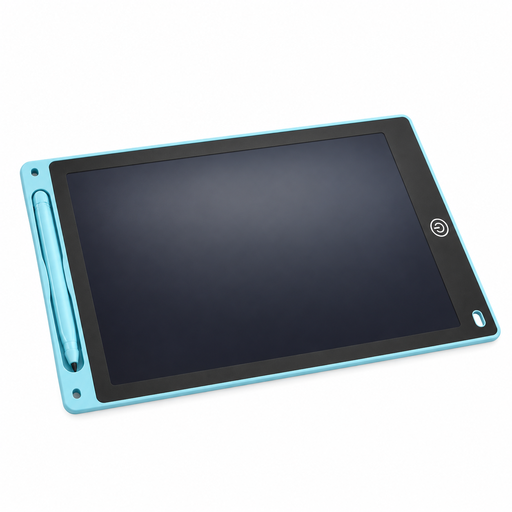
Here you’ll find a reusable LCD writing tablet with a pen for jotting down short handwritten notes at your desk. It’s different from a pen tablet that connects to a computer or note-taking software.
 No image available
A reusable LCD writing tablet is an option for jotting down short handwritten notes at your desk; it’s different from a pen tablet that connects to a computer and software.
The product details give a writing area of 230 × 165 mm and a thickness of 5 mm. A button clears the entire surface, while a lock function helps prevent accidental erasing.
No. The German Federal Institute for Occupational Safety and Health describes sit-stand working as alternating between standing and sitting, and notes that standing may be less suitable for tasks requiring fine motor skills. Set up your desk and writing area for both positions rather than assuming that buying a particular device means you should stand for a fixed amount of time.
No. For the one-cable setup described by Wacom for the Wacom One DTC141, your computer must support Thunderbolt 3 or later, or DisplayPort Alt Mode. Also check the power requirements and which cables are included with the specific version.
No. Microsoft Support notes that handwriting-to-text conversion isn’t available in OneNote for the web. Check which version you’ll actually use to continue working on your notes.
Check which cables and stand accessories are included with the version you choose. Wacom says the stand for the One DTC141 is sold separately. The ugee M908 instructions describe driver installation.
For a qualifying distance purchase from a business seller, you generally have a 14-day right to withdraw from the contract, starting from delivery of the goods. Your Europe, the European Union’s consumer portal, highlights exceptions and possible return costs. Your statutory rights if goods are faulty are separate and are not the same as a voluntary manufacturer’s warranty.