Photographers using a fixed tripod setup
If you’re photographing several stationery sets with the same framing, a tripod helps you keep your setup consistent. Canon Germany describes a tripod as useful for product photos with consistent framing.


For repeated photos using the same tripod setup, the self-timer or a compatible camera app is often enough. A compatible cable is useful if you want to release the shutter straight away. If you’d rather keep your distance from the camera while rearranging your stationery, Bluetooth could be an option, provided your exact camera supports the remote. None of these release methods will keep changing window light consistent.
If you’re photographing several stationery sets with the same framing, a tripod helps you keep your setup consistent. Canon Germany describes a tripod as useful for product photos with consistent framing.
If you rearrange pens, notebooks or cards between shots, a compatible wireless remote can let you release the shutter from a spot near your subject. Sony Germany notes that support depends on the camera model.
Before buying an accessory, try the self-timer or a compatible camera app to see if it suits your workflow. Canon Germany lists Camera Connect as a remote-control option for supported cameras.
A good fit if: a shutter delay works for your workflow, or your camera supports the app controls you want.
Consider: the self-timer won’t release the shutter straight away, and app features depend on the camera model.
A good fit if: you want to release the shutter straight away from a fixed tripod position, and the cable matches your camera’s socket.
Consider: the connector and cable length limit which models and operating positions will work for you.
A good fit if: you want to release the shutter while rearranging your subject, and your camera supports that specific remote.
Consider: you’ll need to check compatibility and pair the device, adding a couple of setup steps.
| Consideration | What to check before buying | Who should pay particular attention? |
|---|---|---|
| Camera compatibility | Check your camera’s full model name against the compatibility list. For wired remotes, check the connector too. Canon Germany distinguishes between E3 and N3 connectors for the cable releases mentioned. | If you’re looking for a remote for a camera you already own, make sure that exact combination is compatible. Around 36% of consumers prioritise camera compatibility. |
| Releasing the shutter from a tripod | Consider whether you want to release the shutter straight away or whether a delay will do. For a cable, check that it reaches your operating position. | If you’re photographing several sets with the same framing, you won’t want to touch the camera when taking the photo. Around 29% of consumers prioritise touch-free shutter release for repeated tripod shots. |
| Freedom of movement | Check support for your exact camera model and find out what pairing steps are required. | If you change the arrangement between photos, you may want to release the shutter from beside your subject. Around 21% of consumers place particular importance on freedom of movement. |
| Avoiding extra accessories | Try the self-timer and, if available, the app supported by your camera model before buying an accessory. | If you only release the shutter occasionally, you may want to use the features you already have first. Around 14% of consumers mainly want to avoid buying an extra device. |
Connectors and supported remotes can vary, even within the same brand. According to Fujifilm, some Fujifilm cameras also require an adapter for the RR-100.
Check your camera’s full model name against the compatibility list. For a cable, also check the connector and whether you’ll need an adapter.
Releasing the shutter without touching the camera can help prevent you from moving it as you take a photo, but it won’t replace setting up a stable tripod.
Set up your camera and framing securely first, then choose the right way to release the shutter. Canon Germany describes a tripod separately as a way to keep product photos consistent.
A Bluetooth menu alone doesn’t mean the camera supports a particular Bluetooth remote. The Sony RMT-P1BT requires a compatible camera and the right setup.
Check the compatibility list and pairing instructions for your exact model. If the remote isn’t supported, a self-timer, app or compatible cable may be an option, depending on your camera.
Canon offers model-specific wired and Bluetooth options, as well as Camera Connect for supported cameras.
Nikon offers the MC-DC3 as a wired option and the ML-L7 as a Bluetooth option, each for supported cameras.
The RMT-P1BT is designed for Sony cameras that support this Bluetooth remote.
The RR-100 is a wired remote shutter release for the X and GFX cameras listed on the German accessories page.
The products featured are smartphone holders with remote-control functions. They offer a way to mount a smartphone, but don’t confirm compatibility with a camera-specific remote shutter release.
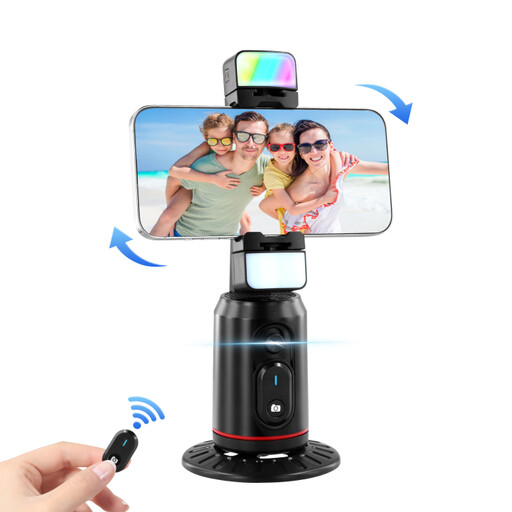 No image available
For smartphone photography when you want a holder with remote-control functions and 360° rotation.
The product title lists automatic face tracking, gesture control, an integrated fill light and a remote control.
 No image available
For taking smartphone photos from a little further away when you want a grip with a detachable remote control.
Features include a 1/4-inch tripod thread, a cold shoe and an integrated fill light.
Yes, if a shutter delay suits your workflow. Canon Germany lists the self-timer as a way to avoid touching the camera when taking a photo. A separate remote shutter release may be more useful if you want to take several shots in quick succession.
First, check whether your exact camera model supports the remote. For the Sony RMT-P1BT, Sony also describes enabling Bluetooth and Bluetooth remote control, then pairing the devices for the first time. Don’t assume these steps apply to other brands without checking.
If you buy from a trader, European Union guidance says you generally have a minimum two-year legal guarantee against the seller. This is separate from any voluntary manufacturer’s warranty. Distance sales are also generally covered by a 14-day right to cancel, subject to the relevant legal conditions and exceptions.
Look for the CE marking, manufacturer details and instructions in German. The Federal Network Agency lists these points in connection with its market surveillance. The CE mark is based on the manufacturer’s declaration and is not an independent quality mark.