Oval racing beginners at a desk
If you want to try your first laps on a single monitor, look for a complete set that can be attached to your desk. iRacing Support recommends setting up your device and inputs for the simulation you’re using.


For oval training on a single monitor, a steering wheel and pedal set that’s compatible with your platform and can be securely mounted to a desk or rig is a sensible starting point. Stronger force feedback won’t replace calibrated inputs or a properly configured monitor view. iRacing Support treats device calibration and seating position as separate setup steps.
If you want to try your first laps on a single monitor, look for a complete set that can be attached to your desk. iRacing Support recommends setting up your device and inputs for the simulation you’re using.
If you want to practise hitting your braking points consistently, pedal feel, calibration and a stable setup all matter. iRacing Support treats calibrating input devices as a separate setup step.
If you want to expand a direct-drive system over time, compare the components included and the compatibility of the specific bundle. Manufacturer specifications for individual wheel bases don’t automatically apply to every complete set.
Start by deciding on your platform and mounting options, then consider the pedals and any extra features. This helps you choose equipment that suits your actual training space.
| What to consider | What to check before buying | Who should consider it? |
|---|---|---|
| Steering feel | Compare the drive type and included components, then calibrate the device in your simulation. | If I want controllable feedback while practising, I’ll compare the wheel and base first. Around 28% of consumers put steering feel first. |
| Pedals and braking control | Consider the number of pedals, adjustment options, floor surface and mounting. A PC Games Hardware test reported that the T248 pedals slipped on carpet. | If you want to practise consistent braking inputs, consider pedal feel and stability together. Around 22% of consumers prioritise braking control. |
| Mounting at your setup | Measure your desk thickness and available space; check that the clamp and pedal positioning suit your workstation. | If I train at a desk, I need to be able to attach the set securely and conveniently. Around 22% of consumers focus mainly on space and mounting. |
| Platform compatibility | Check the full model variant and its compatibility with PC or console, as well as the game you’re using. | If you use a particular console or PC, you’ll need a version that’s specifically compatible. Around 17% of consumers put platform compatibility first. |
| Single-monitor awareness | Check the controls available for your game; adjust the field of view and seating distance in the simulation’s settings. | If I race with just one monitor, I want to configure the view and key functions to suit my game. Around 11% of consumers prioritise single-monitor awareness. |
Logitech G lists the G29 for PlayStation and PC, and the G920 for Xbox and PC. MOZA Support describes the R5 Racing Bundle as PC-only; specifications for a base that can be combined differently don’t automatically apply to this bundle.
Before buying, check the full model variant, what’s included and the platform details on the specific product page.
Choosing the wrong variant may mean extra time and effort spent on an exchange and setting everything up again.
A PC Games Hardware test dated 22 May 2024 reported that the Thrustmaster T248 pedals slipped on carpet. This finding relates to the variant tested and the stated floor surface.
Consider your actual floor and how the pedals can be secured. Don’t assume the test result applies to other sets or floor surfaces.
Depending on where you set it up, you may need extra fixings or a different location.
A Joybuy product listing for a cockpit explicitly excludes the steering wheel and pedals from the package, even though the product title refers to a steering wheel.
Check which parts are actually included before treating an offer as a complete set.
If the steering wheel or pedals aren’t included, you’ll need to budget for them separately.
iRacing Support covers monitor distance and seating position separately from steering wheel choice. In iRacing, the spotter feature can also provide information about other cars.
Configure your view in your simulation’s settings and check which race information features your game offers.
The PlayStation and PC version of the T128 is a complete set with two pedals; the T248 is also available in an Xbox/PC version.
The G29 is listed as a complete set for PlayStation and PC; the G920 is the Xbox/PC version.
The CSL DD QR2 Ready2Race Bundle is a PC direct-drive set with a steering wheel, pedals and desk clamp.
The R5 Racing Bundle is a PC direct-drive set with a steering wheel, SR-P-Lite pedals and desk clamp.
The Joybuy picks below include force-feedback steering wheels for PC and consoles. Before buying, check that the exact platform variant and everything included suit your training space and game.
 No image available
For shoppers looking for a force-feedback set with three pedals; check that the specific console or PC version is compatible with your device.
The product listing specifies three pedals and a 900° steering angle. It lists PlayStation, Xbox, PC and Mac as compatible systems.
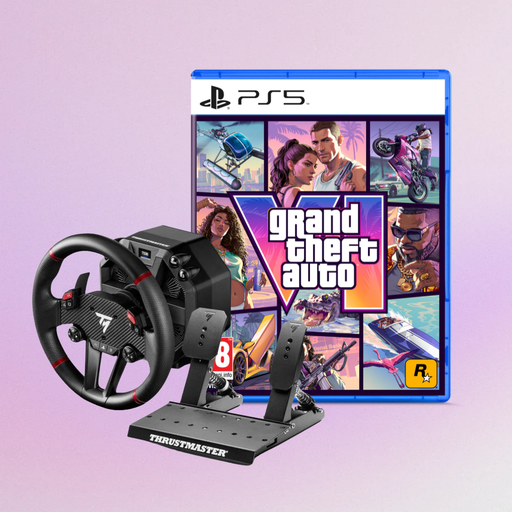 No image available
For shoppers considering a T598-P steering wheel; note that this version also includes GTA 6 for PS5.
The product description lists PS5, PS4 and PC for the steering wheel, and a GTA 6 PS5 German Edition as a boxed code.
 No image available
For shoppers looking for a desk-mounted wheel and pedal set for PC, PS4 or PS5; check that the clamp fits your desk.
The product listing specifies a two-pedal set, a desk clamp for surfaces up to 5.5 cm thick and an automatically adjusted steering angle of 270° to 900°.
 No image available
For shoppers comparing a force-feedback set for PS5, PS4 or PC; check that the listed platform is compatible with the game you use.
The product listing specifies Direct Axial Drive, 5 Nm of torque and a Raceline pedal set.
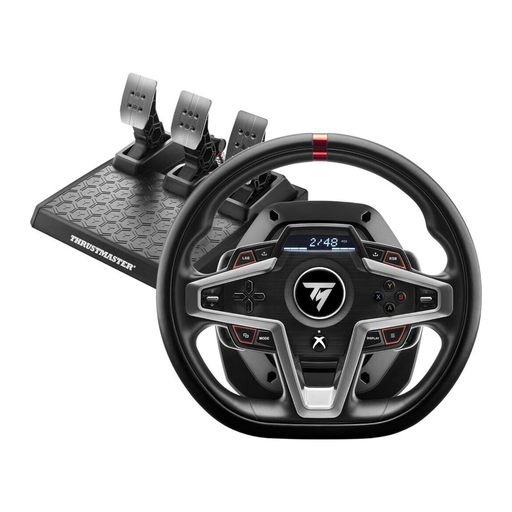 No image available
For shoppers with an Xbox Series X/S, Xbox One or PC who are looking for a force-feedback steering wheel. Check exactly what’s included if you need pedals.
If you use iRacing, measure the distance from your eyes to the screen and the monitor width while sitting in your usual position, then use the single-monitor calculation in the display settings. The iRacing Support guide applies to iRacing; for other games, check their display options.
With iRacing, Windows should first recognise the steering wheel and pedals, which you can then calibrate in the simulation. iRacing Support describes this order for setting up your controls.
iRacing requires a membership and says that the cars and tracks needed for all ranked Rookie series are included. Additional cars or tracks may cost extra, so check the series and track you want to race.
For a standard online purchase of goods by a consumer, a 14-day right to cancel generally applies in Germany, as explained by the Verbraucherzentrale for this type of purchase. If goods are faulty, statutory consumer rights also apply when you buy from a trader; Your Europe, the EU information portal, states that these rights last for at least two years from receipt. The right to cancel and rights relating to faulty goods are separate entitlements.