Choose an amplifier that works with your speakers and existing music source first. For passive speakers and a compatible analogue output, a compact amplifier may be all you need. Built-in network streaming is only relevant if you actually want to use it. Then check the connections, controls and space required – the wattage rating alone won’t answer these questions.
Which type of amplifier is right for you?
Streamers with passive speakers
If you want to listen through passive speakers without a separate streaming device, check which services and connection methods the specific model supports. WiiM, for example, describes the Amp Pro as having built-in streaming, but says it does not support AirPlay 2.
Owners of a desktop stereo system
If you want to keep using your passive speakers and existing music source, the right inputs and outputs matter more than extra features. The specifications from Fosi Audio and Cambridge Audio list different connection options for the V1.0G and AXA35.
Listeners short on space
If you want to keep the amplifier at your desk, make room for the unit, cables and any external power supply. Yamaha gives the A-S301’s dimensions as 435 × 151 × 387 mm; Fosi Audio describes the V1.0G as having an external power supply.
What should you look for when buying?
First, check that your music source and speakers are compatible with the amplifier’s connections. Then compare the space required, controls and any extra equipment you might need.
| What to consider |
What to check before buying |
Who should pay particular attention? |
| Music source and connection |
Check your source’s output and make sure it matches the inputs or supported streaming methods of the exact model. |
If I want to connect my existing source directly, the signal path needs to be compatible. Around 36% of consumers put the connection type first. |
| Speaker compatibility |
Check whether your speakers are passive and whether their impedance is compatible with the amplifier’s manual. |
If I want to keep using my passive speakers, I need to know that they’ll connect properly. Around 29% of consumers prioritise speaker compatibility. |
| Space and controls |
Allow for the device’s dimensions, space for cables, the power supply and, where relevant, a headphone socket. |
If the amplifier needs to fit on a small desk, I’ll need to make room for the unit and accessories together. Around 21% of consumers focus particularly on space and controls. |
| Extra equipment and pauses |
Check which source devices you’ll need, along with the model’s standby and automatic shut-off features. |
If I want to keep the number of devices on my desk to a minimum, streaming features and what happens during playback pauses matter. Around 14% of consumers make these their main priority. |
Common buying mistakes
-
Choosing based on a high wattage rating without checking how it was measured
Power ratings are based on specific loads and test conditions. They won’t tell you whether the connections work with your source or whether the unit will fit on your desk.
Start with your speakers and music source, and compare power ratings only alongside the stated load and measurement conditions.
-
Assuming every streaming amplifier from the same brand supports AirPlay 2
WiiM lists the Amp as AirPlay 2 compatible, but explicitly says the Amp Pro is not.
Check the full model name to confirm it supports the streaming protocol you need.
If your preferred playback method isn’t supported, you may need an additional compatible source device.
-
Allowing space for the amplifier itself, but not the rest of the setup
The Fosi Audio V1.0G is described as having an external power supply, and you’ll also need room for cables and connections.
Allow for the power supply and cable routing, and check that your music source’s output works with the amplifier’s input.
Brands to consider
Fosi Audio
The V1.0G is a compact option for passive desktop speakers with an analogue source; the BT20A Pro adds Bluetooth.
- Fosi Audio lists an RCA input and an external power supply for the V1.0G, and RCA and Bluetooth for the BT20A Pro.
- Before buying the BT20A Pro, check that the power supply option available meets your needs.
Cambridge Audio
The AXA35 is worth considering if you need multiple analogue sources or a wired headphone socket.
- Cambridge Audio lists analogue inputs, a 6.35 mm headphone socket and automatic standby. The manual says the speaker outputs are muted when headphones are plugged in.
- For network streaming, you’ll need to allow for a suitable additional source device.
Yamaha
The A-S301 is an integrated amplifier to consider if you need optical or coaxial digital inputs as well as analogue connections.
- Yamaha lists both digital inputs and dimensions of 435 × 151 × 387 mm for the A-S301.
- Features vary by model. The A-S301’s specifications don’t apply to the differently equipped R-S202D.
WiiM
The Amp and Amp Pro combine amplification for passive speakers with network features. The right choice depends on the streaming protocol you want to use.
- WiiM describes the Amp Pro as supporting streaming services and HDMI ARC. The WiiM Amp is on WiiM’s list of AirPlay 2-compatible devices.
- WiiM explicitly lists the Amp Pro as not supporting AirPlay 2.
Denon
The PMA-600NE combines traditional amplifier inputs with Bluetooth, while the PMA-900HNE adds built-in HEOS network streaming.
- Denon lists Bluetooth, digital inputs and MM phono for the PMA-600NE, and HEOS, AirPlay 2 and Bluetooth for the PMA-900HNE.
- These features apply to the models named and don’t indicate better sound quality at your desk.
Joybuy products for your home office
This selection is intended for use with passive speakers and a wired or Bluetooth music source.
 No image available
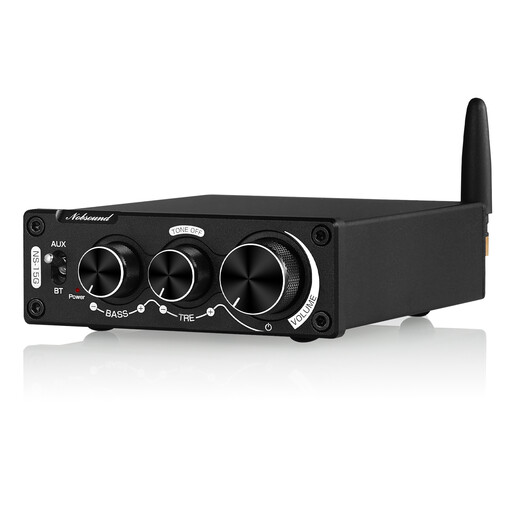
Nobsound 200 W mini Bluetooth digital amplifier with bass and treble controls
This model may suit passive speakers and a source with an analogue stereo output if you’d also like to use Bluetooth. Check that the connections work with your devices.
The product name specifies bass and treble controls. According to the product information, it comes with an external power supply; check that it’s suitable for the specific version before use.
Before buying, check that the specific device meets the applicable EU requirements and, where required, carries the correct CE marking. The European Commission notes that the manufacturer is responsible for meeting the relevant requirements; CE marking is not an independent product test.
Joybuy
Frequently asked questions
Do I need a separate network player with an amplifier that supports network streaming?
Not for a streaming method supported by the specific amplifier: WiiM describes the Amp Pro as having built-in services. Check that it supports the service and protocol you want to use. According to WiiM, the Amp Pro does not support AirPlay 2.
What should I check when connecting my speakers?
First, check whether your speakers are passive, then compare their impedance with the manual for the exact amplifier model. Fosi Audio gives a range of 2–8 Ω for the V1.0G; this doesn’t automatically apply to other devices.
What happens if there’s a fault: a guarantee or statutory rights?
For a consumer purchase, statutory rights relating to faulty goods are against the seller; a guarantee is a separate voluntary promise. The Verbraucherzentrale generally states that claims for defects last two years, and explains a conditional extension that has applied since 31 July 2026 when you choose a repair instead of a replacement for a fault.
What marking should I look for on an amplifier sold in Germany?
Where the applicable EU rules require electrical equipment to carry CE marking, it must be applied correctly. The European Commission describes it as a declaration by the manufacturer, not an independent quality mark; the Bundesnetzagentur lists marking and manufacturer information among the aspects it checks when monitoring the market.


