What should you look for when buying?
At a shared desk, the main consideration is whether you want to draw on your existing monitor, directly on a display or independently of a computer.
Pen tablet without a display
Best if: you already have a computer and monitor, and are happy to look at the monitor while drawing.
The trade-off: the pen and image aren’t on the same surface. You can store the device separately from your monitor after drawing.
Pen display connected to a computer
Best if: you can draw directly on the storyboard displayed on screen, and have room for the display and its cables at your desk.
The trade-off: check the video signal, power supply and cable requirements for the exact model and computer you’ve chosen.
Standalone tablet with a pen
Best if: you want to sketch without a connected computer and take the device with you afterwards.
The trade-off: check that your chosen app runs on the device and can export the storyboard files you need.
| Consideration |
What to check before buying |
Who it matters most to |
| Desk space and storage |
Compare the device’s overall dimensions and active drawing area separately. Allow space for the pen and cables too. |
If I need to clear the desk quickly after drawing, I look at the device’s dimensions. Around 31 % of consumers say space is their top priority. |
| Drawing directly on the screen |
Decide whether you want to draw directly on the display, check what size will fit on your desk and make sure your computer can provide the required video signal. |
If you want to see the panel directly beneath the pen, weigh up drawing directly on screen against desk space and connectivity. Around 25 % of consumers put a direct drawing surface first. |
| Connectivity and file sharing |
Check the host connection, video signal, power supply, included cables and required export formats. According to Krita’s documentation, its Storyboard Docker can export as PDF or SVG. |
If I need to share files with others, I check the connections and export format in advance. Around 25 % of consumers say connectivity and file sharing are their main concerns. |
| Working without a computer |
Check the display size, operating system, included pen and the specific features of the app you plan to use. |
If you want to sketch storyboards without a connected computer, you’ll need a device and app that suit your workflow. Around 19 % of consumers put working independently first. |
Pen tablets at Joybuy
The products below are standalone tablets with a pen, for sketching without a permanently connected computer. Before choosing one, check that your storyboard app and the export formats you need are available on the device.
 No image available
Android tablet, 13.4-inch, 256 GB, grey
Could be a good fit if you want to sketch on a standalone tablet with a pen. Check app compatibility with your storyboard workflow.
The product title lists Android 16, an FHD+ display, a passive stylus, a keyboard and a mouse. This version has 256 GB of storage.
View at Joybuy
 No image available
TECLAST ArtPad Pro 2025, 12.7-inch, 2K, 256 GB
An option for sketching on a standalone tablet. Check that the storyboard app you need runs on Android 15.
The product title lists a T-Pen with 4096 pressure levels, 20 GB RAM (8 GB + 12 GB virtual), 256 GB of storage and a 10,000 mAh battery.
View at Joybuy
 No image available
TECLAST ArtPad Pro, 12.7-inch, 2K, Helio G99
Could suit a mobile drawing workflow if the app you need and its export options are available on the standalone tablet.
The product title lists 4096 pressure levels for the T-Pen, 20 GB RAM (8 GB + 12 GB virtual), 256 GB of storage and Android 15.
View at Joybuy
 No image available
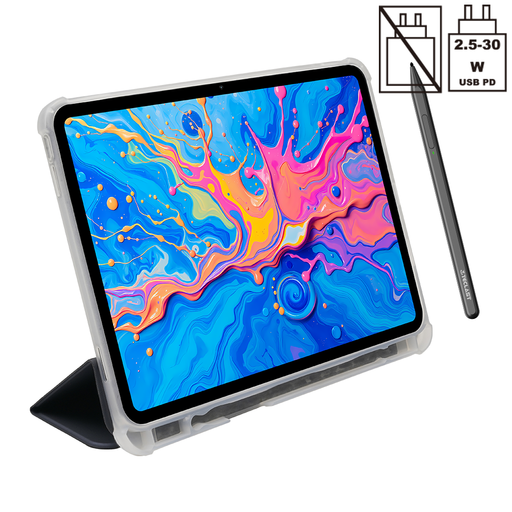
TECLAST ArtPad Pro, 12.7-inch, 2K, with protective case
A standalone tablet option for sketching without a connected computer. Check that your storyboard app and its file formats are supported.
The product title lists a T-Pen with 4096 pressure levels, 20 GB RAM (8 GB + 12 GB virtual), 256 GB of storage, Android 15 and a protective tablet case.
View at Joybuy
 No image available
TECLAST ArtPad Pro, 12.7-inch, 2K, with Bluetooth keyboard
Could be a good fit if you want to sketch storyboards on a standalone tablet. Check that your app can export the files you need.
The product title lists a T-Pen with 4096 pressure levels, 20 GB RAM (8 GB + 12 GB virtual), 256 GB of storage, Android 15 and an English Bluetooth keyboard.
View at Joybuy
Frequently asked questions
Is a USB-C connection enough for a pen display?
Not necessarily. For Huion’s documented single-cable USB-C connection, both the host port and cable must meet the required data and DisplayPort Alt Mode specifications. Check the requirements for your chosen model and computer.
How can I share drawn storyboards for a meeting?
Choose the file format you need before deciding on a device. According to Krita’s documentation, its Storyboard Docker can export as PDF or SVG. This is a software feature, not a general feature of tablets.
What should I check when setting up at a shared desk?
Before setting up your workspace, check the video connection, power supply and included accessories for the specific pen display. The XPPen Artist 13 (2nd Generation) manual lists a 3-in-1 cable as included; the USB-C cable is sold separately.
What are my rights when buying online in Germany?
According to the Verbraucherzentrale, consumers buying online generally have a 14-day right to cancel their purchase. If an item is faulty, statutory rights against the seller are separate from any voluntary guarantee.
What should I look out for when it comes to product safety?
For electrical and electronic products within its remit, the Bundesnetzagentur lists the CE marking, product identification, manufacturer details, German-language instructions and declarations of conformity among the points to check. The EU requirements that apply depend on the product; a CE mark is not an independent quality mark.


