Who is this type of use for?

Reviewers away from a power socket

If you review panels while travelling or away from a charger for extended periods, you’ll need to prepare your files and plan when to charge. Battery capacity and manufacturers’ battery-life claims alone won’t tell you how long your tablet will last at your chosen brightness with your apps. HONOR describes the Pad 10’s capacity as a typical laboratory value.

Storyboard annotators

If you add corrections directly to files and then share them, the file format, app features and included stylus all matter. Adobe explains how to view and edit PDF files on mobile devices, but you should still test your specific file and sharing process.

Reviewers working with lots of panels

If you want to see as much of the storyboard as possible at once, weigh up a larger screen against the device’s weight and portability. Apple lists the Wi-Fi models of the iPad Air at 464 g for the 11-inch model and 616 g for the 13-inch model.

What should you look for when buying?

Buying criterion What to look for Who is this important to?
Using the tablet away from mains power Compare battery-life claims only when the test conditions are comparable; capacity in mAh is not a measure of battery life. If I need to complete a review without access to a power socket, I pay attention to my charging and usage routine. Around 28% of consumers put use away from mains power first.
Viewing panels wherever you are Check screen size, surface and brightness in similar lighting conditions; manufacturers’ figures are no substitute for testing the tablet where you plan to use it. If I need to see fine details and annotations in the light around me, readability is essential. Around 22% of consumers prioritise being able to view panels clearly wherever they are.
Sharing corrections Open a real file in the app you plan to use, annotate it, save it and export it; check stylus compatibility and what’s included separately. If I need my annotations to remain in the file I share, the entire file and app workflow matters. Around 22% of consumers put annotating and sharing first.
Carrying and holding the tablet Compare the weight of the specific model, including any case you plan to use; weigh up screen space against comfort when holding it. If I’m going to hold the tablet for a while or pass it around, a lighter device matters more to me than a larger overview. Around 17% of consumers prioritise portability and ease of use.
Complete setup Check the specific model, compatible stylus, accessories and any app features you need as a complete setup. If I need a stylus to make corrections, I want to know what’s included in the offer and what else my workflow requires. Around 11% of consumers focus first on the cost of a complete review setup.

Common assumptions to avoid

  • Assuming an mAh figure or ‘all-day’ claim guarantees a set review time

    The 10.100 mAh stated by the manufacturer for the HONOR Pad 10 is a typical capacity value based on laboratory testing. It doesn’t tell you how long the tablet will last at your chosen brightness with your apps.

    Compare battery-life claims only alongside their test conditions, and try out your workflow before your review with some battery to spare.

    An unexpected charging break can interrupt your review, so plan for a suitable way to charge between sessions.

  • Assuming stylus support means a stylus is included

    What’s included and the features available can vary by model and offer. You may need to buy a compatible stylus separately for handwritten corrections.

    Check the model, stylus compatibility and stated contents of the specific offer.

    If the right stylus isn’t included, you’ll need to factor in the extra cost for annotating.

  • Assuming a large or matte screen is always better

    A larger screen can show more panels at once, but a bigger device may be less convenient to hold and carry. A matte finish or stated brightness doesn’t guarantee that the screen will be easy to read everywhere.

    Check the storyboard page in similar ambient light, and take the weight of any accessories into account.

Relevant brands at a glance

Apple

The iPad Air comes in 11- and 13-inch sizes, letting you choose between a more portable format and a larger working area.

  • Apple lists the 11-inch Wi-Fi model at 464 g and 500 Nits, and the 13-inch Wi-Fi model at 616 g and 600 Nits. According to Apple, both models support Apple Pencil Pro and Apple Pencil (USB-C).
  • These are model specifications, not independent tests of readability or battery life. Check whether a compatible Pencil is included with the specific offer.

Samsung

The Galaxy Tab S10 FE is a 10.9-inch Android option for occasional stylus annotations.

  • Samsung lists an included S Pen and microSD support up to 2 TB for the Tab S10 FE and FE+.
  • The stylus and storage specifications don’t confirm that a particular storyboard file or app will work. Test your own workflow.

Lenovo

The Tab P12 has a matte screen and a Pen offer, providing a larger working area with less reflective glare.

  • For the relevant model, Lenovo lists a 12.7-inch screen, 2944 × 1840 pixels and 400 cd/m²; the product description mentions a matte screen and a Pen.
  • The stated brightness won’t tell you whether the screen will be easy to read where you plan to use it.

HONOR

The Pad 10 has a 12.1-inch screen for those who want to compare screen space with the stated battery specifications.

  • HONOR lists 10.100 mAh as a typical capacity value based on laboratory testing.
  • Capacity doesn’t confirm how long the tablet will last during a storyboard review. According to HONOR, a stylus isn’t included with the Pad 10 described here; other offers may include different accessories.

Joybuy products for reviewing storyboards on the go

The Joybuy products below include compact and larger tablets for reviewing storyboards on the go. If you want to add annotations, also check that your app is compatible and whether a stylus is included.

SAMSUNG Galaxy Tab A11+ X230, 11-inch, Wi-Fi, 6 GB RAM, 128 GB, Grey

SAMSUNG Galaxy Tab A11+ X230, 11-inch, Wi-Fi, 6 GB RAM, 128 GB, Grey

The 11-inch format is worth considering if you want to review individual panels on the go and often hold the device.

11-inch TFT screen, stated battery capacity of 7040 mAh, 482 g and microSD expansion up to 2 TB.

The capacity figure doesn’t guarantee a particular battery life; check how long it lasts at your chosen brightness with your apps.

View at Joybuy

Xiaomi Pad 7 with keyboard, 8 GB RAM, 128 GB, Grey

Xiaomi Pad 7 with keyboard, 8 GB RAM, 128 GB, Grey

The stated 3.2K screen may be worth considering for reviewing storyboards on the go. Test the file and app you need in advance.

The product name specifies a 3.2K screen with 144 Hz, 8850 mAh and an included keyboard.

The capacity figure doesn’t confirm how long the battery will last with your usage.

View at Joybuy

TECLAST ArtPad Pro, 12.7-inch, 2K, with T-Pen, protective case and English Bluetooth keyboard

TECLAST ArtPad Pro, 12.7-inch, 2K, with T-Pen, protective case and English Bluetooth keyboard

The larger screen and included T-Pen may suit you if you want to view several panels at once and try making handwritten annotations.

12.7-inch screen with 2K resolution, T-Pen with 4096 pressure levels, plus a bundle with a protective case and English Bluetooth keyboard.

These listed features don’t confirm compatibility with your storyboard app or file.

View at Joybuy
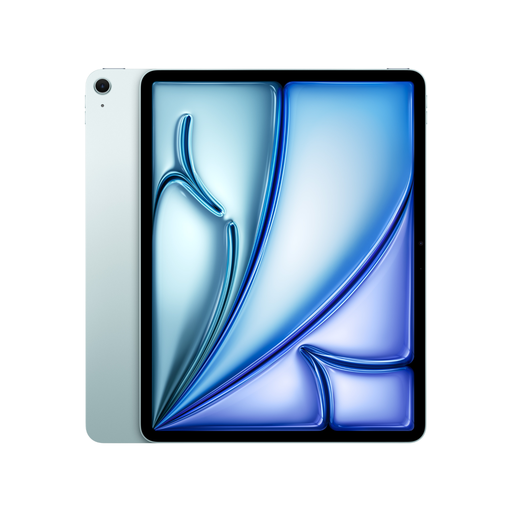
Apple 13-inch iPad Air M4, 2026, Wi-Fi, 128 GB, Blue

Apple 13-inch iPad Air M4, 2026, Wi-Fi, 128 GB, Blue

The 13-inch format is worth considering if you want to view several panels or a larger storyboard page.

The product specifications list 2732 × 2048 pixels, 500 Nits, an anti-reflective coating and support for Apple Pencil Pro.

According to the offer description, Apple Pencil Pro is sold separately. Also check that your app and file suit the workflow you have planned.

View at Joybuy

Apple 11-inch iPad Air M4, 2026, Wi-Fi, 256 GB, Blue

Apple 11-inch iPad Air M4, 2026, Wi-Fi, 256 GB, Blue

Of the two iPad Air sizes listed here, the 11-inch model is the more compact option if you’ll be holding the device often.

The product specifications list 500 Nits, an anti-reflective coating and support for Apple Pencil Pro and Apple Pencil (USB-C).

The box includes the iPad and a USB-C cable, but no Pencil. Before buying, check that your app and file are compatible too.

View at Joybuy

Frequently asked questions

Can I annotate a storyboard without an internet connection?

This may be possible with a PDF saved locally and a suitable app. Adobe explains how to work with PDFs on mobile devices and prepare documents for offline use. Test your file in advance to make sure you can open, annotate and save it, then share it later as needed. This doesn’t guarantee that you can collaborate online at the same time.

Does a tablet with stylus support come with a stylus?

No. Stylus support doesn’t automatically mean one is included. Samsung says the Galaxy Tab S10 FE comes with an S Pen; according to HONOR, the stylus for the Pad 10 described here must be bought separately. Always check what’s included with the specific offer.

How do I prepare a tablet for a review away from a power socket?

Save the file you actually need to the tablet in advance, then test that you can open and save it without an internet connection. Plan when to charge based on your brightness and app usage, rather than relying on an mAh figure alone.

What rights do I have in Germany if a tablet bought online is faulty?

According to EU consumer information, when you buy as a consumer from a trader, you are generally entitled to a statutory guarantee of at least two years from receiving the goods; the seller is your point of contact. For goods bought online, you generally have 14 days from receiving the complete order to withdraw from the contract, although exceptions may apply. A manufacturer’s guarantee doesn’t replace your statutory rights. Consumer rights don’t automatically apply in the same way when you buy for business purposes.