Strategy game fans with a small desk
If your monitor, stand and input devices have to share limited space, suitable dimensions matter just as much as clearly visible maps and menus. Compact Full HD and QHD models are both options to consider.


First, measure the usable width and depth of your desk, including the stand, and take your viewing distance into account. A compact QHD monitor offers more pixels than a Full HD model of the same size, but unscaled text may appear smaller. A 27-inch QHD monitor is only an option if you have enough space and the right viewing distance. Then check the text scaling, adjustability and connections of the specific model.
If your monitor, stand and input devices have to share limited space, suitable dimensions matter just as much as clearly visible maps and menus. Compact Full HD and QHD models are both options to consider.
If you spend a long time looking at unit stats, menus and overviews, weigh the extra pixels against the size of unscaled text. AOC lists the Q24G2A/BK as a 23.8-inch QHD monitor.
If you can adjust your desk space or use a monitor mount, you can consider screen size, positioning and connections together. ASUS lists a 100 × 100 mm VESA mount for the VG27AQ3A; BenQ gives the EX2510S a height adjustment of 130 mm.
A good fit if: You want to keep plenty of map detail or menus in view in a small space. AOC lists the Q24G2A/BK as a 23.8-inch monitor with a resolution of 2,560 × 1,440 pixels.
Worth considering: Unscaled interface elements may look smaller on a compact screen. Check how readable they are with your games and chosen scaling settings.
A good fit if: A compact screen size and Full HD resolution meet your needs. AOC, Philips and BenQ offer examples ranging from 23.8 to 24.5 inches.
Worth considering: Full HD has fewer pixels than QHD, so think about how many map and menu elements you want to see at once.
A good fit if: You have enough width and depth on your desk and prefer a larger display. ASUS lists the VG27AQ3A as approximately 61.5 cm wide.
Worth considering: According to the manufacturer, the ASUS VG27AQ3A stand is not height-adjustable. A VESA mount requires a suitable fixing.
| Buying priority | What to check | Who is it most important for? |
|---|---|---|
| Desk space and seating position | Compare the available desk width and depth with the dimensions of the monitor and stand; if using a mount, check the VESA size and fixing. | If my monitor, keyboard and mouse all need to fit on a small desk, every centimetre counts. Around 29% of consumers prioritise desk space. |
| Maps and text | Consider screen size and native resolution together, and take text scaling and the in-game interface into account. | If I want to read maps, stats and menus clearly without unscaled text looking too small, I compare the resolution and display. Around 29% of consumers prioritise maps and text. |
| Ergonomics for long gaming sessions | Check the height adjustment, tilt and stand dimensions for the exact model variant. | If I play for longer sessions, I want to position the screen so maps and text are comfortable to look at. Around 24% of consumers prioritise ergonomics. |
| PC and connection compatibility | Match the PC outputs to the monitor inputs; check that the desired resolution and refresh rate are available through the connection you plan to use. | When I connect my existing PC, I want the monitor, connection and display settings I need to work together. Around 18% of consumers prioritise compatibility. |
Monitors with similar screen sizes can differ in stand depth and adjustability. Compare the dimensions of the specific model with the available desk space.
A suitable VESA mount may require extra hardware and an appropriate fixing to your desk.
Manufacturer figures may refer to different measurements, such as GtG and MPRT. PC Monitors advises against putting too much weight on individual figures for the compact AOC QHD model.
Compare the measurement definitions and prioritise readability, desk space and ease of use for this type of gaming.
QHD offers more pixels than the Full HD options described here, but it does not guarantee larger unscaled text on a compact screen.
When choosing between compact QHD and compact Full HD, take your operating system and game scaling into account.
ASUS notes that OLED screens may be at risk of burn-in when static, high-contrast images are displayed for a long time.
If game menus often stay on screen unchanged for long periods, check the specific model’s protection features and terms of use, and compare it with LCD options.
If static game elements remain on screen for long periods, you may need to take extra care when using the device’s protection features.
AOC documents compact gaming monitors in both QHD and Full HD.
The Evnia 24M2N3200A/00 is a documented compact Full HD option.
The MOBIUZ EX2510S is a 24.5-inch Full HD option with published details on its stand and connections.
The TUF Gaming VG27AQ3A is a documented 27-inch QHD alternative if you have room for a larger monitor on your desk.
The UltraGear 27GS75QX-B is a documented 27-inch QHD LCD option.
This selection includes compact Full HD monitors and a larger QHD option for strategy games at your desk.
 No image available
A compact Full HD option if you’re looking for a gaming monitor for your desk.
Listed in the product name: 120 Hz, HDMI and VGA.
 No image available
A compact Full HD option if this screen size suits your desk.
Listed in the product name: 144 Hz, IPS, HDMI and DisplayPort.
 No image available
The 23.8-inch screen is a compact Full HD option for a smaller desk.
Listed in the product name: 200 Hz, 16:9, DisplayPort and HDMI.
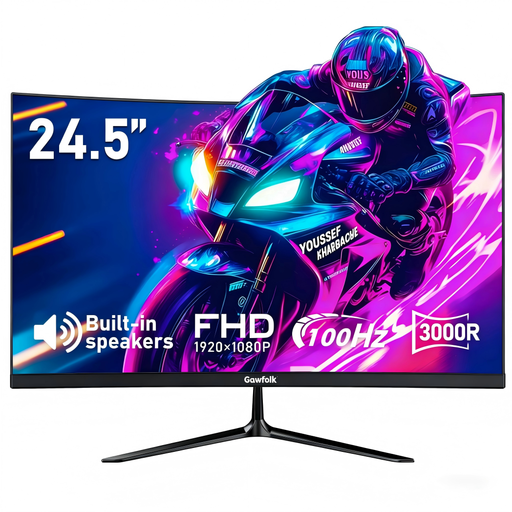 No image available
A compact Full HD option if a curved screen suits your setup.
Listed in the product name: 100 Hz, HDMI, DisplayPort and VESA 75 × 75 mm.
 No image available
This larger QHD option is worth considering if you have enough room for the screen and its stand.
Listed in the product name: 275 Hz, HDMI and DisplayPort.
The stated stand dimensions are 614.2 × 195.5 mm; compare these with the space available on your desk.
No. For turn-based strategy games, start by checking the dimensions, readability and resolution. If you also play fast-paced games, compare the refresh rate you can achieve through the connection you plan to use.
Measure the available desk width and depth, and allow for your keyboard, mouse and cables. Compare these measurements with those of the monitor and stand for the exact model variant. A VESA specification alone does not confirm that a particular mount will fit your desk.
Not necessarily. QHD offers more pixels, but unscaled text and interface elements may look smaller on a compact screen. Check the scaling and interface in your games before choosing between compact QHD and Full HD.
ASUS notes that OLED screens may be at risk of burn-in if static, high-contrast images are displayed for a long time. Follow the instructions and use the protection features of the specific model; this is not a general warning that applies to every monitor.