Players without an external monitor
If you want to view maps and menus directly on your laptop, compare the screen size and resolution of the specific configuration with its footprint and portability.


If you don’t have an external monitor, a laptop with a built-in 17- or 18-inch display that suits you is an obvious choice. If you mainly play at a fixed desk, a laptop with the right video output can also send the action to a large external screen. Check the requirements for the specific games you play: Paradox Interactive, for example, lists different RAM requirements for Crusader Kings III and Europa Universalis V, and desktop graphics cards don’t automatically indicate how well laptop GPUs will perform. A larger laptop takes up more space and is less convenient to carry around; you don’t need to spend extra on top-end graphics just because you play strategy games.
If you want to view maps and menus directly on your laptop, compare the screen size and resolution of the specific configuration with its footprint and portability.
If you want to play a game such as Europa Universalis V, base your comparison on that game’s requirements and the laptop’s full configuration. Paradox Interactive recommends 32 GB of RAM for the game.
If you mainly play in one place, check the video output on the specific laptop model and make sure it’s compatible with your monitor, cable and preferred display settings.
First decide whether you want a large screen built into the laptop or expect to play mostly at a desk with a separate monitor. Then check that the specifications meet the requirements of your games.
A good fit if: You want to view maps and menus on your laptop without an external monitor, and occasionally play in different locations.
Consider: Larger devices need more space, and display and specifications can vary even within the same model family.
A good fit if: You mainly play at a desk and use a separate monitor for a larger screen.
Consider: You’ll also need a monitor, cable and space for your setup; check the video ports on the specific laptop. Lenovo lists HDMI and USB-C with DisplayPort for the Legion Pro 7 16IAX10H.
| What matters | What to check | Who is it important to? |
|---|---|---|
| Built-in display | Compare the screen size and native resolution of the complete configuration. If you’ll be carrying the laptop often, consider its dimensions and weight too. | I want to see maps and menus directly on my laptop without setting up an extra screen. Around 31% of consumers put the built-in display first. |
| Game requirements | Paradox Interactive recommends 16 GB of RAM for Crusader Kings III on Windows. For Europa Universalis V, the publisher lists 16 GB as the minimum and 32 GB as the recommendation. Also check the processor and laptop GPU in the specific configuration: desktop components don’t prove that laptop chips offer equivalent performance. | If I want to play specific games, I need the laptop’s components to meet their requirements. Around 31% of consumers prioritise the requirements of the games they play. |
| External monitor | Check for HDMI or DisplayPort over USB-C on the exact model. Make sure the laptop, monitor and cable support your preferred resolution; Lenovo lists HDMI and USB-C with DisplayPort for the Legion Pro 7 16IAX10H. | I mainly play at a desk and want to connect a large, separate monitor. Around 25% of consumers prioritise connecting a large external monitor. |
| Portability and setup | Compare the dimensions and weight of the specific configuration with your bag and available desk space. Keep the vents clear during use; MSI says blocked vents can affect fan operation. | If I want to move the laptop around or set it up for longer periods, it needs to be practical to carry and fit in my gaming space. Around 13% of consumers prioritise portability and setup. |
Display, memory and graphics card can vary between configurations. ASUS lists different configurations for the TUF Gaming A18, and the specifications of the two HP OMEN 17 models documented here differ too.
Before buying, check the full model number, installed RAM, display and GPU for the specific configuration.
Paradox Interactive lists desktop processors and graphics cards for Europa Universalis V. You can’t automatically assume that a laptop GPU with a similar name offers equivalent performance.
Use the game requirements as a starting point, then check the specifications of the laptop configuration actually on offer.
A USB-C port alone doesn’t prove that a laptop can output a video signal through it. The laptop, port, cable and monitor must also support your preferred resolution.
Check the full model specifically for HDMI or DisplayPort over USB-C, and make sure it supports your preferred monitor resolution.
The TUF Gaming A18 is an example of a laptop with a built-in 18-inch display.
The Raider 18 Max HX range includes examples of laptops with large built-in displays.
The Legion Pro 7 16IAX10H is an example of a laptop with documented ports for external monitors.
The OMEN 17 is another laptop range with a large built-in display; the full model number is key.
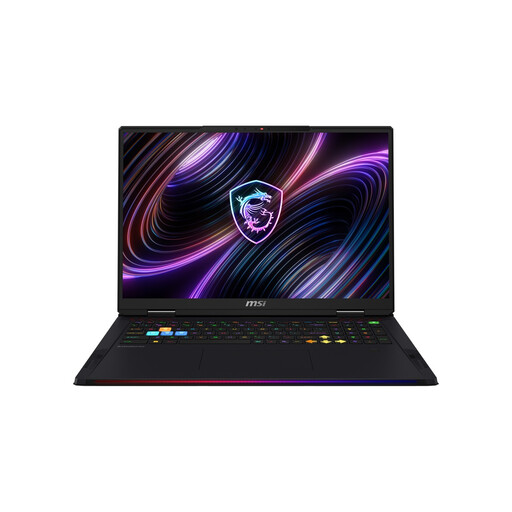
This selection features MSI gaming laptops with built-in 18-inch displays, so you can view maps and menus directly on your device.
 No image available
The built-in 18-inch display gives you a large screen right on your laptop.
WQUXGA Mini LED display, Intel Core Ultra 9 290HX, GeForce RTX 5080, 32 GB DDR5 RAM, 2 TB SSD and Windows 11 Home.
Listed weight: 3,6 kg. Keep the vents clear during use.
 No image available
The built-in 18-inch display is a good choice if you want a large screen without a separate monitor.
UHD+ 240 Hz Mini LED display, Intel Core Ultra 9 290HX Plus, GeForce RTX 5090 with 24 GB, 96 GB DDR5 RAM, 4 TB SSD and Windows 11 Home.
Listed weight: 3,6 kg. Keep the vents clear during use.
 No image available
The 18-inch display shows maps and menus directly on your laptop.
QHD+ 240 Hz display, Intel Core Ultra 9 275HX, GeForce RTX 5070 Ti with 12 GB, 32 GB DDR5 RAM, 1 TB SSD and Windows 11 Home.
Listed weight: 3,6 kg. Keep the vents clear during use.
 No image available
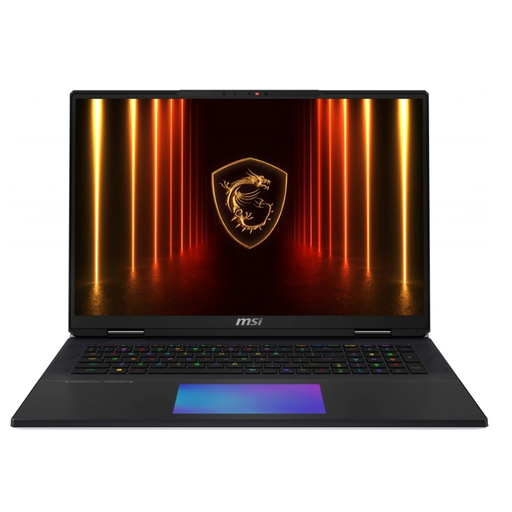
The built-in 18-inch display gives you plenty of room for maps and menus.
Intel Core Ultra 9 285HX, GeForce RTX 5090, 64 GB RAM, 6 TB SSD and Windows.
Listed weight: 3,6 kg. Keep the vents clear during use.
 No image available
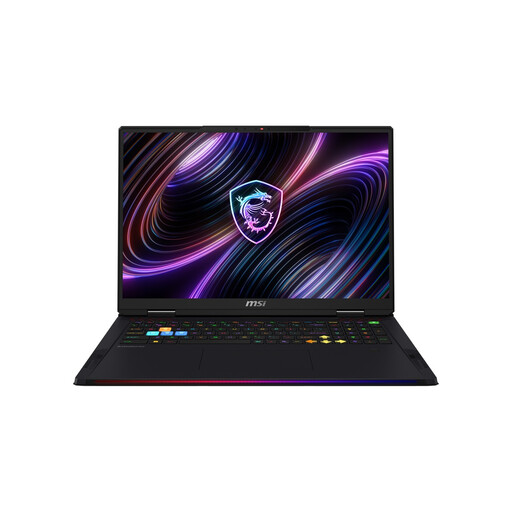
The built-in 18-inch display gives you a large gaming screen right on the laptop.
UHD+ Mini LED display, Intel Core Ultra 9 290HX Plus, GeForce RTX 5090, 64 GB DDR5 RAM, 2 TB SSD and Windows 11 Home.
Listed weight: 3,6 kg. Keep the vents clear during use.
It depends on the game. Paradox Interactive recommends 16 GB of RAM for Crusader Kings III on Windows. For Europa Universalis V, the publisher lists 16 GB as the minimum and 32 GB as the recommendation. Check the RAM installed in the specific laptop, not just the maximum amount it can support after an upgrade.
First check the video output on the complete laptop model and the monitor’s input. Then make sure the cable and connection support your preferred resolution and refresh rate. Lenovo lists HDMI and USB-C with DisplayPort for the Legion Pro 7 16IAX10H; some of the maximum resolutions listed require a DSC-compatible display. Also keep the vents clear.
No. For a new device, you generally have statutory consumer rights against the seller for two years from receipt, as explained by the Verbraucherzentrale. This is separate from a voluntary manufacturer’s warranty, so check its terms separately.
For a distance purchase by a consumer, you generally have a right to cancel. According to the Verbraucherzentrale, the period is usually 14 days from receipt of the goods, and you must notify the seller that you wish to cancel. Check the specific contract and any legal exceptions that may apply.
Electrical waste must not go in household rubbish. The Federal Ministry for the Environment lists local collection points as one option; retailers have take-back obligations in certain circumstances.