What to look for in a strategy gaming PC for the bedroom
Start by deciding on the game, resolution and settings. Then compare noise levels for the complete PC and check that the case, lighting and potential running costs suit your shared room.
| What matters |
What to check before buying |
Who is this important for? |
| Noise while gaming |
Noise figures should relate to the exact PC configuration and a comparable workload. COMPUTER BILD reports noise levels for the specific devices it tests; you can’t automatically apply those results to other versions. |
If someone else wants to sleep in the same room, I want to know how loud this exact PC gets while gaming, rather than relying on details about a single fan. Around 36% of consumers put noise levels first. |
| Performance for your game and resolution |
Compare the CPU, GPU, RAM and operating system with the requirements of the specific game. Civilization Support sets out different requirements for Civilization VII at 1080p and 4K, as well as for different settings. |
If I want to play a particular strategy game at a set resolution, I choose the specifications to match that exact goal. Around 29% of consumers put suitable gaming performance first. |
| Space and a shared room |
Check the dimensions of the exact version, the space needed for ventilation and whether any lighting can be adjusted. For example, MSI lists dimensions of 173.8 × 446.97 × 407.17 mm for the MAG Infinite S3 14NVP7-2842EU. |
If the PC is going next to furniture used by others, I want to know in advance whether it will fit in the intended space and have clear airflow. Around 21% of consumers put available space first. |
| Total cost and future use |
Check whether an existing PC can be upgraded and what upgrade options the specific version offers. The German Environment Agency notes that over-specified computers can have higher purchase and electricity costs. |
If I’m weighing up the purchase price, power consumption and potential future upgrades, I don’t want to pay for performance I don’t need for my gaming goals. Around 14% of consumers put total cost first. |
Joybuy products at a glance
The Joybuy products below include gaming towers, a handheld PC and a mini PC. Check the exact version against your game’s requirements, the space available and your need for a quiet room. Noise measurements for the complete configuration are essential.
 No product image available
Acer Predator Orion 3000 desktop PC, i5 Ultra, 16 GB, 512 GB SSD, RTX 5060
Could suit strategy games if the details for this specific version match your game and target resolution.
The product name lists 16 GB, a 512 GB SSD, an RTX 5060 and Windows 11 Home. According to the product details, you’ll need to leave at least 10 cm of clearance on all sides for ventilation.
View at Joybuy
 No product image available
Acer Nitro 20 N20-100 desktop PC, i5, 32 GB, 1 TB SSD, RTX 5060
Check the specifications against the requirements of the games you plan to play, and make sure you have enough space for it in your shared room.
The product name lists 32 GB, a 1 TB SSD, an RTX 5060 and Windows 11 Home. According to the product details, you’ll need to leave at least 10 cm of clearance on all sides for ventilation.
View at Joybuy
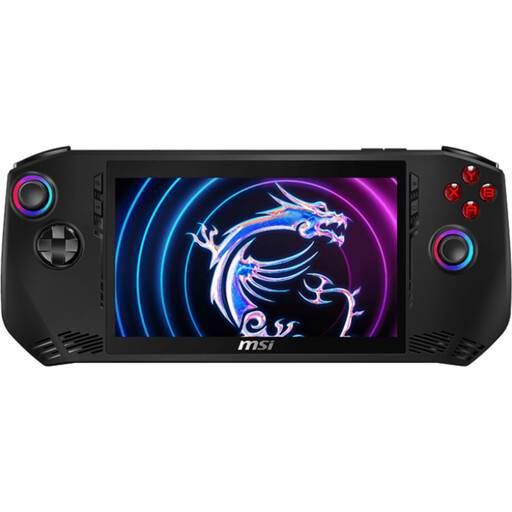 No product image available
MSI Claw A1M-059 handheld gaming PC
The handheld design may appeal if you’re looking for a PC that takes up less space than a tower. Check the specifications against the requirements of your games.
Listed features include Windows 11 Home, Core Ultra 7 155H, 16 GB LPDDR5, a 1 TB SSD and a 7-inch FHD touchscreen with a 120 Hz refresh rate. The device should be used in a dry, well-ventilated area; the description recommends using a certified specialist to replace the battery.
View at Joybuy
 No product image available
Ninkear M7 mini PC, Core i7-1185G7, 16 GB DDR4, 512 GB SSD
A mini PC could be a good option if space is limited. Check the game’s requirements to see whether its specifications will be powerful enough for a particular strategy game.
The product name lists Windows 10/11, dual-band Wi-Fi 6, Bluetooth 5.2 and support for three displays.
View at Joybuy
 No product image available
Captiva Highend gaming PC R89-503
Compare the specifications with the games you actually plan to play, rather than assuming you need extra performance without a specific reason.
The product name lists a Ryzen 7 7800X3D, an RTX 5070 Ti with 16 GB, 32 GB DDR5, a 2 TB SSD and Windows 11 Home. For setup, it specifies a hard, level surface and 10 to 15 cm of clearance behind the PC for ventilation.
View at Joybuy
Frequently asked questions
Will Civilization VII’s minimum requirements deliver the gaming experience I want?
Not necessarily. Civilization Support specifies the Windows minimum requirements for 1080p at 30 FPS with low graphics settings. Its separate recommended requirements are for 1080p at 60 FPS with high settings. Match the right level to the complete PC configuration rather than checking only whether the game will start.
How should I position and look after a PC in a shared room?
Compare the dimensions of the specific version with the space available, and keep its ventilation unobstructed as instructed in the device manual. Check whether you can switch off any lighting, and use power-saving features or shut down the PC after gaming. These steps don’t prove that it will run quietly.
Is a voluntary manufacturer’s warranty the same as your statutory rights?
No. According to the Verbraucherzentrale, consumers can generally exercise their statutory rights with the seller within two years of receiving new goods if there’s a defect. Any additional manufacturer’s warranty is subject to its own terms and conditions.
Can I cancel an online PC purchase in Germany?
For a distance contract with a consumer, there’s generally a statutory 14-day cancellation period, and you must notify the seller that you wish to cancel. The Federal Ministry of Justice and the Federal Office of Justice list exceptions, including goods made to a significant degree according to an individual selection or clearly tailored to personal needs. Check whether any such exception applies to the specific PC.
What should I know about CE marking and disposing of my old PC?
A complete device newly placed on the market in Germany must meet the applicable EU product requirements. Where those requirements call for CE marking, it must be affixed to the specific device. A statement covering a product range alone doesn’t automatically prove that every configuration complies. When carrying out market surveillance, the Bundesnetzagentur checks factors including CE marking, manufacturer details and required instructions in German. Take an old PC to an authorised collection point, such as a local recycling centre, rather than putting it in household waste.


