What should you look for when buying?
Compact button controller
A good fit if: You mainly want to trigger OBS scenes, sources or individual mute actions. Elgato lists eight LCD keys for the Stream Deck Neo.
The trade-off: There are no physical dials, and you may need pages or folders if you want to set up lots of actions.
Buttons with dials
A good fit if: You regularly want to adjust audio levels as well as switch scenes. Elgato lists eight buttons and four dials for the Stream Deck +; Razer lists twelve LCD touch buttons and six dials for the Stream Controller.
The trade-off: Dials are only useful for controlling sources that have been set up and assigned appropriately in the software. The Razer Stream Controller is configured using Loupedeck software.
Audio and capture device
A good fit if: You also need to bring an HDMI signal or specific microphone connections into your signal path. RØDE describes the Streamer X as offering HDMI capture, audio connections and four SMART pads.
The trade-off: Four pads aren’t a substitute for a large button panel. AVerMedia lists a six-track mixer for the AX310 and notes that Creator Central is no longer supported on Mac from macOS 28 onwards.
The following comparison is aimed at people choosing a controller for a co-op stream in a shared bedroom. Each person is considered in terms of their main buying priority.
| Consideration |
What to look for when buying |
Who is this especially important to? |
| Privacy |
Check which OBS source a mute button controls, and test your microphone, camera and other sources separately. |
If I want to avoid accidentally capturing my housemates’ voices or images, I check which sources are active before streaming. Around 31% of consumers are likely to have privacy as their main buying priority. |
| Separate audio control |
Set up your voice, chat and game audio as needed, then listen back to a test recording or stream. |
If I want to adjust several audio sources during a co-op stream, they need to be set up correctly in the software. Around 25% of consumers are likely to have audio mixing as their main buying priority. |
| Scenes and sources |
Decide which actions you need and check that the OBS plugin is compatible with your operating system and software version. Elgato lists Windows 11 or macOS 13, and Stream Deck 6.9 or later, as requirements for its OBS plugin. |
If I want to switch scenes and sources while gaming without searching through menus, the number of actions I can access directly matters to me. Around 25% of consumers are likely to prioritise scene control above all else. |
| Space and connections |
Measure the space available and check whether you really need HDMI capture or extra audio inputs. |
If I share my desk, I look for a control surface that suits the space I have and my signal path. Around 19% of consumers are likely to prioritise a compact setup that takes little effort to configure. |
Joybuy product selection
This selection includes controllers for OBS and streaming shortcuts, as well as an audio mixer console for live streaming. For each model, check that its controls and connections suit your signal path.
 No image available
AJAZZ AKP153 Studio Controller, 15 macro keys, black
The product title lists 15 macro keys and OBS; check which action each assigned key actually triggers in your setup.
Assigning a mute action doesn’t confirm the status of all your other audio sources. Test each source separately in OBS and, before recording or broadcasting, check whether anyone else will be captured.
View at Joybuy
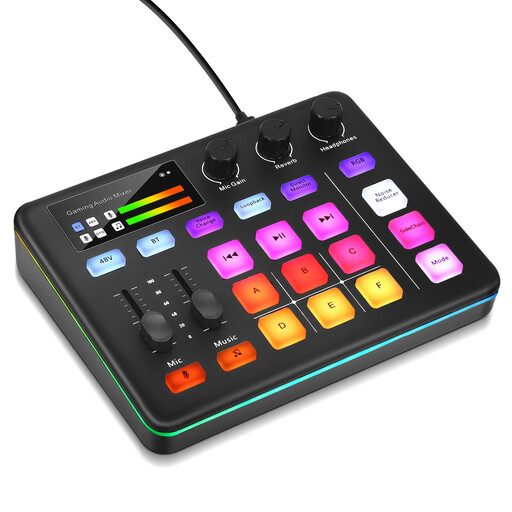 No image available
Professional Audio Mixer Console for Live Streaming and Interactive Entertainment
Described as an audio mixer console for live streaming, this model could suit you if you’re looking for dedicated audio controls. Before buying, check that the connections and controls are right for your sources.
View at Joybuy
Frequently asked questions
Do I need a hardware controller for co-op streams?
No. OBS already has an audio mixer with level controls, mute and monitoring. An external controller gives you an additional way to manage things, and is most useful if you want quicker access to actions while gaming or prefer not to switch between windows.
How can I check whether chat or my housemates can be heard on stream?
Set up the relevant sources in OBS, check the levels, mute and monitoring, then listen back to a test recording or stream. OBS Project notes that the same audio device can be captured both globally and within a scene, which can cause an echo. A mute button alone doesn’t confirm the status of every source.
Can noise suppression reliably remove other people’s voices?
You shouldn’t rely on it to do so. OBS Project describes the Noise Suppression filter as a way to help with light background noise, such as fan noise, and notes that it isn’t generally effective in noisy environments. Stronger filtering can also change the voice you want to keep, so check your microphone position and sources with a realistic listening test.
Which software compatibility should I check before buying?
Check your operating system, plugin version and support for the specific device. Elgato lists Windows 11 or macOS 13, and Stream Deck 6.9 or later, as requirements for its OBS plugin. If you’re considering a device that uses Loupedeck software, note that the Marketplace for Legacy version 5.8 has not been supported since 30 March 2026.
Can I simply stream other people’s conversations or images from my bedroom?
A controller button alone doesn’t give you legal permission. Under certain circumstances, Section 201 of the German Criminal Code (StGB) makes the unauthorised recording of privately spoken words a criminal offence. The State Commissioner for Data Protection and Freedom of Information of Rhineland-Palatinate notes that private individuals may also be affected if they capture other people’s data outside the family context or make it available to others outside that context. What applies in a particular case depends, among other things, on who is captured and whether the recording is published. Let anyone affected know in advance, and set up your camera and audio sources so that people who aren’t involved aren’t broadcast accidentally.


