Who is a stream controller for?

Presenters using multiple views

If you show several prepared viewpoints or overlays, having commands within easy reach can make switching between them easier. Elgato’s documentation for the OBS integration includes actions for selecting scenes and controlling source visibility.

Presenters who adjust audio on the fly

If you want to adjust the sound while presenting, check whether dials as well as buttons suit your workflow. The audio actions available depend on your software configuration.

Home studios with a few recurring commands

A compact keypad may be enough for a small number of frequently used actions. In COMPUTER BILD’s test, the Stream Deck Mini’s six buttons handled many simple tasks, but proved limiting for more complex workflows.

What should you look for when choosing one?

First decide which actions you want to access without a mouse while presenting. Then weigh up the number of buttons, dials and software compatibility.

What matters What to look for when buying Who is it important to?
Switching scenes Count the views you need and check whether your software can select the scene directly or switch the visible output. If I want to access several showcase views without navigating through menus, direct access matters. Around 36% of consumers prioritise switching scenes.
Audio control Decide which audio source you want to adjust and check whether a suitable action or supported dial is available. If you want to control your microphone or other audio sources during a narrated showcase, check that the specific action is available in your software. Around 29% of consumers put audio control first.
Software compatibility Make a note of your operating system, programme and version. Also check for any required plug-ins and specific guidance for portable installations. If I want the controller to work with my existing setup and be straightforward to configure, software compatibility is essential. Around 21% of consumers focus primarily on this.
Compact setup List your most important commands and compare the total with the number of buttons you can access directly. Remember to factor in extra navigation through pages or folders. If you only need a few recurring actions and want to save desk space, a compact option could be a good place to start. Around 14% of consumers put this first.

Avoiding common buying mistakes

  • Assuming the number of buttons equals the number of actions you can use straight away

    More buttons don’t automatically mean that every action you want is available in your software. COMPUTER BILD found that the Stream Deck Mini’s six buttons were limiting for more complex workflows. The OBS actions in the documentation also require the right software integration.

    Start by planning your scenes, overlays, audio and recording commands. Then check which ones you want to access directly and which software versions you’ll need.

  • Choosing a controller just because it has dials

    A dial is only useful if it can make the adjustment you want in your software. Elgato’s device comparison also lists the Stream Deck + as having eight directly labelable buttons, compared with 15 on the MK.2.

    Before buying, assign a specific action to each dial you plan to use, and check that you’ll still have enough buttons for your other commands.

  • Assuming older software guidance is still up to date

    Support for the old Loupedeck software 5.8 and its Marketplace ended on 30 March 2026. However, on 19 August 2026, Loupedeck confirmed that support for Razer devices would continue.

    If you have an older setup, check which software line and support arrangements currently apply to your specific device.

    Switching software may mean extra time spent setting things up and configuring them again.

Key brands at a glance

Elgato

According to Elgato’s device comparison, the Stream Deck range spans compact six-button models, versions with 15 or 32 buttons, and the Stream Deck + with eight buttons and dials.

  • Elgato’s OBS documentation includes actions for selecting scenes, controlling source visibility and managing recordings. Check which versions you need for your setup.
  • COMPUTER BILD’s test found that the Mini’s six buttons were enough for many simple tasks but limiting for more complex workflows. Portable OBS installations may require extra setup.

Ulanzi

Ulanzi describes the D200X as combining 14 customisable LCD buttons, three dials and an integrated hub – a design for workspaces where you need different types of control.

  • Ulanzi lists OBS and programmes that use keyboard shortcuts as possible applications, and provides software for Windows and Mac.
  • The manufacturer’s specifications don’t automatically confirm that every OBS action you want is supported or that the hub will work with all your existing devices. Check your specific setup before buying.

Loupedeck

The Loupedeck Live S combines 15 touch-sensitive buttons with two analogue dials and the ability to switch layouts.

  • Loupedeck explains how to set it up with OBS and has announced that technical support will continue.
  • Loupedeck stopped selling its own product range on 28 March 2025. Support for the old software 5.8 and its Marketplace ended on 30 March 2026; this does not mean that current Loupedeck software has been discontinued altogether.

Razer

According to Razer, the Stream Controller X combines a 15-button layout with profiles, macros and OBS plug-ins.

  • On 19 August 2026, Loupedeck confirmed that support for Razer Stream Controllers would continue.
  • For detection issues, Loupedeck recommends updating the software. Check the software version you need and OBS compatibility in advance.

AJAZZ

According to the product information, the AKP153 has 15 customisable buttons for visual shortcuts.

  • The manufacturer lists applications that use keyboard shortcuts as a possible use and provides setup software.
  • The manufacturer’s website lists both the AKP153 and AKP153E. Check the exact model variant and available plug-ins before building your setup around it.

Joybuy products for your showcase workflow

This selection includes a programmable button controller for recurring app actions and an audio mixer console for livestream audio. The two product types cover different tasks in a showcase workflow.

AJAZZ AKP153 studio controller with 15 macro buttons, black

AJAZZ AKP153 studio controller, 15 macro buttons, black

A good fit if you want to access recurring app actions using clearly labelled buttons. Test your assigned actions before going live.

15 customisable LCD buttons; colour: black.

View at Joybuy
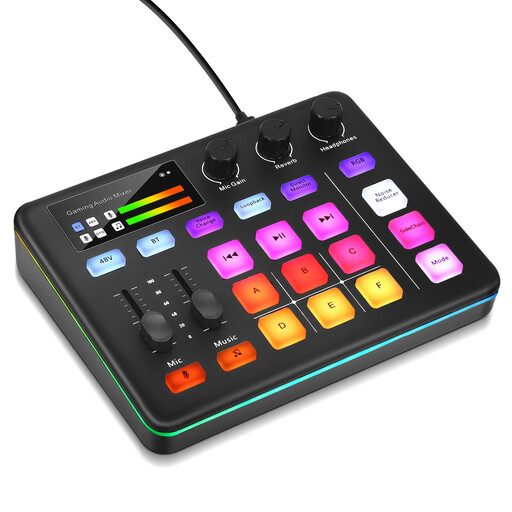
Audio mixer console for livestreaming and interactive entertainment

Audio mixer console for livestreaming

If audio control is a key part of your workflow, an audio mixer console could complement your setup. Plan your scene and recording commands separately.

Described in the product title as a console for livestreaming and interactive entertainment.

View at Joybuy

Frequently asked questions

Can I use one button to control an OBS scene or recording?

Yes. Elgato’s OBS integration documentation includes actions for selecting scenes and starting or stopping recordings. Whether they work as you expect depends, among other things, on your versions of OBS and Stream Deck. Before presenting, make sure you test what happens in the preview and what appears in the visible output.

What should I check if my controller doesn’t recognise OBS?

First, check that you have the right software versions and that the plug-in is connected. For its documented integration, Elgato specifies Stream Deck 5.3 or later and OBS Studio 27.0 or later. For OBS 30.1 or later, Elgato’s troubleshooting guide requires Stream Deck 6.5.2 or later. Elgato also describes additional setup steps for portable OBS. For detection issues with Razer devices, Loupedeck recommends updating the software.

What are my rights when buying online from a business seller?

For most online purchases of goods in the EU, you generally have 14 days from delivery to cancel. Exceptions may apply, and return costs depend on the circumstances. Your Europe also states that faulty goods are generally covered by a minimum two-year legal guarantee from the date you receive them. Any additional guarantee offered is separate from this.

Does a stream controller automatically give me the legal right to use music or other people’s showcase content?

No. The hardware does not grant you usage rights. Whether you need additional permission to use music in a video depends, among other things, on the platform, whether the use is private or commercial, and the rights to the work and recording. GEMA distinguishes between these cases. You should also check the rights to any third-party content you may show.