Choose a stream controller based on the recording, scene and audio actions you actually need while explaining something. A compact keypad may be enough for a handful of commands, while more keys or dials can give you convenient shortcuts to additional controls. Before you buy, check that it works with your recording software, review the software’s version requirements, and consider desk space and connectivity. For a simple recording, the controls built into OBS may be all you need.
Who is a stream controller for?
Solo presenters switching between scenes
If you film yourself using a controller and switch between camera and screen views, pre-configured recording and scene actions can make controls easier to reach while you explain something. Elgato documents OBS actions, and the OBS Project guide describes scenes and sources as parts of a recording layout.
Tutorial creators adjusting audio
If you want to use set commands and configured audio actions while explaining something, compare keypads with models that also have dials. Elgato documents audio mute controls for OBS integration, while Loupedeck lists two dials on the Live S.
Creators filming at a small desk
If there’s little space left beside your computer, microphone and camera, the device’s dimensions and cable routing matter. Elgato lists different dimensions and key layouts for the Stream Deck MK.2 and Stream Deck Neo.
What should you look for when buying?
Compact keypad
A good fit if: You only want to trigger a few set recording and scene actions directly. Elgato lists eight customisable LCD keys and two Touch Points on the Stream Deck Neo.
The trade-off: You’ll need to organise key assignments or pages for additional commands; Touch Points aren’t dials.
Keypad with more shortcuts
A good fit if: You want dedicated keys for camera view, screen view and other tutorial steps. Elgato lists 15 customisable keys on the Stream Deck MK.2; Razer also describes the Stream Controller X as having 15 keys.
The trade-off: These models don’t have the dials found on the Stream Deck +. Setup on the Razer device depends on Loupedeck software and the plugins you need.
Keys plus dials
A good fit if: As well as set commands, you want to adjust supported settings while recording. Elgato lists eight LCD keys and four dials on the Stream Deck +; Loupedeck lists 15 touch buttons and two dials on the Live S.
The trade-off: The Stream Deck + has fewer readily accessible keys than the MK.2. Loupedeck stopped selling its product range in 2025; legacy software version 5.8 and its Marketplace have not been supported since March 2026.
Recording without extra controller hardware
A good fit if: You only occasionally record a simple scene and are happy to use a mouse or existing keyboard shortcuts. The OBS Project guide explains how to start recording directly in OBS.
The trade-off: You won’t have dedicated, labelled hardware keys for recording commands and scene changes.
| Need |
What to check before buying |
Who is this important for? |
| Recording and scenes |
Count the actions you need to access at the same time and check that your software supports them. Elgato documents OBS actions for recording and scenes. |
If you want to switch between camera and screen views and start recording directly while explaining something, you’ll need suitable actions that are easy to reach. Consumers whose main concern is recording and scenes are estimated to make up around 40%. |
| Audio controls |
Distinguish between muting and adjusting audio while it’s playing; check that the specific audio source can be controlled using the action you want. |
When filming, you’ll want to adjust the audio to suit your explanation without relying on a dial that hasn’t been set up. Consumers whose main concern is audio control are estimated to account for around 30%. |
| Space and connectivity |
Measure the space the device will occupy, including its stand, and plan the cable route to your computer. |
If your desk also needs to accommodate a camera, microphone and input devices, the overall footprint matters. Consumers who prioritise desk space and connectivity are estimated to make up around 20%. |
| Software setup |
Check the requirements for the latest controller software and any plugins you need. Elgato lists Windows 11 (64-bit) or macOS 13 or later as requirements for the current Stream Deck software. |
If you only occasionally start a simple recording, you may want to use software you already have and avoid extra setup. Consumers whose main concern is keeping purchase and setup requirements to a minimum are estimated to make up around 10%. |
Buying and setup pitfalls
-
More keys don’t automatically mean better tutorial recordings
You can also start a simple recording directly in OBS. Extra keys are most useful when you actually need those actions while filming.
Plan your scenes and commands before deciding how many keys you need.
-
Hardware compatibility isn’t the same as compatibility with current software
The hardware specifications for the Stream Deck MK.2 and the requirements for the current Stream Deck software relate to different compatibility questions.
Check the requirements for your specific model, the current software and your operating system separately.
-
Older support announcements may be out of date
Loupedeck has not supported legacy software version 5.8 since March 2026. On 19 August 2026, Loupedeck reversed its earlier announcement that it would end support for Razer devices.
Check which software version is actually available and whether it supports the actions you need, rather than relying on an earlier announcement.
Switching software and setting up the plugins you need can take extra time.
Key brands at a glance
Elgato
The Stream Deck range includes compact keypads, models with more keys and devices with dials.
- Elgato documents OBS actions for recording, scenes and muting audio.
- The number of keys and dials varies by model. Check the current software requirements for your operating system.
Razer
The Stream Controller X is a keypad with 15 customisable keys and is configured using Loupedeck software.
- Razer describes OBS plugins and profiles for the device.
- On 19 August 2026, Loupedeck reversed its announcement that it would end support for Razer devices. If the device isn’t recognised, Loupedeck recommends version 6.4.1 or later; this isn’t a guarantee that every plugin or configuration will work.
Loupedeck
The Live S combines touch buttons, layout buttons and dials for different workflows.
- Loupedeck lists 15 touch buttons and two dials on the Live S.
- Sales of the Loupedeck product range ended in 2025. Legacy software version 5.8 and its Marketplace have not been supported since March 2026; the end of sales and continued support are separate matters.
Ulanzi
According to the manufacturer, the D200X Creative Deck combines keys, dials and a built-in hub for a permanent workstation.
- Ulanzi lists 14 customisable LCD keys and three dials. The manufacturer lists OBS as a supported application for shortcut workflows.
- Ulanzi lists Windows 10 or later, or macOS 12 or later. Before buying, check that the specific action you want works with your setup.
Joybuy products for recording tutorials
The Joybuy products below are suited to tutorial recordings where you want several frequently used OBS and audio actions within easy reach on a keypad.
 No image available
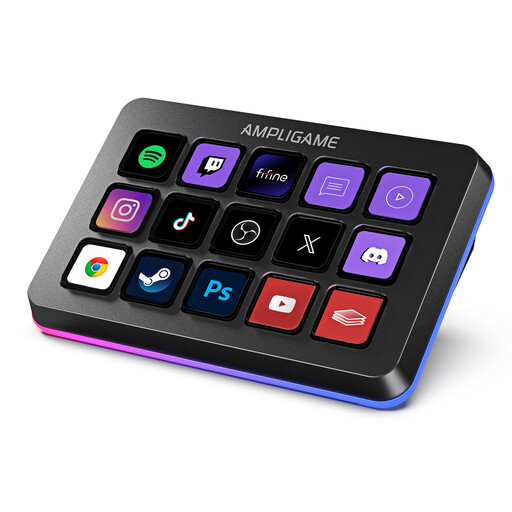
FIFINE D6 RGB Macro Keyboard with 15 programmable keys
A good fit if you want quick access to frequently used tutorial commands and OBS actions from a keypad.
The product description lists 15 customisable macro keys, RGB lighting, OBS scene switching and one-touch audio controls. It recommends updating the firmware and software before first use.
View at Joybuy
 No image available
AJAZZ AKP153 Studio Controller with 15 macro keys
A good fit if you want to assign several pre-configured shortcuts and audio actions to keys while filming.
The product description lists 15 customisable LCD keys, action sequences and PC/Mac support. Possible actions include muting the microphone and adjusting audio. Test your assigned actions before recording live.
View at Joybuy
Frequently asked questions
Can I use a stream controller to record video for my tutorial?
A stream controller is an input device, not a camera or capture device. First, set up the video and audio sources you want in OBS; supported controller actions can then control the recording you’ve prepared.
How do I set up recording and scene changes in OBS?
Start by setting up scenes and sources in OBS, then make a short test recording. Elgato’s documented OBS integration requires Stream Deck 5.3 or later and OBS Studio 27.0 or later. For OBS 30.1 or later, Elgato’s troubleshooting guidance requires Stream Deck 6.5.2 or later. Then assign the recording and scene actions you want to use.
What should I check after an update or if OBS controls stop working?
Check the versions of OBS, your controller software and the plugin, then make a test recording. Elgato notes that its OBS plugin may not install or update correctly in some cases; portable OBS installations may require additional steps.
What are my return rights when buying online in Germany?
The Verbraucherzentrale says that online purchases generally come with a 14-day right of withdrawal from the conclusion of the contract or receipt of the goods ordered; exceptions apply. Statutory rights relating to faulty goods and a voluntary manufacturer’s guarantee are separate matters.
Can I simply record another person speaking for my tutorial?
Recording another person’s private conversation without permission may be covered by § 201 StGB. If you’re recording another person in this way, make sure you have permission before you start. This specific issue doesn’t arise when you’re recording yourself alone.


