Who can benefit from a stream controller?

Anyone switching between scenes

If you switch between gameplay, a close-up view and your camera during a mod demo, prepared OBS scenes can help you bring up each view without a lengthy interruption. The OBS Project guide describes scenes and sources as the foundation of your stream layout.

Presenters with a small desk

If there’s little room alongside your keyboard, mouse and perhaps a microphone, the control pad’s dimensions and the number of actions you can see at a glance matter. Elgato lists six buttons for the Stream Deck Mini and eight for the Neo; their dimensions also differ.

Presenters who adjust audio on the fly

If you change game or microphone audio while explaining, dials can be useful for making those adjustments. Elgato lists four dials on the Stream Deck +, while the manufacturer lists two analogue dials on the Loupedeck Live S.

What should you look for when choosing one?

What you need What to check before buying Who is this important to?
Bring up scenes directly Count the actions you want to access without changing pages, then compare this with the buttons on the specific model. If I switch between gameplay, an explanation view and the camera during my demo, I want to bring up the key scenes without extra steps. Around 26% of consumers put scene switching first.
Space and cables Measure the available desk space and check the specific model’s dimensions, cable length and stand. On a small desk, I need to be able to reach the controller while keeping it alongside my other equipment. Around 21% of consumers prioritise desk space.
Software and set-up Check the operating system, processor, controller software and OBS version separately; test the actions you plan to use before your demo. If I want to set up the controls reliably on my existing computer, I check the software requirements particularly carefully. Around 21% of consumers prioritise compatibility.
Audio during your explanation Think about which audio source you want to adjust and whether you can configure the required action in your software. If the game or microphone audio changes while I’m explaining, I want to be able to adjust the levels directly. Around 16% of consumers prioritise audio controls.
Controller or hotkeys Try your workflow with OBS scenes and hotkeys first; add hardware for actions you genuinely want to access directly. If a mouse or hotkeys are enough for my straightforward demo, I don’t want to set up an extra control pad. Around 16% of consumers mainly want to avoid unnecessary extra hardware.

Common pitfalls when buying

  • Assuming a device’s specifications guarantee compatibility with the latest software

    A device’s system requirements may differ from those of the controller software you’re currently using. Elgato lists Windows 11 (64-bit) with an Intel or AMD processor, or macOS 13 or later, for its current Stream Deck software.

    Check the device, installable software and OBS integration separately before choosing a model.

    Allow extra time, if needed, to check the set-up on your computer.

  • Assuming lots of buttons mean OBS is set up for you automatically

    For its OBS plugin, Streamplify describes a WebSocket set-up process. The OBS scenes and sources you need must also suit your demo.

    Set up the actions you want first, then test the picture and sound in a short run-through.

    Allow time to set up the plugin and test that it works.

  • Treating remaining Loupedeck stock as a product line that’s still being sold

    Loupedeck stopped selling its product line on 28 March 2025. For the old software version 5.8, the Marketplace has not supported new plugin downloads since 30 March 2026; the manufacturer also said it would continue to provide warranty handling and technical support.

    If you’re considering remaining stock, check the software version, the plugins you need and the applicable support terms. The end of sales doesn’t automatically mean that all support has ended.

    Switching from older software may require extra set-up time.

Key brands at a glance

Elgato

According to Elgato, its Stream Deck range includes everything from compact button pads to models with additional dials.

  • Elgato lists six buttons on the Mini, eight on the Neo and 15 on the MK.2; the Stream Deck + adds four dials.
  • Check the current software requirements separately from the device specifications. Elgato’s documented OBS integration requires Stream Deck 5.3 or later and OBS Studio 27.0 or later.

Streamplify

Streamplify describes the Streaming Deck One as a button pad with a stand and two USB 3.0 ports.

  • Streamplify lists 15 customisable LCD buttons and two USB 3.0 ports.
  • Streamplify describes a separate WebSocket set-up process for its OBS plugin. Check that it suits your computer and workflow.

Loupedeck

According to the manufacturer, the Live S combines touch-sensitive buttons with analogue dials for streaming workflows.

  • Loupedeck lists two analogue dials and 15 touch-sensitive buttons on the Live S.
  • Loupedeck stopped selling its product line on 28 March 2025. New plugin downloads for the old software version 5.8 have not been available through the Marketplace since 30 March 2026.

Joybuy products for mod demos

This selection includes products for live streaming and actions you can trigger directly during a mod demo.
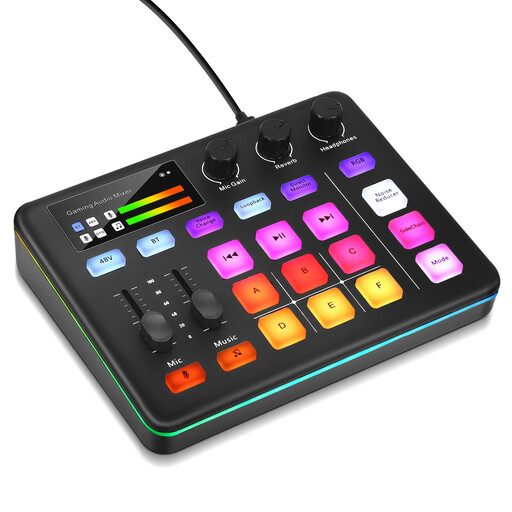
Audio mixer console for live streaming

Audio mixer console for live streaming

A useful option if you want to adjust audio and trigger sound effects in a live-streaming set-up.

Joybuy

AJAZZ AKP153 studio controller with 15 macro buttons

AJAZZ AKP153 studio controller with 15 macro buttons

A good option if you want to trigger several actions directly during your demo.

The product name lists 15 macro buttons and actions in software such as OBS.

Joybuy

Frequently asked questions

Do I need to buy a stream controller for a mod demo?

No, if you’re happy to control things on your computer: OBS supports prepared scenes and sources, as well as hotkeys. Test the picture and sound before your presentation; a controller adds buttons you can access directly to this set-up.

How do I set up the controls for my demo?

First, create the OBS scenes and sources you need, then check the picture and sound. Next, assign only the actions you’ll actually need during your demo, and check the requirements for the relevant plugin.

Are the operating system details on the box enough to check compatibility?

Not necessarily. For the current Stream Deck software, Elgato lists Windows 11 (64-bit) with an Intel or AMD processor, or macOS 13 or later. Also check that the software version and OBS integration will work with your set-up.

Do I automatically need a broadcasting licence for a publicly streamed mod demo?

No, not automatically. The media authorities assess whether a licence may be required using several criteria, including the type of distribution, programme schedule, journalistic and editorial content, and audience reach. The seventh amended version of the Interstate Media Treaty has been in force since 1 December 2025; you can’t tell whether a specific public stream needs a licence based solely on a demo in a room.

Does the controller clear the rights for music in a published showcase?

No. Music rights depend, among other things, on the music used, the platform and how the content is published. GEMA distinguishes between livestreams and recordings that remain available to watch later; check the rights and platform rules for your specific content separately.