What should you look for when buying?
Start by planning which actions need to be accessible during your showcase. Then you can decide whether OBS shortcuts will do, or whether a keypad or audio mixer would make your workflow easier.
| Priority |
What to look for when buying |
Who might find this most important? |
| Privacy and audio control |
Assign a clear microphone action and check its status; preview the image before switching scenes. |
When I’m presenting from a shared bedroom, I want to check before every transition whether conversations or private content on my screen could be heard or seen. Around 36% of consumers put privacy and immediate audio control first. |
| Scene and source switching |
Count the actions you need at the same time and check that they’re accessible without switching pages; test the OBS assignments in advance. |
When switching between mod views, comparison images and explanations, I want to be able to call up the key scenes directly. Around 29% of consumers prioritise scene switching and source control. |
| Adjusting multiple audio sources |
Check whether you need to control sources separately and which audio action a dial controls in your software. |
If my voice and game audio need different levels during the presentation, I look for suitable dials or a mixing solution. Around 21% of consumers say adjusting multiple audio sources is their top priority. |
| Space and ease of use |
Try your existing shortcuts or virtual buttons, then weigh up the space available and how many physical keys you need. |
If space is limited on my desk and I only need a few actions, I don’t want to make room for more controls than necessary. Around 14% of consumers prioritise a compact footprint and an easy start. |
Related products at Joybuy
The products below include a keypad with OBS-related features, as well as audio-focused mixers and microphone kits. Consider whether you mainly want to control scenes directly or make use of additional audio features.
 No image available
AJAZZ AKP153 Studio Controller, 15 macro keys (Black)
With 15 macro keys, this controller is designed to give you direct access to several actions. Check how scenes and microphone controls are assigned, and test them before going live.
View at Joybuy
 No image available
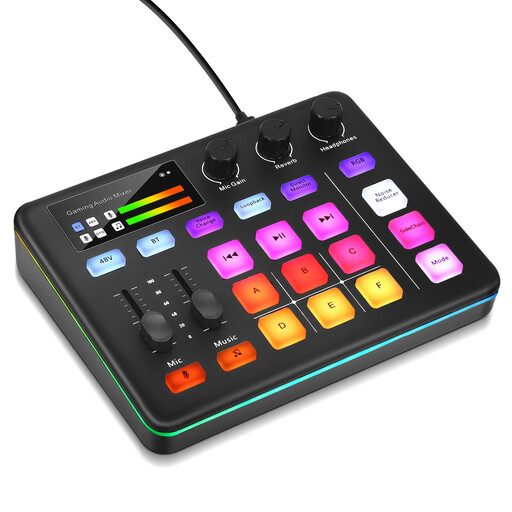
Audio mixer console for live streaming
This could be an option if you’re looking for an audio mixer for your stream rather than just a scene keypad. Before buying, check which audio sources and actions your specific set-up supports.
View at Joybuy
 No image available
Yinkaer G10-P17 podcast microphone kit with audio mixer
This kit is described as an audio-focused addition for live streaming. It’s suitable for your showcase only if you’re also looking for a microphone and mixer set alongside scene control; check that it’s compatible with your set-up.
The product name states that it includes a 3.5 mm condenser microphone.
View at Joybuy
 No image available
Yinkaer G10-P17-P17 podcast kit with two microphones
This kit is designed for an audio-focused streaming set-up and is not a substitute for a dedicated scene keypad. Check whether you really need two microphones and the additional audio features.
The product name lists two 3.5 mm condenser microphones and an audio mixer.
View at Joybuy
Frequently asked questions
How do I prepare scene changes for a mod showcase?
Set up the gameplay, comparison and explanation scenes you need in OBS, then test their sources before streaming. Studio Mode lets you preview a scene before switching to it. If the system requirements are met, Elgato’s OBS plugin also offers assignable scene and source actions.
Can a stream controller remove other people’s voices from the room?
No. A controller can operate a configured audio source, but the OBS documentation describes noise suppression as being mainly for light background noise and generally ineffective against loud background noise. Test your audio and make sure mute is immediately accessible.
What should I check before installing an OBS plugin?
Compare your operating system and app version with the requirements for the specific plugin. For its OBS plugin, Elgato lists Windows 11 or later, or macOS 13 or later, as well as Stream Deck 6.9 or later. These requirements apply to this plugin, not to every controller as a rule.
What should I do if a device is faulty or its software is out of date?
When you buy from a trader in the EU, you’re generally entitled to a minimum two-year legal guarantee from the seller; a manufacturer’s guarantee does not replace it, as explained in the European Union’s consumer information. Check software support separately: Loupedeck’s old Marketplace for version 5.8 has not been supported since 30 March 2026.
Can I broadcast my housemates or their conversations without asking?
Not as a general rule. Section 201 of the German Criminal Code (StGB) covers, among other things, the unauthorised recording of another person’s private speech. Under Section 22 of the German KunstUrhG, consent is generally required to make someone’s image publicly available; Section 23 sets out statutory exceptions. The legislation published by the German Federal Ministry of Justice and the Federal Office of Justice does not give blanket permission for a particular stream. Avoid broadcasting other people’s conversations or images, or check that you have permission first; a controller is no substitute for consent.


