Solo creators using OBS
If you want to control recording, scenes and your microphone while explaining, a controller can put those functions within easy reach. Elgato’s OBS documentation describes actions for recording and scenes.


For a strategy guide, a stream controller is useful if you want to operate recording, scenes or your microphone directly while explaining. The right option depends on how many actions you need at your fingertips and whether you need dials. Elgato documents OBS actions for recording and scenes. As well as checking device compatibility, check the requirements for the controller software and any plugin you plan to use.
If you want to control recording, scenes and your microphone while explaining, a controller can put those functions within easy reach. Elgato’s OBS documentation describes actions for recording and scenes.
If you want to switch between gameplay, camera and other sources while recording a guide, compare the actions you need at your fingertips with the number of accessible buttons. Elgato lists 15 customisable LCD keys for the Stream Deck MK.2.
If you want to adjust supported audio or other settings while recording, dials may be useful alongside buttons. Elgato lists four dials on the Stream Deck +, while Ulanzi describes three on the D200X.
First, think about the actions you want to trigger directly while explaining. Then choose the right number of buttons and, if needed, dials.
| Priority | What to check before buying | Who is it important to? |
|---|---|---|
| Controlling recording and scenes | Check that the recording, scene and source actions you need work with your OBS setup. Elgato documents these actions for its OBS integration. | If I want to switch between recording and scenes while explaining, without returning to the OBS window, the right setup is essential. Around 40% of consumers prioritise recording and scene controls. |
| Quick access to actions | Compare the actions you need at your fingertips with the number of assignable buttons. Elgato lists six customisable LCD keys for the Stream Deck Mini and 15 for the MK.2. | If my guide involves switching between gameplay, camera and other sources, I want as many of the commands I need as possible to be available at a glance. Around 30% of consumers prioritise quick access to lots of actions. |
| Adjusting audio as you record | Check which settings you can actually assign to dials in your recording software. Elgato lists four dials on the Stream Deck +, while Ulanzi lists three on the D200X. | If I want to adjust levels or other supported settings while recording, I need to be able to assign the right controls. Around 20% of consumers prioritise adjusting audio as they record. |
| Setup and desk space | Check that your operating system, controller app, plugin and USB port are compatible. Then test the picture and sound with a short OBS recording. | If I only need a few commands and have limited desk space, I want to keep my setup tidy. Around 10% of consumers prioritise a simple setup and a small footprint. |
The controller triggers an action you have set up, but your OBS sources, audio devices and recording settings still need to be configured correctly.
Before making a longer recording, do a quick test with gameplay and spoken audio. Check that the assigned actions actually work.
In the worst case, your recording may be missing or unusable.
Elgato’s Stream Deck MK.2 specifications list Windows 10 or later and macOS 10.15 or later. Elgato’s OBS plugin page lists Windows 11 or later or macOS 13 or later, as well as Stream Deck App 6.9 or later.
Before buying, check the requirements for the entire software setup, including the plugin and controller app versions you plan to use.
Switching software or operating systems may involve extra setup.
Loupedeck stopped selling its product range directly on 28 March 2025. The company said it would continue to provide support, but the marketplace for the older software version 5.8 has not been supported since 30 March 2026.
If you’re considering a particular Loupedeck offer, check the device’s condition, which software can be used and the service terms.
Setting it up and checking software and service details may take extra time.
The Stream Deck range offers different control options: six buttons on the Mini, 15 on the MK.2, and eight buttons plus four dials on the Stream Deck +.
The Stream Controller X is a 15-button option that you set up using Loupedeck software.
According to Ulanzi, the D200X combines a keypad with dials and an integrated hub.
Loupedeck Live is an option if you’re specifically looking for a combination of touch controls and analogue dials.
These products cover two different needs: a keypad for quick access to actions and an audio mixer for sound controls. Check that each control setup suits the way you record.
 No image available
A good option if you want to trigger several actions for your guide directly from the buttons. The product details mention OBS control and assignable single or multiple actions.
15 customisable LCD keys. The description lists PC and Mac as compatible platforms.
 No image available
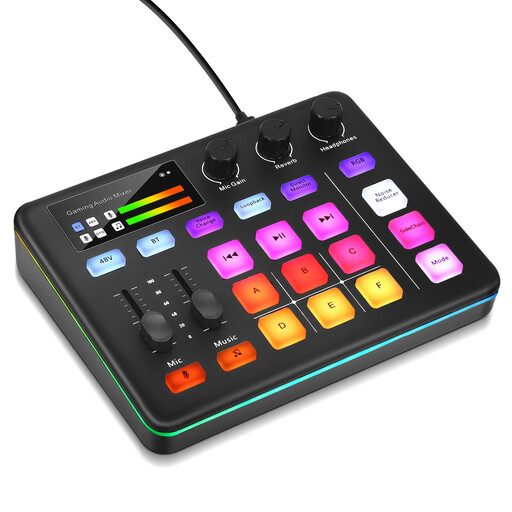
This could be useful for controlling audio functions while recording. The product description mentions muting, direct monitoring and sound effects you can trigger.
Six customisable sound pads. The description also mentions loopback, direct monitoring and XLR microphone recording.
Not necessarily: OBS lets you control recording and scenes in the app. A controller gives you an additional way to operate it. Choose one based on the commands you want to access while playing, without switching windows.
No, because the device, controller app and plugin may each have different requirements. Elgato’s OBS plugin page lists Windows 11 or later or macOS 13 or later, as well as Stream Deck App 6.9 or later. Check the requirements for the version you plan to install.
Check that gameplay and, if needed, your camera are set up as OBS sources. Check the gameplay and microphone audio, then make a short test recording. Next, assign the controller actions you want and check that they work.
Loupedeck stopped selling its product range directly on 28 March 2025 and said it would continue to provide support. The marketplace for the older software version 5.8 has not been supported since 30 March 2026, so check which software version can be used and the service terms for the particular product.
For online purchases by consumers in Germany, there is generally a 14-day right to cancel. You must notify the seller you’re cancelling the contract, so check the terms of your specific purchase and any exceptions.