Directing scenes in OBS
If you often switch between gameplay, camera and prepared layouts during an analysis, clearly assigned scene and source controls can help. Elgato documents OBS actions for this in its Stream Deck integration.


Choose a controller based on the actions you want to trigger during your tournament breakdown without switching screens. Clearly labelled, dedicated buttons are useful for scenes and replays, while extra dials can be handy if you often adjust audio. Before buying, check that the OBS actions, plugins and software versions you need work with your operating system. More controls won’t automatically make your workflow easier.
If you often switch between gameplay, camera and prepared layouts during an analysis, clearly assigned scene and source controls can help. Elgato documents OBS actions for this in its Stream Deck integration.
If you want to discuss notable tournament moments later, set up the replay buffer and save action in your OBS workflow. Elgato documents these as separate actions.
If you adjust audio sources while commentating, weigh up the benefits of dials against the number of scene buttons you can see at a glance. Elgato notes that not every plugin supports dials.
| What you need | What to look for | Who it matters to |
|---|---|---|
| Scenes and sources | Count how many commands you need at once and check that scenes and source actions work with your OBS setup. Elgato documents both types of action. | If you want to switch between gameplay, camera and analysis view without searching through menus, clearly labelled, dedicated buttons matter. Around 36% of consumers put scenes and sources first. |
| Saving replays | Check that the replay buffer is enabled and that the controller action you want can start the buffer or save its contents. Elgato lists these OBS actions separately. | If you want to capture a key moment in a match for a later breakdown, you need a clearly assigned save action. Around 29% of consumers prioritise replay controls. |
| Adjusting audio | Distinguish between muting and adjusting levels on the fly, and check that the plugin you need supports the dials in question. Elgato says not all plugins are compatible with dials. | If you regularly want to adjust audio sources while commentating, dials may be more useful than extra scene buttons. Around 21% of consumers put audio control first. |
| Software and computer | Check that your operating system, controller app and plugin versions meet the requirements of the integration you want. Elgato’s current OBS plugin page lists Windows 11 or later or macOS 13 or later, and Stream Deck App 6.9 or later. | If you want your existing computer to work seamlessly with the OBS actions you need, check compatibility before buying. Around 14% of consumers prioritise integration with their existing setup. |
The save action requires the replay buffer to be enabled and set up in OBS.
Set up the buffer before your broadcast, then test starting and saving separately.
Allow time to configure OBS and run a test.
Not every plugin supports dials. A hybrid device may also have fewer buttons directly in view.
Decide in advance which buttons or dials you’ll assign to your key audio and scene actions.
Loupedeck stopped selling its product range on 28 March 2025. Support for Legacy Software 5.8 and its Marketplace ended on 30 March 2026, according to Loupedeck.
If you’re buying a used device, check its condition and whether the available software still supports that specific model.
With older devices, switching to a different software version may mean extra setup work.
The Stream Deck range includes everything from compact button panels to models with dials.
The Streaming Deck One is an option with 15 customisable LCD buttons for stream control.
The Live S combines touch-sensitive controls with two dials.
According to Razer, the Stream Controller X has 15 assignable buttons and uses Loupedeck software.
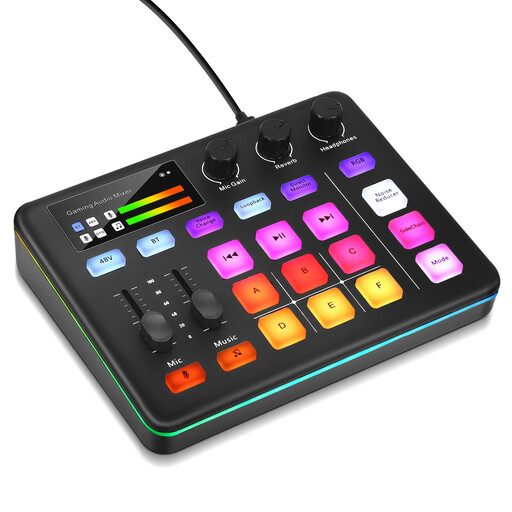
This selection includes a live audio mixer and a controller with macro buttons for workflows involving OBS. Think about which functions you actually want to control directly during your tournament breakdown.
 No product image available
If you want to control audio directly during your breakdown, this model, described as a live audio mixer, may be worth considering. Before buying, check that its features suit your microphone and playback needs.
 No product image available
If you want to assign several frequently used actions to dedicated buttons, this model has 15 macro buttons according to its product description. OBS is listed as an example of supported software; check that the actions you need work with your own setup.
Yes. Elgato’s documented OBS integration includes separate actions for toggling and saving the replay buffer. Enable and configure the buffer in OBS first; a button on its own won’t create a replay history.
On Stream Deck +, only available dial actions are shown. Elgato notes that not every plugin supports dials. Check the specific plugin action you need, rather than just general OBS compatibility.
Before setting things up, compare the plugin’s current requirements with your computer. Elgato’s OBS plugin page lists Windows 11 or later or macOS 13 or later, as well as Stream Deck App 6.9 or later. If you have an older Loupedeck device, bear in mind that support for Legacy Software 5.8 and its Marketplace ended on 30 March 2026.
A controller doesn’t grant you the rights to use footage. The German Copyright Act covers matters including making works available to the public and broadcasting rights. Whether you can show specific gameplay or broadcast footage depends on the rights to it and the permissions you have.
No. If a product is faulty, your statutory rights are against the seller. A guarantee is an additional voluntary promise with its own terms. When you buy, check who the seller is and what guarantee applies to the specific device.